OmniSS7 - User Guide
OmniSS7 by Omnitouch Network Services is a comprehensive, general-purpose SS7 signaling stack that provides flexible network element functionality.
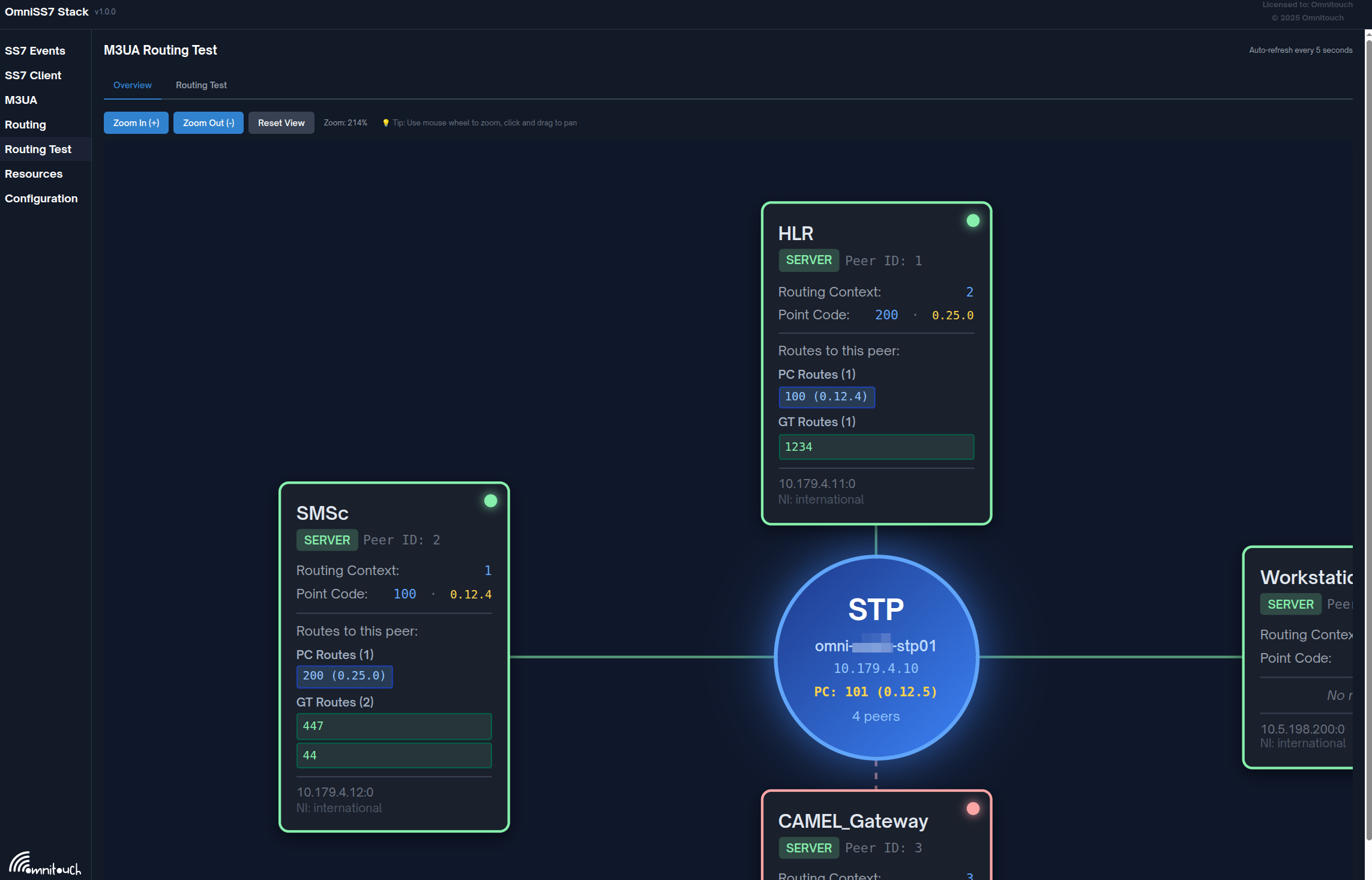
Documentation Overview
This documentation is organized by network element role. Choose the guide that matches your deployment:
📚 Configuration Guides
-
STP Guide - Signal Transfer Point Configuration
- Route SS7 traffic between network peers
- Point Code and Global Title routing
- Load balancing and topology hiding
- Use this if you're routing SS7 traffic between networks
-
MAP Client Guide - MAP Client Configuration
- Connect as M3UA client to send MAP requests
- HLR queries, authentication, routing info
- Generic MAP protocol support
- Use this if you're sending MAP requests to network elements
-
SMS Center Guide - SMS Center (SMSc) Configuration
- SMS message routing and delivery
- Database-backed message queuing
- Auto-flush and delivery reports
- Use this if you're operating an SMS Center
-
HLR Guide - Home Location Register Configuration
- Subscriber database management
- Authentication vector generation
- Location updates and routing information
- Use this if you're operating an HLR/HSS
-
CAMEL Gateway Guide - CAMEL Gateway Configuration
- Intelligent network services (CAP/CAMEL)
- Real-time call control and charging
- OCS integration for billing
- Interactive request builder and session monitoring
- Use this if you're providing IN services or real-time charging
🔧 Common Features
- Common Features Guide - Shared Components
- Web UI overview and configuration
- API documentation
- Monitoring and metrics (Prometheus)
- Best practices and troubleshooting
📖 Reference Documentation
- Appendix - Technical Reference
- SS7 protocol specifications
- MAP operation codes
- TCAP transaction flows
- Character encodings and formats
Quick Start
1. System Overview
OmniSS7 can operate in different modes depending on your network requirements:
3. Configuration
OmniSS7 can run in 5 different operational modes. The configuration file config/runtime.exs contains complete, ready-to-use examples.
To switch modes:
- Open
config/runtime.exs - Uncomment your desired configuration section (STP, HLR, SMSc, or CAMEL GW)
- Comment out the other sections
- Update IP addresses and API URLs as needed
- Restart the application
→ See the mode-specific guides below for complete configuration instructions
Example configurations in runtime.exs:
STP Mode:
config :omniss7,
  map_client_enabled: true,
  hlr_mode_enabled: false,
  smsc_mode_enabled: false,
  camelgw_mode_enabled: false,
  map_client_m3ua: %{...}
HLR Mode:
config :omniss7,
  map_client_enabled: false,
  hlr_mode_enabled: true,
  smsc_mode_enabled: false,
  camelgw_mode_enabled: false,
  hlr_api_base_url: "...",
  map_client_m3ua: %{...}
SMSc Mode:
config :omniss7,
  map_client_enabled: true,
  hlr_mode_enabled: false,
  smsc_mode_enabled: true,
  camelgw_mode_enabled: false,
  smsc_api_base_url: "...",
  auto_flush_enabled: true,
  map_client_m3ua: %{...}
CAMEL Gateway Mode:
config :omniss7,
  cap_client_enabled: true,
  camelgw_mode_enabled: true,
  ocs_enabled: true,
  ocs_url: "http://your-ocs-server/api/charging",
  cap_version: :v2,  # CAP version: :v1, :v2, :v3, or :v4
  cap_client_m3ua: %{...}
4. Access Web UI
Navigate to http://localhost (or your configured hostname)
System Architecture
Feature Matrix
| Feature | STP Mode | MAP Client | SMSc Mode | HLR Mode | CAMEL GW |
|---|---|---|---|---|---|
| Point Code Routing | ✅ | ❌ | ❌ | ❌ | ❌ |
| Global Title Routing | ✅ | ❌ | ❌ | ❌ | ❌ |
| SSN Rewriting | ✅ | ❌ | ❌ | ❌ | ❌ |
| Multi-Peer Support | ✅ | ✅ | ✅ | ✅ | ✅ |
| MAP Requests (Send) | ❌ | ✅ | ✅ | ✅ | ❌ |
| MAP Responses (Receive) | ❌ | ✅ | ✅ | ✅ | ❌ |
| SMS Queue Management | ❌ | ❌ | ✅ | ❌ | ❌ |
| Auto-Flush SMS | ❌ | ❌ | ✅ | ❌ | ❌ |
| Subscriber Database | ❌ | ❌ | ❌ | ✅ | ❌ |
| Authentication Vectors | ❌ | ❌ | ❌ | ✅ | ❌ |
| Location Updates | ❌ | ❌ | ❌ | ✅ | ❌ |
| CAP/CAMEL Support | ❌ | ❌ | ❌ | ❌ | ✅ |
| Real-time Charging | ❌ | ❌ | ❌ | ❌ | ✅ |
| Call Control (IN Services) | ❌ | ❌ | ❌ | ❌ | ✅ |
| Web UI | ✅ | ✅ | ✅ | ✅ | ✅ |
| REST API | ✅ | ✅ | ✅ | ✅ | ✅ |
| Prometheus Metrics | ✅ | ✅ | ✅ | ✅ | ✅ |
Common Operations
Web UI Access
- URL:
http://localhost(or configured hostname) - Swagger API:
http://localhost/swagger - Metrics:
http://localhost/metrics
Monitoring
# Check M3UA peer status
curl http://localhost/api/m3ua-status

# View Prometheus metrics
curl http://localhost/metrics

# Check application health
curl http://localhost/api/health
Logs
# Configure log level in config/runtime.exs
config :logger,
  level: :debug  # Options: :debug, :info, :warning, :error
Key Capabilities
- Full MAP Protocol Support - MAP Phase 2/3 operations
- CAP/CAMEL Protocol Support - CAP v1/v2/v3/v4 for intelligent network services
- M3UA/SCTP Signaling - IP-based SS7 transport
- Real-time Charging - OCS integration for prepaid/postpaid billing
- Real-time Message Queue - Database-backed SMS delivery
- Interactive Request Builder - Web UI for CAMEL/CAP testing
- Session Monitoring - Real-time CAMEL call session tracking
- Interactive API Docs - Swagger UI for testing
- Prometheus Metrics - Complete observability
- Multi-role Configuration - STP, MAP Client, SMSc, HLR, CAMEL Gateway
Protocol Stack Overview
Use Case Examples
Network Gateway (STP)
Route SS7 traffic between different mobile networks
- Connect operator networks
- International SS7 gateway
- Load balancing across HLRs
- Global Title Translation
- SCCP NAT (Smart Global Title reuse)
- → STP Guide
SMS Center (SMSc)
Deliver SMS messages to mobile subscribers
- MT-SMS delivery
- MO-SMS origination
- SMS Home Routing
- IMSI Hiding
- SMS Firewall
- Message queue management
- Delivery reports
- Integrated into OmniMessage to handle all MAP SMS
- → SMS Center Guide
MAP Client
Interact with any network elements over MAP using a simple RESTful API
- PRN / SRI / ATI / etc
- Build your own SS7/MAP applications using RESTful APIs
- USSD Gateways
- Authentication vector requests
- IMSI/MSISDN lookups
- Routing information queries
- → MAP Client Guide
Subscriber Database (HLR)
Manage subscriber data and authentication
- Location updates
- Authentication generation
- Routing information provisioning
- Integrates fully into OmniHSS
- → HLR Guide
Intelligent Network Platform (CAMEL Gateway)
Real-time call control and charging for telecom operators
- Prepaid/postpaid call charging
- Call control (connect, release, routing)
- Session management and CDR generation
- Interactive request builder for testing
- → CAMEL Gateway Guide
Support and Resources
Documentation
Core Configuration Guides:
- STP Configuration Guide - Signal Transfer Point routing
- MAP Client Configuration Guide - MAP protocol client
- SMS Center Configuration Guide - SMS routing and delivery
- HLR Configuration Guide - Subscriber database
- CAMEL Gateway Configuration Guide - Intelligent network & charging
Integration & Reference:
- CAMEL Request Builder Guide - Interactive testing tool
- Common Features Guide - Shared components & Web UI
- Technical Reference - Protocol specifications