OmniTWAG Operations and Deployment Guide
Created by Omnitouch
This guide is for network operators, system administrators, and customers deploying OmniTWAG.
Table of Contents
- Introduction
- What is WiFi Offload?
- Deployment Architecture
- Charging Flow
- Authentication Flow
- Configuration Guide
- Access Point Setup
- Hotspot 2.0 Integration
- Monitoring and Management
- Troubleshooting
- Standards Compliance
Introduction
OmniTWAG (Trusted WiFi Access Gateway) is a standards-compliant implementation of a 3GPP TWAG that enables mobile network operators to securely offload subscriber traffic from cellular networks to WiFi access points while maintaining secure, SIM-based authentication.
The TWAG authenticates WiFi subscribers using their SIM credentials via EAP-AKA (Extensible Authentication Protocol - Authentication and Key Agreement), the same authentication mechanism used in cellular networks. This provides seamless, secure WiFi access for mobile subscribers without requiring separate WiFi passwords.
Key Benefits
For End Users:
- Zero Configuration: Works out of the box with compatible SIM
- Seamless Experience: Automatic connection like cellular
- Secure: Always uses encrypted WiFi (WPA2)
- No Passwords: SIM-based authentication
For Mobile Operators:
- Network Capacity Relief: Reduces load on cellular base stations
- Controlled Offload: Only authorized subscribers can connect
- Improved User Experience: WiFi typically offers higher bandwidth
- Cost Efficiency: WiFi infrastructure is less expensive than cellular
- Consistent Identity: Same IMSI used for WiFi and cellular
- Billing Integration: Can charge for WiFi usage if desired
For Venues/Enterprises:
- Operator-Grade Security: No risk of password sharing
- Scalability: Support thousands of users without manual provisioning
- Simplified Management: No need to distribute WiFi passwords
What is WiFi Offload?
WiFi offload allows mobile network operators to redirect subscriber data traffic from congested cellular networks to WiFi networks.
How TWAG Enables Offload
The TWAG acts as the authentication gateway between:
- WiFi Access Points (via RADIUS protocol)
- Mobile Core Network HSS/HLR (via Diameter SWx interface)
When a subscriber's device connects to a WiFi AP configured for offload:
- The device identifies itself using its IMSI (from the SIM card)
- The WiFi AP forwards authentication requests to the TWAG via RADIUS
- The TWAG communicates with the operator's HSS to retrieve authentication vectors
- EAP-AKA challenge-response authentication occurs between the device and TWAG
- Upon successful authentication, the device is granted WiFi access
- Optionally, traffic can be tunneled back to the mobile core or break out locally
Deployment Architecture
Network Topology
Interface Legend:
- STa*: RADIUS/Diameter interface between WiFi AP and TWAG (non-3GPP to AAA)
- SWx: Diameter interface between TWAG (3GPP AAA Server) and HSS
- S2a/S2b: GTP tunnel interface for backhaul to home network (optional)
- SGi: Interface to external packet data networks (Internet)
- 802.11: WiFi radio interface
- EAPOL: EAP over LAN (802.1X authentication)
Deployment Scenarios
Scenario 1: Local Breakout (Recommended for Performance)
Benefits:
- Lower latency (no hairpinning to core)
- Reduced core network load
- Better user experience for high-bandwidth applications
- Cost savings on backhaul capacity
Scenario 2: Home Network Routing (GTP Tunnel)
Benefits:
- Consistent policy enforcement
- Centralized charging/billing
- Corporate VPN/security policies apply
- Seamless mobility between WiFi and cellular
SWx Connection Options
Option 1: Direct Connection to HSS
Use Case: Simple deployments, lab environments, single HSS
Benefits:
- Lower latency (no hop through DRA)
- Simplified configuration
- Easier troubleshooting
Option 2: Via DRA (Diameter Routing Agent)
Use Case: Multi-HSS deployments, roaming scenarios, large-scale networks
Benefits:
- Centralized routing logic
- Load balancing across multiple HSS
- Roaming support (routes to home HSS)
- Redundancy and failover
- Session stickiness
Charging Flow
The TWAG can be fully integrated to send Diameter Gy based online charging requests to an Online Charging System (OCS).
This allows for accounting of all data consumed on WiFi, against the balance of the customer, and is delivered via the AP on RADIUS and converted to Gy by the TWAG and forwarded to the DRA/OCS.
In all modes, usage is traced by the TWAG metrics.
Charging Modes
The TWAG supports three online charging modes:
1. Charging Disabled
No credit control requests are sent. No authorization of balance is performed.
Use Cases:
- Open/free WiFi networks
- Lab/testing environments
- Networks with offline charging only (RADIUS accounting to billing)
Flow:
2. Authorization Only
A CCR-Initial (Credit-Control-Request) is sent to the OCS at the start of the WiFi session to validate the subscriber has balance, but the balance is not drawn down during the session.
Use Cases:
- Validate subscriber has active account/balance
- Prevent WiFi access for suspended accounts
- Check service eligibility without quota tracking
- Allow WiFi as bonus/unlimited service for paying customers
Flow:
Configuration:
- OCS is queried at session start (CCR-I) and end (CCR-T)
- No CCR-Update messages sent during session
- Subscriber authorized based on account status, not quota
- Usage reported at end of session for informational purposes only
3. Fully Gy Online Charging (Full Implementation)
Standard 3GPP online charging flow is followed. All usage on WiFi is passed to the OCS for charging, with the subscriber cut off once they have exceeded their quota.
Use Cases:
- Prepaid data services
- Pay-per-use WiFi
- Quota-based plans (e.g., 10GB monthly allowance)
- Real-time charging and cutoff
Flow:
Configuration:
- OCS queried at session start (CCR-I), during session (CCR-U), and at end (CCR-T)
- Quota requested in configurable chunks (e.g., 10MB, 50MB, 100MB)
- CCR-Update triggered at configurable threshold (e.g., 80% of granted quota)
- Validity timer triggers re-authorization if quota not exhausted
- Forced disconnection when quota exhausted
- Real-time balance deduction
Authentication Flow
Complete EAP-AKA Authentication Sequence
Key Points in Authentication Flow
-
MAR/MAA is the end of HSS communication: After receiving the MAA (Multimedia-Auth-Answer) with XRES, the TWAG handles all subsequent verification locally.
-
TWAG performs RES verification: The HSS provides the expected response (XRES), but the TWAG compares it against the actual RES from the UE. The HSS is NOT involved in this comparison.
-
Authentication happens at TWAG: This is different from some diagrams that show HSS doing verification—in the actual 3GPP architecture, the AAA server (TWAG) performs the comparison.
Identity Format
The device responds with its permanent identity (IMSI) in NAI format:
5055700000000000001@wlan.mnc057.mcc505.3gppnetwork.org
Format: 0<IMSI>@wlan.mnc<MNC>.mcc<MCC>.3gppnetwork.org
Note - The first digit,before the IMSI is the identity, this is generally 0 but may be another single digit number for multi-IMSI SIMs / handsets.
Master Session Key (MSK)
The Master Session Key (MSK) is a 512-bit (64-byte) cryptographic key derived during EAP-AKA authentication. It serves as the root key material for securing the WiFi connection.
MSK Derivation:
- Both UE and TWAG independently derive the same MSK
- UE derives from CK/IK computed by SIM
- TWAG derives from CK/IK received from HSS
- MSK = PRF'(CK || IK, "Full Authentication", IMSI, ...)
MSK Usage:
- PMK Derivation: PMK = first 256 bits (32 bytes) of MSK
- WPA2 4-Way Handshake: Both UE and AP use PMK to derive PTK
- Data Encryption: All WiFi data frames encrypted with Temporal Key (TK) from PTK
Why MSK is Critical:
- Confidentiality: Without MSK, WiFi traffic would be unencrypted
- Integrity: Prevents tampering with WiFi frames
- Authentication Binding: Links EAP authentication to WiFi encryption
- Replay Protection: Fresh MSK prevents replay attacks
- Perfect Forward Secrecy: Compromise of one MSK doesn't affect others
Resynchronization Recovery
If the device detects a sequence number mismatch (SQN out of sync), it initiates resynchronization:
- Device computes AUTS (Authentication Token - Synchronization)
- Sends EAP-AKA Synchronization-Failure with AT-AUTS
- TWAG forwards AUTS to HSS
- HSS resyncs sequence number and generates new vectors
- Authentication retried with fresh vectors
This is transparent to the end user and requires no operator intervention.
Configuration Guide
The TWAG is configured via Elixir configuration files in the config/ directory. The main runtime configuration is in config/runtime.exs.
For production deployments, configuration is centrally managed. The below is a reference only, any values changed on a production node will be lost next time the automated orchestration is run.
Diameter Configuration
Located in config :diameter_ex:
config :diameter_ex,
  diameter: %{
    # Service name for the Diameter stack
    service_name: :omnitouch_twag,

    # Local IP address to bind Diameter service
    listen_ip: "10.5.198.200",

    # Local port for Diameter connections (standard is 3868)
    listen_port: 3868,

    # Diameter Origin-Host
    host: "omnitwag",

    # Diameter Origin-Realm (matches your network realm)
    realm: "epc.mnc057.mcc505.3gppnetwork.org",

    # Diameter peers (HSS, DRA, AAA servers)
    peers: [
      %{
        # Peer Diameter Origin-Host
        host: "omni-hss01.epc.mnc057.mcc505.3gppnetwork.org",

        # Peer Diameter Origin-Realm
        realm: "epc.mnc057.mcc505.3gppnetwork.org",

        # Peer IP address (can be HSS directly or DRA)
        ip: "10.179.2.140",

        # Peer port (standard is 3868)
        port: 3868,

        # Use TLS for transport security
        tls: false,

        # Transport protocol (:diameter_tcp or :diameter_sctp)
        transport: :diameter_tcp,

        # Initiate connection to peer (true) or wait for peer to connect (false)
        initiate_connection: true
      }
    ]
  }
Realm Format follows 3GPP TS 23.003:
epc.mnc<MNC>.mcc<MCC>.3gppnetwork.org
Where:
- MNC = Mobile Network Code (e.g., 057)
- MCC = Mobile Country Code (e.g., 505 for Australia)
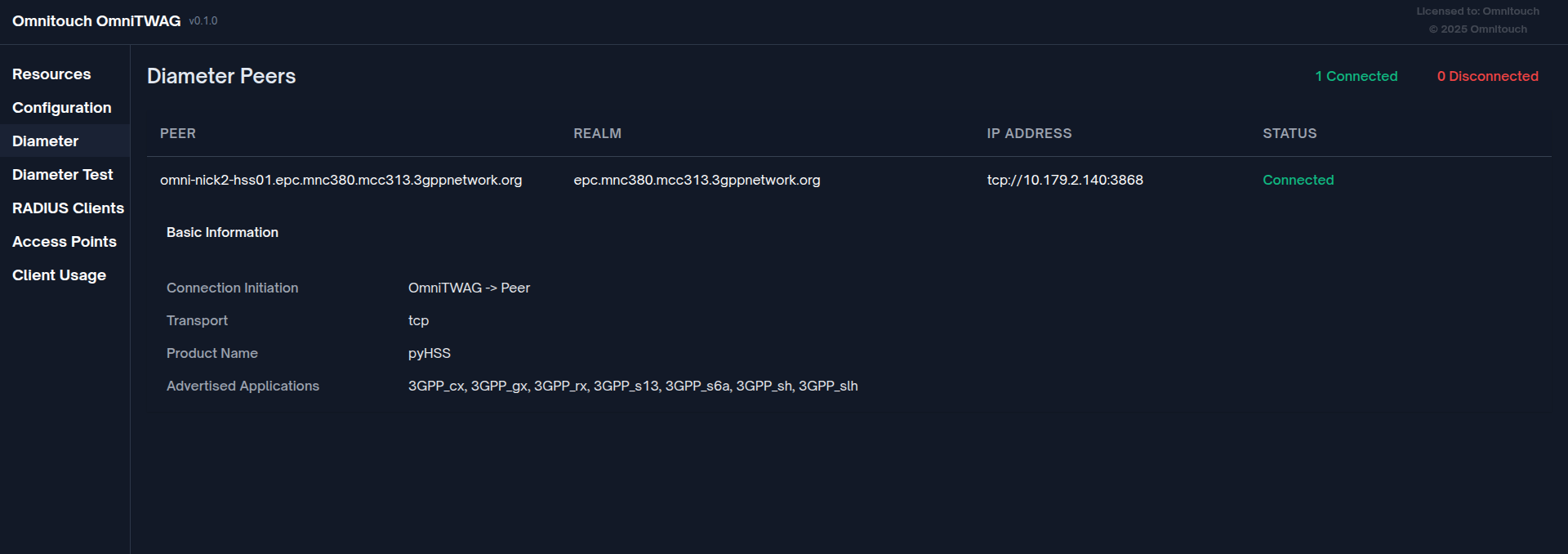
Note on DRA Usage: To use OmniDRA, configure the peer IP to point to the DRA instead of directly to the HSS. The DRA will then route messages to the appropriate HSS based on routing rules (Destination-Realm, IMSI range, etc.).
RADIUS Configuration
Located in config :omnitwag:
config :omnitwag,
  radius_config: %{
    # List of allowed source IP subnets for RADIUS clients
    # Empty list = allow all (not recommended for production)
    allowed_source_subnets: ["10.7.15.0/24", "192.168.1.0/24"],

    # Shared secret for RADIUS clients
    # All APs must use this secret
    secret: "YOUR_STRONG_SECRET_HERE"
  }
Security Best Practices:
- Use strong RADIUS shared secrets (20+ characters)
- Configure
allowed_source_subnetsto restrict AP access - Use firewall rules to further restrict access to ports 1812/1813
Example subnet configuration:
allowed_source_subnets: ["10.7.15.0/24", "192.168.1.0/24"]
If empty, all sources are allowed (only suitable for lab/testing).
Prometheus Monitoring Configuration
Located in config :omnitwag:
config :omnitwag,
  prometheus: %{
    # Port for Prometheus metrics endpoint
    port: 9568
  }
Access metrics at: http://<twag-ip>:9568/metrics
Port Summary
| Port | Protocol | Purpose |
|---|---|---|
| 1812 | UDP | RADIUS Authentication |
| 1813 | UDP | RADIUS Accounting |
| 3868 | TCP | Diameter (SWx to HSS/DRA) |
| 443 | TCP | HTTPS Web Dashboard |
| 8444 | TCP | HTTPS REST API |
| 9568 | TCP | Prometheus Metrics |
Access Point Setup
Supported Access Points
OmniTWAG works with any WiFi AP that supports:
- WPA2-Enterprise (802.1X authentication)
- RADIUS client functionality
- EAP-AKA authentication method
Tested platforms: Cisco Aironet, Aruba, Ubiquiti UniFi, Ruckus, hostapd-based APs
General AP Configuration Requirements
- WPA2-Enterprise (802.1X) security mode
- RADIUS server pointing to TWAG IP address
- RADIUS authentication port: 1812
- RADIUS accounting port: 1813 (optional but recommended)
- RADIUS shared secret: Must match TWAG configuration
- EAP method: EAP-AKA (or "All")
Cisco AP Configuration Example
CLI Configuration:
! Configure RADIUS server
radius-server host 10.5.198.200 auth-port 1812 acct-port 1813 key YOUR_SHARED_SECRET

! Configure SSID with 802.1X
dot11 ssid OPERATOR-WIFI
   vlan 10
   authentication open eap eap_methods
   authentication network-eap eap_methods
   authentication key-management wpa version 2

! Associate SSID with radio interface
interface Dot11Radio0
   encryption mode ciphers aes-ccm
   ssid OPERATOR-WIFI
Web Interface:
- Navigate to Security → AAA → RADIUS Server
- Add RADIUS server:
10.5.198.200:1812with shared secret - Navigate to WLAN configuration
- Set Security to WPA2-Enterprise
- Set EAP method to EAP-AKA or All
- Assign RADIUS server group
hostapd Configuration Example
For Linux-based APs (OpenWrt, embedded systems):
# /etc/hostapd/hostapd.conf

interface=wlan0
driver=nl80211
ssid=OPERATOR-WIFI

# WPA2-Enterprise
wpa=2
wpa_key_mgmt=WPA-EAP
wpa_pairwise=CCMP
ieee8021x=1

# RADIUS configuration
auth_server_addr=10.5.198.200
auth_server_port=1812
auth_server_shared_secret=YOUR_SHARED_SECRET

acct_server_addr=10.5.198.200
acct_server_port=1813
acct_server_shared_secret=YOUR_SHARED_SECRET

# EAP configuration
eap_server=0

# Hotspot 2.0 (Optional - for automatic offload)
interworking=1
internet=1
anqp_3gpp_cell_net=505,057
domain_name=wlan.mnc057.mcc505.3gppnetwork.org
nai_realm=0,wlan.mnc057.mcc505.3gppnetwork.org,0,21[2:1][5:7]
roaming_consortium=505057
hs20=1
Network Architecture Best Practices
Important: Place APs and TWAG on trusted network segments. Use firewall rules to:
- Allow only APs to reach TWAG ports 1812/1813
- Allow TWAG to reach HSS port 3868
- Restrict management access to TWAG dashboard (port 443)
Hotspot 2.0 Integration
Hotspot 2.0 (Passpoint) Overview
Hotspot 2.0 (also called Passpoint or 802.11u) is a WiFi Alliance standard that enables automatic, secure WiFi network discovery and connection without user interaction. It's the key technology for seamless WiFi offload.
Key Features:
- Automatic Network Discovery: Device finds compatible networks based on criteria
- Automatic Authentication: Uses SIM credentials (EAP-AKA) without user input
- Encrypted Initial Association: OSEN (OSU Server-only Authentication) for secure provisioning
- Roaming Agreements: Supports visited networks (like cellular roaming)
- Prioritization: Device prefers operator-owned networks
Hotspot 2.0 AP Configuration
Requirements for AP:
- 802.11u Support: ANQP query/response capability
- WPA2-Enterprise: 802.1X authentication
- EAP-AKA Support: Must support EAP-AKA method
- ANQP Configuration: Advertise correct operator information
Example Configuration (hostapd-based AP):
# Hotspot 2.0 / Passpoint Configuration
interworking=1
internet=1
asra=0
esr=0
uesa=0

# ANQP Configuration
anqp_3gpp_cell_net=505,057
domain_name=omnitouchns.com,wlan.mnc057.mcc505.3gppnetwork.org

# NAI Realm configuration
nai_realm=0,wlan.mnc057.mcc505.3gppnetwork.org,0,21[2:1][5:7]
# Format: <encoding>,<realm>,<eap-method>[auth-id:auth-val]
# 21 = EAP-AKA
# 2:1 = Credential Type: SIM
# 5:7 = Tunneled EAP Method: None (direct EAP-AKA)

# Roaming Consortium
roaming_consortium=505057
# MCC=505 (USA), MNC=057 (operator specific)

# Venue Information (optional)
venue_group=1
venue_type=8
venue_name=eng:Operator Public WiFi

# WPA2-Enterprise Configuration
wpa=2
wpa_key_mgmt=WPA-EAP
rsn_pairwise=CCMP
ieee8021x=1

# RADIUS Configuration (points to OmniTWAG)
auth_server_addr=10.5.198.200
auth_server_port=1812
auth_server_shared_secret=YOUR_SHARED_SECRET

acct_server_addr=10.5.198.200
acct_server_port=1813
acct_server_shared_secret=YOUR_SHARED_SECRET

# SSID Configuration
ssid=OperatorWiFi
utf8_ssid=1

# Hotspot 2.0 Indication
hs20=1
hs20_oper_friendly_name=eng:Operator WiFi Network
Automatic Offload Behavior
How Automatic Offload Works:
- Device with Passpoint profile performs periodic WiFi scan
- Sends ANQP query to detected APs
- If ANQP response matches profile (MCC/MNC, roaming consortium):
- Priority is HIGH (home network) or MEDIUM (roaming partner)
- If priority ≥ threshold and signal > minimum:
- Automatic EAP-AKA authentication
- If authentication successful and priority > current connection:
- Switch to WiFi, disconnect cellular data
- Monitor signal quality and maintain connectivity
Priority Factors:
- Home vs. Roaming: Home network (MCC/MNC match) preferred over roaming
- Signal Strength: Stronger signal preferred
- Security: WPA2-Enterprise preferred over open/WPA2-PSK
- Policy: Operator can configure preferred networks
- User Override: User can manually disable WiFi or prefer cellular
Monitoring and Management
Web Dashboard
Access the real-time monitoring dashboard at: https://<twag-ip>/
Features:
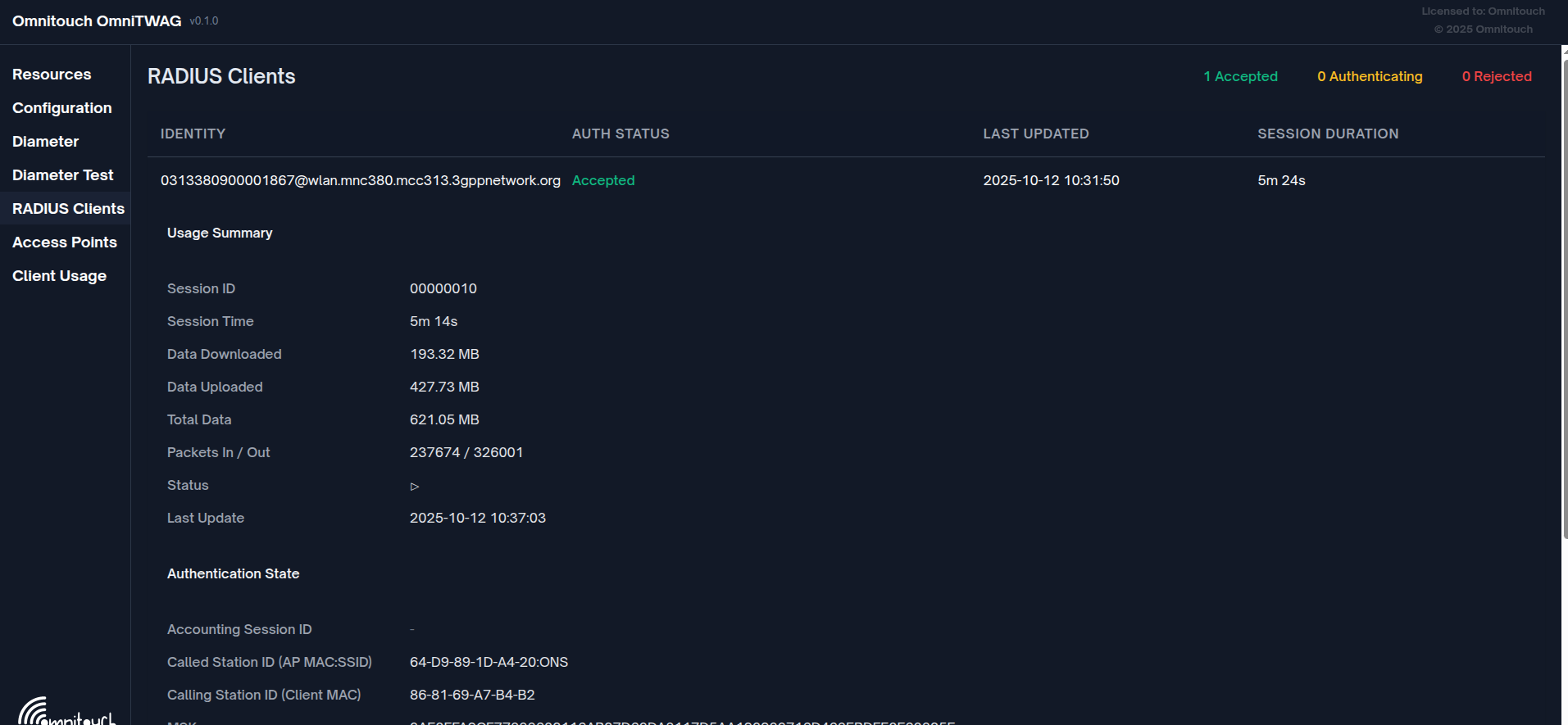
- RADIUS Clients View: Active subscribers, authentication status, session details
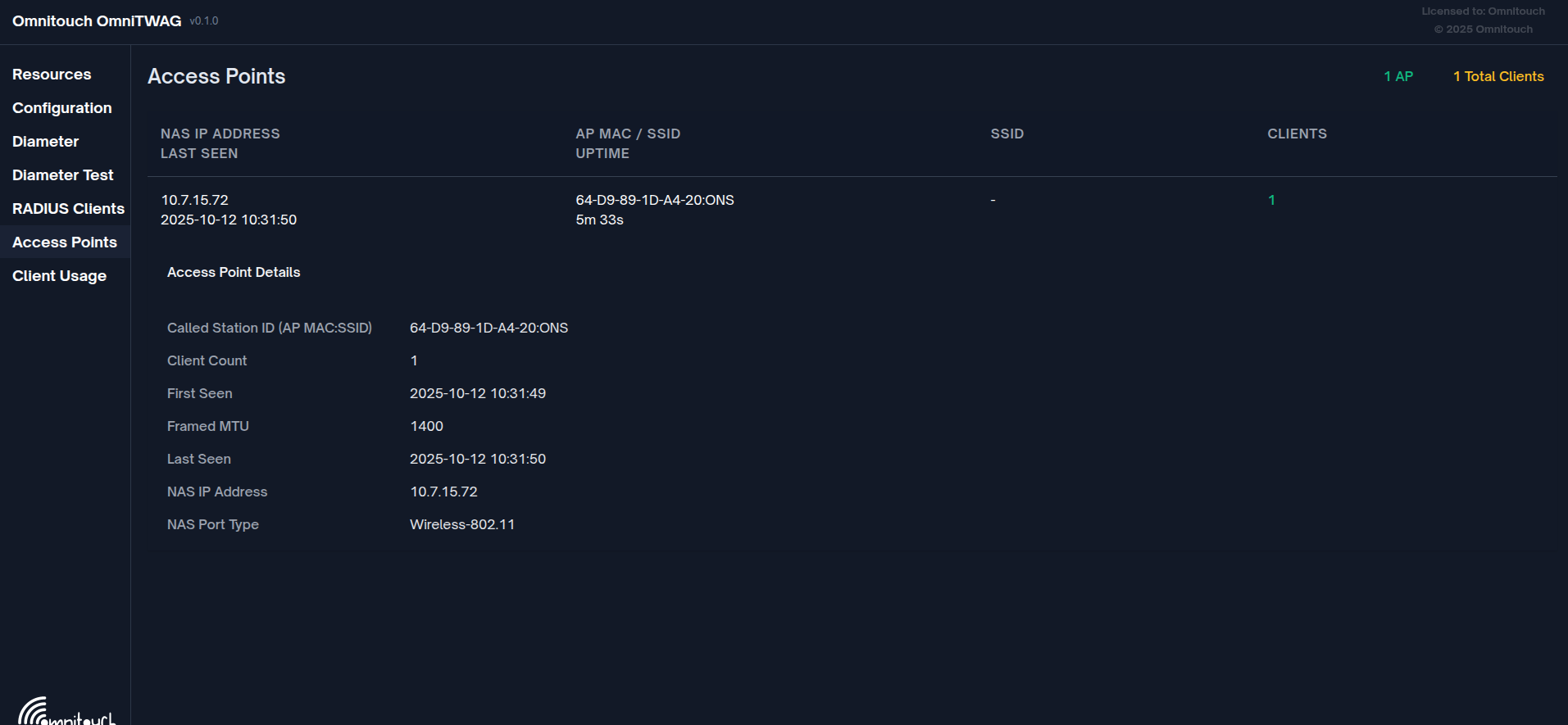
- Access Points View: Connected APs, client counts, SSID information
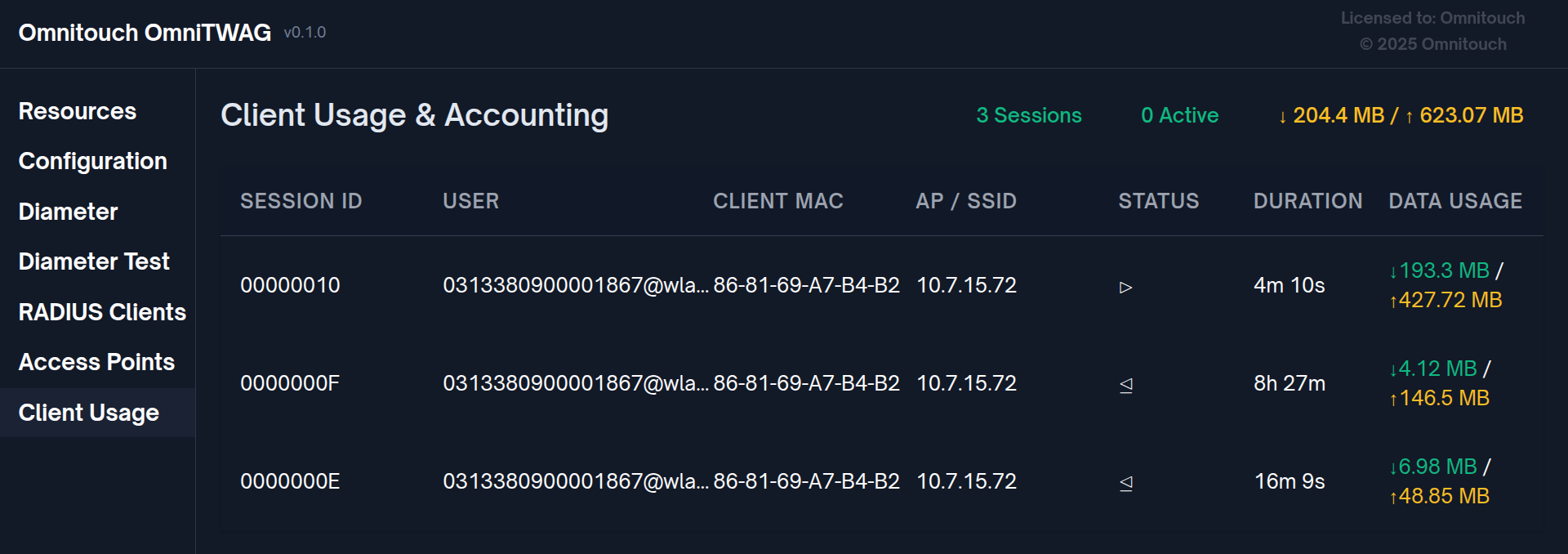
- Client Usage View: Accounting data, session time, data usage
- Diameter Peers View: HSS/DRA connection status
Prometheus Integration
Configure Prometheus to scrape TWAG metrics:
# prometheus.yml
scrape_configs:
  - job_name: 'omnitwag'
    static_configs:
      - targets: ['10.5.198.200:9568']
    metrics_path: '/metrics'
    scrape_interval: 15s
Available Metrics:
RADIUS Server Metrics:
radius_access_request_count- Total RADIUS Access-Request packets receivedradius_access_accept_count- Total Access-Accept packets sentradius_access_reject_count- Total Access-Reject packets sentradius_access_challenge_count- Total Access-Challenge packets sentradius_accounting_request_count{status_type}- Total Accounting-Request packets (tagged by status: start, stop, interim_update, accounting_on, accounting_off)radius_active_clients_count- Currently authenticated clients (polled every 5 seconds)radius_access_points_count- Registered access points (polled every 5 seconds)
EAP-AKA Authentication Metrics:
eap_aka_identity_count- EAP-AKA Identity exchangeseap_aka_challenge_count- EAP-AKA Challenge exchangeseap_aka_sync_failure_count- Synchronization failures (SQN resync events)eap_aka_auth_success_count- Successful authenticationseap_aka_auth_reject_count- Rejected authentications
Diameter Protocol Metrics:
diameter_message_count{application, command, direction}- Total Diameter messages (tagged by application, command type, and direction)
Erlang VM Memory Metrics:
vm_memory_total- Total amount of memory allocated (bytes)vm_memory_processes- Memory used by Erlang processes (bytes)vm_memory_processes_used- Memory used by Erlang processes excluding unused allocated memory (bytes)vm_memory_system- Memory used by the Erlang runtime system (bytes)vm_memory_atom- Memory used by atoms (bytes)vm_memory_atom_used- Memory used by atoms excluding unused allocated memory (bytes)vm_memory_binary- Memory used by binaries (bytes)vm_memory_code- Memory used by loaded code (bytes)vm_memory_ets- Memory used by ETS tables (bytes)
Erlang VM System Metrics:
vm_system_info_process_count- Current number of Erlang processesvm_system_info_port_count- Current number of portsvm_system_info_atom_count- Current number of atomsvm_system_info_schedulers- Number of scheduler threadsvm_system_info_schedulers_online- Number of schedulers currently online
Erlang VM Scheduler Metrics:
vm_statistics_run_queue- Total length of all run queuesvm_total_run_queue_lengths_total- Total length of all run queues (total schedulers)vm_total_run_queue_lengths_cpu- Total length of CPU scheduler run queuesvm_total_run_queue_lengths_io- Total length of IO scheduler run queues
Metric Collection:
- RADIUS and EAP-AKA metrics are emitted in real-time as events occur
- Active clients and access points counts are polled every 5 seconds
- VM metrics are polled every 5 seconds from the Erlang runtime
- All metrics are exposed in Prometheus format at
http://<twag-ip>:9568/metrics
Logging
The TWAG uses Elixir's Logger for structured logging.
View Logs (systemd):
# Real-time log tail
journalctl -u twag -f

# Last 100 lines
journalctl -u twag -n 100

# Logs since last boot
journalctl -u twag -b

# Logs for specific time range
journalctl -u twag --since "2025-10-12 10:00:00" --until "2025-10-12 11:00:00"
Key Log Messages:
RADIUS server listening on port 1812- Server startedFrom {IP}: Access-Request received- RADIUS request from APPhase 1: Identity Response- Initial EAP identityPhase 2: AKA Challenge- Challenge sent to deviceAuthentication ACCEPTED- Successful authenticationAuthentication REJECTED- Failed authenticationRegistered AP: {IP}- New AP detected
Troubleshooting
Authentication Failures
Symptom: Client cannot connect to WiFi
Diagnostic Steps:
- Check TWAG logs:
journalctl -u twag -f - Verify RADIUS shared secret matches between AP and TWAG
- Confirm RADIUS packets reaching TWAG:
tcpdump -i eth0 port 1812 - Check subscriber provisioning in HSS/configuration
Common Causes:
- Incorrect RADIUS shared secret
- Firewall blocking UDP 1812/1813
- RES/XRES mismatch (wrong SIM Ki or HSS configuration)
- Sequence number (SQN) out of sync (should auto-recover via resync)
- Network connectivity issues between AP and TWAG
Diameter Connection Issues
Symptom: Diameter peer not connecting to HSS/DRA
Diagnostic Steps:
- Verify network connectivity:
telnet <hss-ip> 3868 - Check Diameter configuration (Origin-Host, Origin-Realm, peer IP)
- Review HSS/DRA logs for connection attempts
- Verify firewall allows TCP 3868
Common Causes:
- Incorrect peer IP/port in configuration
- Firewall blocking TCP 3868
- Origin-Host/Realm mismatch
- HSS/DRA not accepting connection from TWAG
Performance Issues
Symptom: Slow authentication (>5 seconds)
Diagnostic Steps:
- Check HSS response time
- Measure network latency:
ping <hss-ip>,mtr <hss-ip> - Monitor TWAG resource usage:
top,htop - Review Diameter request timeout settings
Common Causes:
- HSS query timeout or slow response
- High network latency
- TWAG resource exhaustion (CPU/memory)
- Too many concurrent authentications
Debug Tools
Packet Capture
# Capture RADIUS traffic
tcpdump -i eth0 -n port 1812 or port 1813 -w radius.pcap

# Capture Diameter traffic
tcpdump -i eth0 -n port 3868 -w diameter.pcap

# Capture from specific AP
tcpdump -i eth0 -n host 10.7.15.72 and port 1812 -w radius-ap1.pcap
Analyze with Wireshark (supports RADIUS and Diameter dissectors).
Interactive Console
Attach to running TWAG for live debugging:
# Remote shell to running TWAG
iex --sname debug --remsh twag@hostname --cookie <cookie>
From IEx console:
# List all authenticated clients
CryptoState.keys()

# Get specific client state
CryptoState.get("0505338057900001867@wlan.mnc057.mcc505.3gppnetwork.org")

# List all APs
APState.list()

# List accounting sessions
ClientUsage.list()
Common Error Messages
| Error Message | Meaning | Solution |
|---|---|---|
Message-Authenticator validation failed | Shared secret mismatch | Verify RADIUS secret matches on AP and TWAG |
RES verification failed: expected <XRES>, got <RES> | Authentication response incorrect | Check SIM Ki, verify HSS provisioning |
Diameter peer connection timeout | Can't reach HSS | Check network, firewall, HSS configuration |
Failed to decode EAP message | Malformed EAP packet | Check AP firmware, may need AP update |
Unknown EAP-AKA subtype | Unsupported EAP-AKA message | Device using non-standard EAP-AKA variant |
Sequence number synchronization required | SQN out of sync | Normal, device will resync automatically |
Standards Compliance
OmniTWAG implements the following 3GPP and IETF specifications:
- 3GPP TS 23.402: Architecture enhancements for non-3GPP accesses
- 3GPP TS 24.302: Access to EPC via non-3GPP access networks
- 3GPP TS 29.273: Diameter-based SWx/SWm interfaces
- 3GPP TS 33.402: Security aspects of non-3GPP accesses
- 3GPP TS 35.206: Milenage algorithm specification
- RFC 2865: RADIUS Authentication
- RFC 2866: RADIUS Accounting
- RFC 3579: RADIUS support for EAP
- RFC 4187: EAP-AKA authentication protocol
- RFC 5448: EAP-AKA' (enhanced version)
Summary
OmniTWAG, created by Omnitouch, provides a complete, standards-compliant solution for 3GPP WiFi offload:
- Flexible Deployment: Supports local breakout or home-routed traffic
- Standards-Based: Implements 3GPP SWx, EAP-AKA, RADIUS protocols
- Secure Authentication: SIM-based mutual authentication with automatic resync
- Strong Encryption: MSK-derived keys provide WPA2 encryption
- Hotspot 2.0 Ready: Enables fully automatic, zero-touch offload
- Operator Control: Maintains identity, policy, and optionally billing
- Flexible Connectivity: Direct HSS connection or via OmniDRA for routing/load balancing
Document Version: 2.0 Last Updated: 2025 OmniTWAG - Trusted WiFi Access Gateway Copyright © 2025 Omnitouch. All rights reserved.