P-CSCF Discovery and Monitoring
Dynamic P-CSCF Server Discovery with Real-Time Monitoring
OmniPGW by Omnitouch Network Services
Overview
P-CSCF (Proxy Call Session Control Function) Discovery and Monitoring provides dynamic discovery of IMS P-CSCF servers using DNS SRV queries with real-time SIP OPTIONS health checking. This feature enables:
- Per-Rule P-CSCF Discovery: Different P-CSCF servers for different traffic types
- Automatic Monitoring: Background process continuously monitors DNS resolution (every 60 seconds)
- SIP OPTIONS Health Checks: Verifies P-CSCF servers are alive via SIP OPTIONS pings
- TCP First: Attempts SIP OPTIONS via TCP (preferred for reliability)
- UDP Fallback: Falls back to UDP if TCP fails
- Status Tracking: Marks each server as :up or :down based on response
- Real-Time Health Tracking: Web UI displays resolution status, discovered IPs, and health status
- Graceful Fallback: Three-tier fallback strategy for maximum reliability
- Prometheus Metrics: Full observability via Prometheus metrics
Table of Contents
- Quick Start
- Configuration
- How It Works
- Web UI Monitoring
- Metrics and Observability
- Fallback Strategy
- DNS Configuration
- Troubleshooting
- Best Practices
Quick Start
Basic Configuration
# config/runtime.exs

# Global PCO configuration (DNS server for P-CSCF discovery)
config :pgw_c,
  pco: %{
    p_cscf_discovery_dns_server: "10.179.2.177",
    p_cscf_discovery_enabled: true,
    p_cscf_discovery_timeout_ms: 5000
  },

  upf_selection: %{
    rules: [
      # IMS Traffic - Dynamic P-CSCF discovery
      %{
        name: "IMS Traffic",
        priority: 20,
        match_field: :apn,
        match_regex: "^ims",
        upf_pool: [
          %{remote_ip_address: "10.100.2.21", remote_port: 8805, weight: 80}
        ],
        # P-CSCF Discovery FQDN (see Configuration Guide for more UPF selection rules)
        p_cscf_discovery_fqdn: "pcscf.mnc380.mcc313.3gppnetwork.org",
        # Static fallback (see PCO Configuration Guide)
        pco: %{
          p_cscf_ipv4_address_list: ["10.101.2.100", "10.101.2.101"]
        }
      }
    ]
  }
See Configuration Guide for complete UPF selection rule configuration and PCO Configuration for static P-CSCF fallback options.
Access Monitoring
- Start OmniPGW
- Navigate to Web UI → P-CSCF Monitor (
https://localhost:8086/pcscf_monitor) - View real-time resolution status and discovered IPs
Configuration
Global P-CSCF Discovery Settings
Configure the DNS server used for P-CSCF discovery in the PCO section:
pco: %{
  # DNS server for P-CSCF discovery (separate from DNS given to UE)
  p_cscf_discovery_dns_server: "10.179.2.177",

  # Enable P-CSCF DNS discovery feature
  p_cscf_discovery_enabled: true,

  # Timeout for DNS SRV queries (milliseconds)
  p_cscf_discovery_timeout_ms: 5000,

  # Static P-CSCF addresses (global fallback)
  p_cscf_ipv4_address_list: ["10.101.2.146"]
}
Per-Rule P-CSCF FQDNs
Each UPF selection rule can specify its own P-CSCF discovery FQDN:
upf_selection: %{
  rules: [
    # IMS Traffic - IMS-specific P-CSCF
    %{
      name: "IMS Traffic",
      match_field: :apn,
      match_regex: "^ims",
      upf_pool: [...],
      p_cscf_discovery_fqdn: "pcscf.ims.mnc380.mcc313.3gppnetwork.org",
      pco: %{
        p_cscf_ipv4_address_list: ["10.101.2.100"]  # Fallback
      }
    },

    # Enterprise - Enterprise-specific P-CSCF
    %{
      name: "Enterprise Traffic",
      match_field: :apn,
      match_regex: "^enterprise",
      upf_pool: [...],
      p_cscf_discovery_fqdn: "pcscf.enterprise.example.com",
      pco: %{
        p_cscf_ipv4_address_list: ["192.168.1.50"]  # Fallback
      }
    },

    # Internet - No P-CSCF discovery (uses global config)
    %{
      name: "Internet Traffic",
      match_field: :apn,
      match_regex: "^internet",
      upf_pool: [...]
      # No p_cscf_discovery_fqdn - uses global PCO config
    }
  ]
}
How It Works
Startup Process
-
Application Starts
- P-CSCF Monitor GenServer initializes
- Config parser extracts all unique P-CSCF FQDNs from UPF selection rules
-
FQDN Registration
- Each unique FQDN is registered with the monitor
- Monitor performs initial DNS SRV query for each FQDN
- SIP OPTIONS Health Check (in parallel for all discovered servers):
- Try TCP first (
SIP/2.0/TCPon port 5060) - If TCP fails, fall back to UDP (
SIP/2.0/UDPon port 5060) - Mark each server as
:up(responds) or:down(no response/timeout)
- Try TCP first (
- Results (IPs, health status, or errors) are cached with timestamps
-
Periodic Monitoring (Every 60 seconds)
- Monitor refreshes all FQDNs
- DNS queries run in background without blocking
- For each discovered server:
- Send SIP OPTIONS via TCP (timeout: 5 seconds)
- If TCP fails, try UDP (timeout: 5 seconds)
- Update health status based on response
- Cache is updated with latest DNS results and health status
Session Creation Flow
DNS Query Process
The monitor uses DNS SRV records for direct P-CSCF discovery:
- SRV Query: Query SRV records at
_sip._tcp.{fqdn} - Priority Sorting: Sort by priority and weight
- Target Extraction: Extract target hostnames from SRV records
- Hostname Resolution: Resolve target hostnames to IP addresses (A/AAAA records)
- Caching: Cache resolved IPs with status and timestamp
P-CSCF Address Selection Precedence
When both FQDN and static PCO are configured on a rule, FQDN takes precedence:
%{
  name: "IMS Traffic",
  p_cscf_discovery_fqdn: "pcscf.mnc380.mcc313.3gppnetwork.org",  # ← Tried FIRST
  pco: %{
    p_cscf_ipv4_address_list: ["10.101.2.100", "10.101.2.101"]   # ← Fallback
  }
}
Selection Logic:
| Condition | P-CSCF Source | IPs Used | Log Message |
|---|---|---|---|
| FQDN resolves successfully | DNS Discovery (Monitor) | Discovered IPs from DNS | "Using P-CSCF addresses from FQDN pcscf.example.com" |
| FQDN fails to resolve | Rule PCO Override | Static IPs from pco.p_cscf_ipv4_address_list | "Failed to get P-CSCF IPs from FQDN..., falling back to static config" |
| FQDN returns empty list | Rule PCO Override | Static IPs from pco.p_cscf_ipv4_address_list | Fallback triggered |
| Monitor unavailable | Rule PCO Override | Static IPs from pco.p_cscf_ipv4_address_list | Error triggers fallback |
| No FQDN configured | Rule PCO Override or Global | Static IPs from rule or global config | Uses static config directly |
Example Flow:
Session Creation for IMS Traffic Rule:
┌─────────────────────────────────────┐
│ 1. Check if FQDN configured?       │
│    ✓ Yes: "pcscf.mnc380.mcc313..." │
└──────────────┬──────────────────────┘
               │
               ▼
┌─────────────────────────────────────┐
│ 2. Query Monitor for cached IPs    │
│    Monitor.get_ips(fqdn)            │
└──────────────┬──────────────────────┘
               │
       ┌───────┴────────┐
       ▼                ▼
┌─────────────┐  ┌──────────────────┐
│ SUCCESS     │  │ FAILED/EMPTY     │
│ {:ok, ips}  │  │ {:error, reason} │
└──────┬──────┘  └────────┬─────────┘
       │                  │
       ▼                  ▼
┌─────────────┐  ┌──────────────────┐
│ Use DNS IPs │  │ Use Static PCO   │
│ [from DNS]  │  │ [from config]    │
└─────────────┘  └──────────────────┘
       │                  │
       └────────┬─────────┘
                ▼
      ┌──────────────────┐
      │ Send to UE in    │
      │ PCO message      │
      └──────────────────┘
Real-World Scenarios:
Scenario 1: DNS Discovery Works ✅
Config:
  p_cscf_discovery_fqdn: "pcscf.ims.example.com"
  pco.p_cscf_ipv4_address_list: ["10.101.2.100"]

DNS Result: [10.101.2.150, 10.101.2.151]
UE Receives: [10.101.2.150, 10.101.2.151] ← From DNS
Note: Static PCO is ignored when DNS succeeds
Scenario 2: DNS Fails, Graceful Fallback ⚠️
Config:
  p_cscf_discovery_fqdn: "pcscf.ims.example.com"
  pco.p_cscf_ipv4_address_list: ["10.101.2.100"]

DNS Result: ERROR :no_naptr_records
UE Receives: [10.101.2.100] ← From static PCO
Note: Session succeeds despite DNS failure
Scenario 3: No FQDN Configured
Config:
  # No p_cscf_discovery_fqdn
  pco.p_cscf_ipv4_address_list: ["192.168.1.50"]

UE Receives: [192.168.1.50] ← From static PCO
Note: DNS discovery not attempted
Why This Design?
- Prefer Dynamic: DNS provides flexibility, load balancing, and location-aware routing
- Ensure Reliability: Static fallback ensures sessions never fail due to DNS issues
- Zero Manual Intervention: Automatic failover without operator involvement
- Production Safe: Best of both worlds - agility with stability
Recommendation: Always configure both FQDN and static PCO for production deployments:
# ✓ RECOMMENDED: Dynamic with fallback
%{
  p_cscf_discovery_fqdn: "pcscf.ims.example.com",  # Preferred
  pco: %{
    p_cscf_ipv4_address_list: ["10.101.2.100"]     # Safety net
  }
}

# ⚠️ RISKY: Dynamic only (falls back to global PCO)
%{
  p_cscf_discovery_fqdn: "pcscf.ims.example.com"
  # No rule-specific fallback!
}

# ✓ VALID: Static only (no DNS overhead)
%{
  pco: %{
    p_cscf_ipv4_address_list: ["192.168.1.50"]
  }
}
Web UI Monitoring
P-CSCF Monitor Page
Access the monitoring interface at: https://localhost:8086/pcscf_monitor
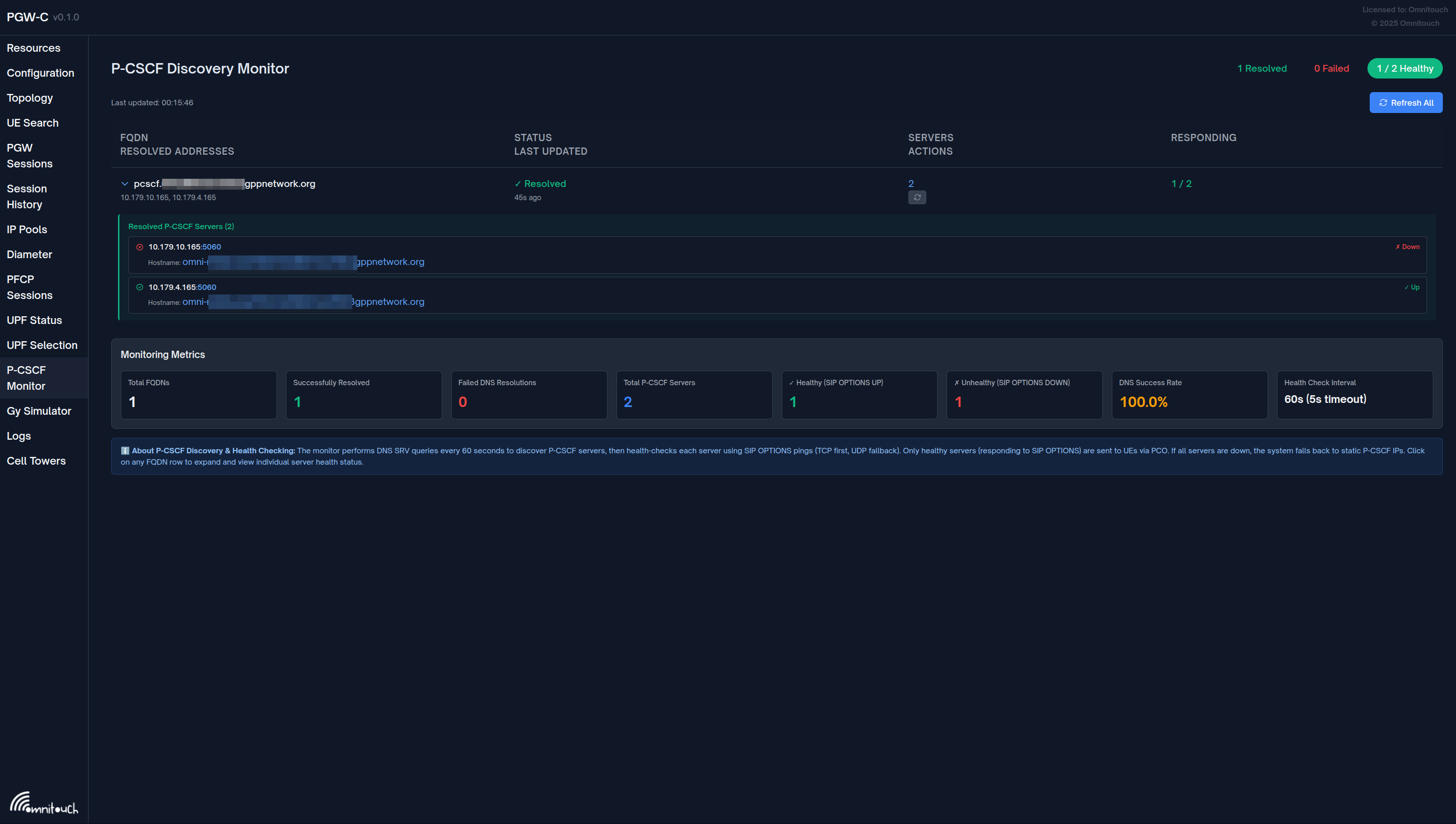
Features:
-
Overview Statistics
- Total FQDNs monitored
- Successfully resolved FQDNs
- Failed resolutions
- Total discovered P-CSCF IPs
-
FQDN Table
- FQDN being monitored
- Resolution status (✓ Resolved / ✗ Failed / ⏳ Pending)
- Number of discovered IPs
- List of resolved IP addresses (with expandable server details)
- Last update timestamp
- Manual refresh button per FQDN
- Health Status: Each discovered server shows:
- IP address and port
- Hostname (from DNS SRV target)
- Real-time health indicator (✓ Up / ✗ Down)
-
Refresh Controls
- Refresh All button: Trigger immediate re-query of all FQDNs
- Per-FQDN Refresh: Refresh individual FQDNs on demand
- Auto-refresh: Page updates every 5 seconds
-
Monitoring Metrics Dashboard
- Total FQDNs: Number of unique FQDNs registered for monitoring
- Successfully Resolved: FQDNs that successfully resolved via DNS
- Failed DNS Resolutions: FQDNs that failed to resolve
- Total P-CSCF Servers: Total number of servers discovered across all FQDNs
- ✓ Healthy (SIP OPTIONS UP): Servers responding to SIP OPTIONS health checks
- ✗ Unhealthy (SIP OPTIONS DOWN): Servers not responding to SIP OPTIONS
- DNS Success Rate: Percentage of successful DNS resolutions
- Health Check Interval: Frequency of SIP OPTIONS health checks (60s, 5s timeout)
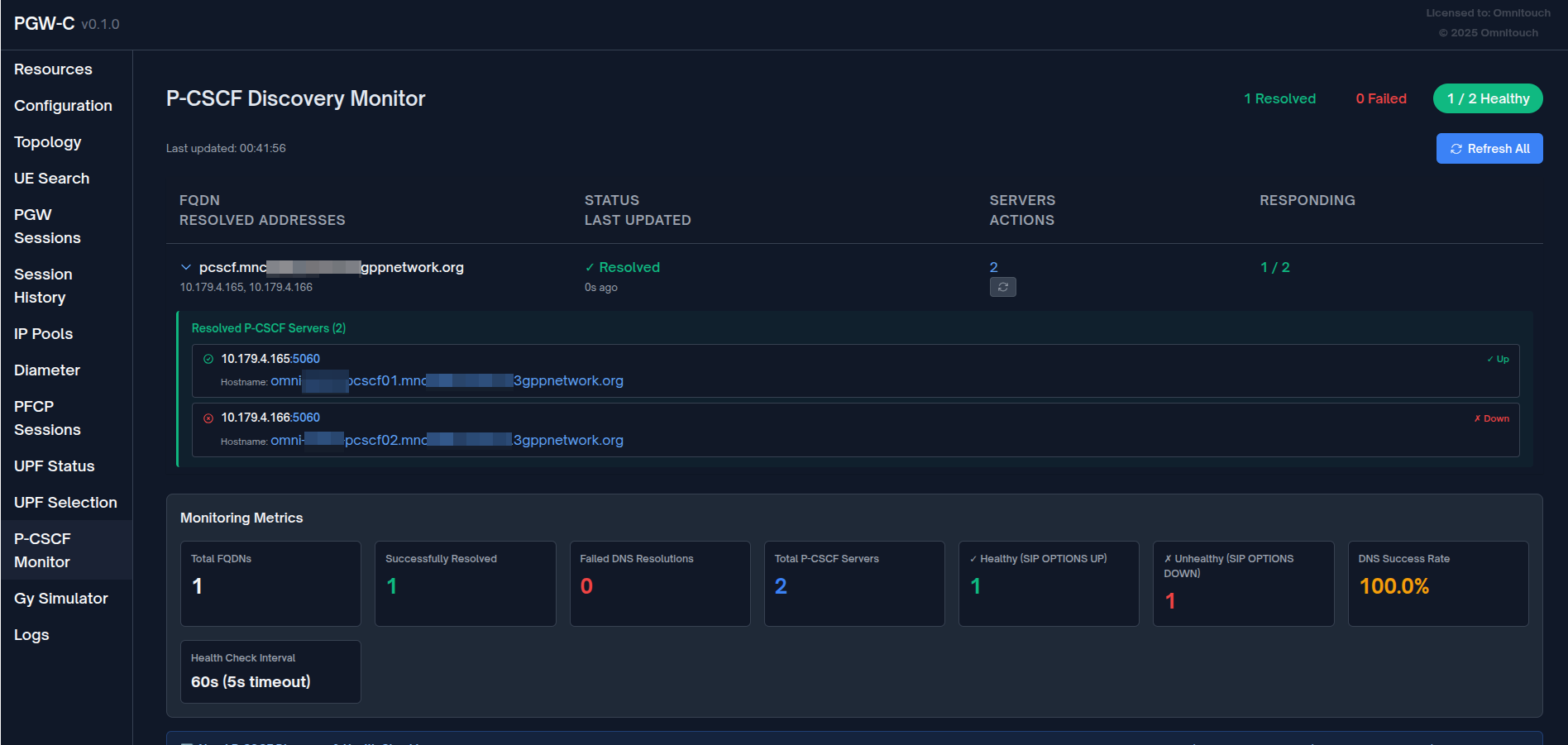
The metrics dashboard provides real-time visibility into both DNS resolution health and P-CSCF server availability via SIP OPTIONS.
UPF Selection Page Integration
The UPF Selection page (/upf_selection) displays P-CSCF discovery status for each rule:
📌 IMS Traffic (Priority 20)
   Match: APN matching ^ims
   Pool: UPF-IMS-Primary (10.100.2.21:8805)

   🔍 P-CSCF Discovery
      FQDN: pcscf.mnc380.mcc313.3gppnetwork.org
      Status: ✓ Resolved (2 IPs)
      Resolved IPs: 10.101.2.100, 10.101.2.101

   ⚙️ PCO Overrides
      Primary DNS: 10.103.2.195
      P-CSCF (static fallback): 10.101.2.100, 10.101.2.101
Metrics and Observability
Prometheus Metrics
The P-CSCF monitoring system exposes metrics via Prometheus (port 42069 by default):
Gauge Metrics
# FQDN-level metrics
pcscf_fqdns_total                      # Total number of monitored FQDNs
pcscf_fqdns_resolved                   # Successfully resolved FQDNs (DNS succeeded)
pcscf_fqdns_failed                     # Failed FQDN resolutions (DNS failed)

# Server-level metrics (aggregate)
pcscf_servers_total                    # Total P-CSCF servers discovered via DNS SRV
pcscf_servers_healthy                  # Servers responding to SIP OPTIONS (aggregate)
pcscf_servers_unhealthy                # Servers not responding to SIP OPTIONS (aggregate)

# Server-level metrics (per-FQDN with label)
pcscf_servers_healthy{fqdn="..."}      # Healthy servers for specific FQDN
pcscf_servers_unhealthy{fqdn="..."}    # Unhealthy servers for specific FQDN
Health Check Details:
healthy: Server responded to SIP OPTIONS ping (TCP or UDP)unhealthy: Server failed to respond to SIP OPTIONS (5s timeout per transport)
Metric Examples
DNS Resolution Metrics:
# Query successfully resolved FQDNs
pcscf_fqdns_resolved

# Calculate DNS success rate
(pcscf_fqdns_resolved / pcscf_fqdns_total) * 100

# Total discovered servers
pcscf_servers_total
SIP OPTIONS Health Metrics:
# Total healthy servers across all FQDNs
pcscf_servers_healthy

# Total unhealthy servers
pcscf_servers_unhealthy

# Calculate health check success rate
(pcscf_servers_healthy / pcscf_servers_total) * 100

# Healthy servers for a specific FQDN
pcscf_servers_healthy{fqdn="pcscf.mnc380.mcc313.3gppnetwork.org"}

# Alert on all servers down
pcscf_servers_healthy == 0 AND pcscf_servers_total > 0
Example Prometheus Alerts:
# Alert when all P-CSCF servers are down
- alert: AllPCSCFServersDown
  expr: pcscf_servers_healthy == 0 AND pcscf_servers_total > 0
  for: 5m
  labels:
    severity: critical
  annotations:
    summary: "All P-CSCF servers are unhealthy"
    description: "{{ $value }} healthy servers (0) - all failed SIP OPTIONS checks"

# Alert when more than 50% servers are down
- alert: MajorityPCSCFServersDown
  expr: (pcscf_servers_healthy / pcscf_servers_total) < 0.5
  for: 5m
  labels:
    severity: warning
  annotations:
    summary: "Majority of P-CSCF servers are unhealthy"
    description: "Only {{ $value }}% of servers are responding to SIP OPTIONS"

# Alert on DNS resolution failures
- alert: PCSCFDNSResolutionFailed
  expr: pcscf_fqdns_failed > 0
  for: 5m
  labels:
    severity: warning
  annotations:
    summary: "P-CSCF DNS resolution failures"
    description: "{{ $value }} FQDN(s) failing to resolve"
Logging
The monitor logs key events:
[info] P-CSCF Monitor started
[info] Registering 2 unique P-CSCF FQDNs for monitoring: ["pcscf.ims.example.com", "pcscf.enterprise.example.com"]
[info] P-CSCF Monitor: Registering FQDN pcscf.ims.example.com
[debug] P-CSCF Monitor: Successfully resolved pcscf.ims.example.com to 2 IPs
[warning] P-CSCF Monitor: Failed to resolve pcscf.enterprise.example.com: :nxdomain
[debug] Using P-CSCF addresses from FQDN pcscf.ims.example.com: [{10, 101, 2, 100}, {10, 101, 2, 101}]
Fallback Strategy
The system uses a three-tier fallback strategy for maximum reliability:
Tier 1: DNS Discovery (Preferred)
p_cscf_discovery_fqdn: "pcscf.ims.example.com"
- Monitor queries DNS and caches resolved IPs
- Session uses cached IPs if available
- Advantage: Dynamic, load-balanced, location-aware
Tier 2: Rule-Specific Static PCO (Fallback)
pco: %{
  p_cscf_ipv4_address_list: ["10.101.2.100", "10.101.2.101"]
}
- Used if DNS discovery fails or returns no IPs
- Rule-specific static configuration
- Advantage: Rule-specific fallback, predictable
Tier 3: Global PCO Configuration (Last Resort)
# Global pco config
pco: %{
  p_cscf_ipv4_address_list: ["10.101.2.146"]
}
- Used if no rule-specific config and DNS fails
- Global default P-CSCF addresses
- Advantage: Always available, prevents session failure
Fallback Logic Example
Session matches "IMS Traffic" rule:

1. Try DNS discovery for "pcscf.ims.example.com"
   ├─ Success → Use [10.101.2.100, 10.101.2.101] ✓
   └─ Failed → Try next tier

2. Try rule's PCO override
   ├─ Configured → Use [10.101.2.100, 10.101.2.101] ✓
   └─ Not configured → Try next tier

3. Use global PCO config
   └─ Use [10.101.2.146] ✓ (Always succeeds)
DNS Configuration
DNS Server Setup
Configure DNS server with SRV and A/AAAA records for P-CSCF discovery:
; SRV records for P-CSCF (_sip._tcp prefix is queried automatically)
_sip._tcp.pcscf.mnc380.mcc313.3gppnetwork.org. IN SRV 10 50 5060 pcscf1.example.com.
_sip._tcp.pcscf.mnc380.mcc313.3gppnetwork.org. IN SRV 20 50 5060 pcscf2.example.com.

; A records
pcscf1.example.com. IN A 10.101.2.100
pcscf2.example.com. IN A 10.101.2.101
Important: OmniPGW automatically prepends _sip._tcp. to the configured FQDN. If you configure p_cscf_discovery_fqdn: "pcscf.mnc380.mcc313.3gppnetwork.org", the system will query _sip._tcp.pcscf.mnc380.mcc313.3gppnetwork.org.
SRV Record Format
SRV records follow this format:
_service._proto.domain. IN SRV priority weight port target.
- Priority: Lower values have higher priority (10 before 20)
- Weight: For load balancing among same priority (higher = more traffic)
- Port: SIP port (typically 5060 for TCP, 5060 for UDP)
- Target: Hostname to resolve to IP address
Testing DNS Configuration
# Query SRV records (note the _sip._tcp prefix)
dig SRV _sip._tcp.pcscf.mnc380.mcc313.3gppnetwork.org @10.179.2.177

# Expected output:
# _sip._tcp.pcscf.mnc380.mcc313.3gppnetwork.org. 300 IN SRV 10 50 5060 pcscf1.example.com.

# Resolve P-CSCF hostname to IP
dig A pcscf1.example.com @10.179.2.177

# Expected output:
# pcscf1.example.com. 300 IN A 10.101.2.100
Troubleshooting
Issue: FQDN Shows "Failed" Status
Symptoms:
- Web UI shows ✗ Failed status
- Error:
:nxdomain,:timeout, or:no_naptr_records
Possible Causes:
- DNS server not reachable
- FQDN does not exist in DNS
- No NAPTR records configured
- DNS server timeout
Resolution:
# 1. Test DNS server connectivity
ping 10.179.2.177

# 2. Test NAPTR query manually
dig NAPTR pcscf.mnc380.mcc313.3gppnetwork.org @10.179.2.177

# 3. Check OmniPGW logs
grep "P-CSCF" /var/log/pgw_c.log

# 4. Verify configuration
grep "p_cscf_discovery_dns_server" config/runtime.exs

# 5. Manual refresh in web UI
# Click "Refresh" button next to failed FQDN
Issue: No IPs Returned
Symptoms:
- Web UI shows "0 IPs"
- Status may be ✓ Resolved or ✗ Failed
Possible Causes:
- NAPTR records exist but replacement FQDNs don't resolve
- Service field doesn't match IMS/SIP pattern
- A/AAAA records missing
Resolution:
# Check NAPTR record service field
dig NAPTR pcscf.example.com @10.179.2.177

# Ensure service contains "SIP" or "IMS":
# CORRECT: "SIP+D2U", "x-3gpp-ims:sip"
# WRONG: "HTTP", "FTP"

# Check A/AAAA records exist
dig pcscf1.example.com A @10.179.2.177
Issue: Sessions Use Wrong P-CSCF
Symptoms:
- UE receives unexpected P-CSCF addresses
- Static fallback used instead of discovered IPs
Possible Causes:
- DNS discovery failed but fallback is working
- Rule matching incorrect
- FQDN not registered
Resolution:
# 1. Check P-CSCF Monitor page
# Verify FQDN is registered and resolved

# 2. Check session logs
grep "Using P-CSCF addresses from FQDN" /var/log/pgw_c.log

# 3. Check UPF Selection page
# Verify rule shows correct FQDN and status

# 4. Test rule matching
# Create session with specific APN and verify which rule matches
Issue: High DNS Query Latency
Symptoms:
- Slow session creation
- Metrics show high
pcscf_discovery_query_duration_seconds
Possible Causes:
- DNS server performance issues
- Network latency to DNS server
- Timeout too high
Resolution:
# Reduce query timeout
pco: %{
  p_cscf_discovery_timeout_ms: 2000  # Reduce from 5000ms
}

# Consider using closer DNS server
pco: %{
  p_cscf_discovery_dns_server: "10.0.0.10"  # Local DNS
}
Best Practices
1. DNS Server Selection
Use Dedicated DNS Server
pco: %{
  # Dedicated DNS for P-CSCF discovery (not the same as UE DNS)
  p_cscf_discovery_dns_server: "10.179.2.177",

  # UE DNS servers (given to mobile devices)
  primary_dns_server_address: "8.8.8.8",
  secondary_dns_server_address: "8.8.4.4"
}
Why?
- Separate concerns: UE DNS vs. internal IMS DNS
- Different access policies and security
- Independent scaling and reliability
2. Always Configure Static Fallback
%{
  p_cscf_discovery_fqdn: "pcscf.ims.example.com",  # Preferred
  pco: %{
    p_cscf_ipv4_address_list: ["10.101.2.100"]  # Required fallback
  }
}
Why?
- Ensures sessions succeed even if DNS fails
- Graceful degradation
- Meets SLA requirements
3. Use Specific FQDNs per Traffic Type
rules: [
  # IMS
  %{
    name: "IMS",
    match_regex: "^ims",
    p_cscf_discovery_fqdn: "pcscf.ims.mnc380.mcc313.3gppnetwork.org"
  },

  # Enterprise
  %{
    name: "Enterprise",
    match_regex: "^enterprise",
    p_cscf_discovery_fqdn: "pcscf.enterprise.example.com"
  }
]
Why?
- Different P-CSCF pools per service
- Better load distribution
- Service-specific routing
4. Monitor DNS Query Performance
# Alert on high P-CSCF query latency
alert: HighPCSCFQueryLatency
expr: histogram_quantile(0.95, pcscf_discovery_query_duration_seconds_bucket) > 2
for: 5m
labels:
  severity: warning
annotations:
  summary: "P-CSCF DNS queries are slow (p95 > 2s)"
5. Regular DNS Health Checks
- Web UI: Check P-CSCF Monitor page daily
- Metrics: Monitor
pcscf_monitor_fqdns_failedmetric - Logs: Watch for DNS errors
- Testing: Periodically verify DNS records exist
6. Configure Appropriate Timeout
# Production: Balance reliability vs. latency
pco: %{
  p_cscf_discovery_timeout_ms: 5000  # 5 seconds
}

# High-performance: Favor speed, rely on fallback
pco: %{
  p_cscf_discovery_timeout_ms: 2000  # 2 seconds
}
7. Use DNS Redundancy
Configure primary and secondary DNS:
# Primary P-CSCF DNS
pcscf.mnc380.mcc313.3gppnetwork.org. IN NAPTR 10 50 "s" "SIP+D2U" "" _sip._udp.pcscf1.example.com.

# Secondary P-CSCF DNS
pcscf.mnc380.mcc313.3gppnetwork.org. IN NAPTR 20 50 "s" "SIP+D2U" "" _sip._udp.pcscf2.example.com.
Related Documentation
- PCO Configuration - Protocol Configuration Options, DNS and P-CSCF settings
- Configuration Guide - Complete OmniPGW configuration reference
- Monitoring - Metrics, logging, and observability
- Session Management - Session lifecycle and PCO delivery
- PFCP Interface - User Plane Function communication
OmniPGW P-CSCF Monitoring - by Omnitouch Network Services