UE IP Pool Allocation Documentation
IP Address Management for Mobile Devices
Table of Contents
- Overview
- IP Allocation Concepts
- Configuration
- Allocation Process
- Advanced Topics
- Monitoring
- Troubleshooting
Overview
The PGW-C allocates IP addresses to UE (User Equipment) devices when they establish PDN (Packet Data Network) connections. This is a critical function that enables mobile devices to communicate with external networks.
Why IP Allocation Matters
Each UE receives a unique IP address from the PGW-C that:
- Identifies the device on the network
- Routes traffic to/from the device
- Enables charging and policy enforcement
- Persists for the duration of the PDN connection
Supported IP Versions
| IP Version | Support | Description |
|---|---|---|
| IPv4 | ✅ Full | Standard IPv4 addresses |
| IPv6 | ✅ Full | IPv6 addresses and prefixes |
| IPv4v6 | ✅ Full | Dual-stack (both IPv4 and IPv6) |
IP Allocation Concepts
PDN Type
When a UE requests a PDN connection, it specifies a PDN Type:
| PDN Type | Description | Allocated Addresses |
|---|---|---|
| IPv4 | IPv4-only connection | Single IPv4 address |
| IPv6 | IPv6-only connection | IPv6 prefix (e.g., /64) |
| IPv4v6 | Dual-stack connection | Both IPv4 address and IPv6 prefix |
Allocation Methods
PGW-C supports two IP allocation methods:
1. Dynamic Allocation (Most Common):
- PGW-C selects IP from configured pool
- Random selection to avoid predictability
- Collision detection ensures uniqueness
2. Static Allocation:
- UE requests specific IP in GTP-C message
- PGW-C validates availability
- Useful for enterprise devices with fixed IPs
APN-Based Subnet Selection
Different APNs (Access Point Names) can use different IP pools:
Benefits:
- Traffic Segregation - Different APNs route to different networks
- Policy Differentiation - Apply different policies per APN
- Capacity Planning - Size pools based on expected usage
- Billing - Track usage by service type
Address Registry
The Address Registry tracks allocated IPs:
| Function | Description |
|---|---|
| Registration | Maps UE IP → Session Process PID |
| Lookup | Find session by UE IP |
| Deregistration | Release IP when session ends |
| Collision Detection | Prevent duplicate allocations |
Configuration
Basic Configuration
Edit config/runtime.exs:
config :pgw_c,
  ue: %{
    subnet_map: %{
      # APN "internet" uses two subnets
      "internet" => [
        "100.64.1.0/24",    # 254 usable IPs
        "100.64.2.0/24"     # 254 usable IPs
      ],

      # APN "ims" uses one subnet
      "ims" => [
        "100.64.10.0/24"
      ],

      # Default pool for unknown APNs
      default: [
        "42.42.42.0/24"
      ]
    }
  }
Regex Pattern Matching for APNs
For scenarios where multiple APNs share the same subnet pool, you can use regex patterns instead of exact APN names. This is useful for wildcard APN matching.
Pattern Rules:
- Keys starting with
^are treated as regex patterns - Keys without
^are matched exactly (backwards compatible) - Patterns are evaluated in order - first match wins
- Falls back to
defaultif no pattern matches
config :pgw_c,
  ue: %{
    subnet_map: %{
      # Regex: APNs starting with "ims" (e.g., "ims", "ims.apn", "ims.something.else")
      "^ims" => [
        "100.64.10.0/24"
      ],

      # Regex: APNs starting with "m2m." (e.g., "m2m.test", "m2m.prod")
      "^m2m\." => [
        "100.64.20.0/24"
      ],

      # Exact match only - "enterprise.corp" exactly
      "enterprise.corp" => [
        "10.100.0.0/16"
      ],

      # Default pool for unmatched APNs
      default: [
        "42.42.42.0/24"
      ]
    }
  }
Important Notes:
- Regex patterns use standard Elixir/Erlang regex syntax
- Backslashes must be escaped in Elixir strings (use
\for\) - The
^at the start is required to indicate a regex pattern - Exact matches and regex patterns can be mixed in the same config
- Order matters for regex patterns - place more specific patterns first
Common Pattern Examples:
| Pattern Type | Regex Key | Matches |
|---|---|---|
| Starts with | "^ims" | ims, ims.apn, ims.anything |
| Ends with | "^.*\.corp$" | foo.corp, bar.corp |
| Contains | "^.*test.*" | test, foo.test.bar, testing |
| Exact (with dots) | "^internet\.apn$" | internet.apn only |
Suffix Matching Example:
To match APNs ending with a specific suffix (like .corp), use ^.*\.suffix$:
subnet_map: %{
  # Match APNs ending with ".corp"
  "^.*\.corp$" => ["10.100.0.0/16"],

  # Match APNs ending with ".iot"
  "^.*\.iot$" => ["10.200.0.0/16"],

  default: ["42.42.42.0/24"]
}
Example Pattern Matching:
| APN Request | Matched Key | Pool Used |
|---|---|---|
ims | ^ims | 100.64.10.0/24 |
ims.apn | ^ims | 100.64.10.0/24 |
ims.something.else | ^ims | 100.64.10.0/24 |
m2m.test | ^m2m\. | 100.64.20.0/24 |
m2m | default | 42.42.42.0/24 |
enterprise.corp | enterprise.corp | 10.100.0.0/16 |
foo.corp | ^.*\.corp$ | 10.100.0.0/16 |
unknown.apn | default | 42.42.42.0/24 |
Subnet Notation
CIDR Notation: <network>/<prefix_length>
| CIDR | Usable IPs | Example Range |
|---|---|---|
| /24 | 254 | 100.64.1.1 - 100.64.1.254 |
| /23 | 510 | 100.64.0.1 - 100.64.1.254 |
| /22 | 1022 | 100.64.0.1 - 100.64.3.254 |
| /20 | 4094 | 100.64.0.1 - 100.64.15.254 |
| /16 | 65534 | 100.64.0.1 - 100.64.255.254 |
Notes:
- Network address (e.g., 100.64.1.0) is not allocated
- Broadcast address (e.g., 100.64.1.255) is not allocated
- PGW-C allocates from
<network> + 1to<broadcast> - 1
Multiple Subnets per APN
Load Balancing Across Subnets:
config :pgw_c,
  ue: %{
    subnet_map: %{
      "internet" => [
        "100.64.1.0/24",
        "100.64.2.0/24",
        "100.64.3.0/24",
        "100.64.4.0/24"
      ]
    }
  }
Selection Method:
- PGW-C randomly selects one subnet from the list
- Provides basic load balancing
- Each session independently selects a subnet
Benefits:
- Distribute load across multiple subnets
- Easier capacity expansion (add new subnets)
- Flexibility for routing policies
Real-World Example
config :pgw_c,
  ue: %{
    subnet_map: %{
      # General internet access
      "internet" => [
        "100.64.0.0/20"     # 4094 IPs for general use
      ],

      # IMS (Voice over LTE)
      "ims" => [
        "100.64.16.0/22"    # 1022 IPs for IMS
      ],

      # Enterprise APN
      "enterprise.corp" => [
        "10.100.0.0/16"     # 65534 IPs for enterprise
      ],

      # IoT devices (low bitrate)
      "iot.m2m" => [
        "100.64.20.0/22"    # 1022 IPs for IoT
      ],

      # Default fallback
      default: [
        "42.42.42.0/24"     # 254 IPs for unknown APNs
      ]
    }
  }
IPv6 Configuration
config :pgw_c,
  ue: %{
    subnet_map: %{
      "internet" => [
        # IPv4 pools
        "100.64.1.0/24"
      ],
      "internet.ipv6" => [
        # IPv6 pools (prefix delegation)
        "2001:db8:1::/48"
      ],
      default: [
        "42.42.42.0/24"
      ]
    }
  }
IPv6 Prefix Delegation:
- UE typically receives a /64 prefix
- Allows UE to assign multiple IPs (e.g., for tethering)
- Example: UE receives
2001:db8:1:a::/64
Dual-Stack (IPv4v6) Configuration
config :pgw_c,
  ue: %{
    subnet_map: %{
      "internet" => [
        "100.64.1.0/24",        # IPv4 pool
        "2001:db8:1::/48"       # IPv6 pool (will be used for IPv6 allocation)
      ]
    }
  }
Dual-Stack Allocation:
- UE requests PDN Type: IPv4v6
- PGW-C allocates both IPv4 address and IPv6 prefix
- Both addresses active simultaneously
Allocation Process
IP allocation occurs during session creation when PGW-C receives a Create Session Request via the S5/S8 interface. See S5/S8 Interface for GTP-C message details and Session Management for session lifecycle.
Step-by-Step: Dynamic IPv4 Allocation
How It Works
Dynamic Allocation Process:
- Subnet Lookup: System retrieves configured subnets for the requested APN
- Random Selection: One subnet is randomly selected from the available list
- IP Generation: A random IP is generated within the subnet range
- Uniqueness Check: System verifies the IP hasn't been allocated
- Retry Logic: If collision detected, retry up to 100 times with new random IP
- Registration: Once unique IP found, it's registered to the session
Key Design Points:
- Max 100 attempts: Prevents infinite loops when pool is nearly exhausted
- Random selection: Avoids predictable IP assignment patterns for security
- Atomic operations: Process-based registry ensures no duplicate allocations
- Fallback to default: If APN not found in config, uses default pool
Collision Handling
Scenario: Two sessions try to allocate same IP simultaneously
How Collision Prevention Works:
- Registry processes requests one at a time (serialized)
- No race conditions possible
- First request to register an IP succeeds
- Subsequent requests for same IP are rejected
- Rejected sessions automatically retry with new random IP
Default Subnet Fallback
Scenario: UE requests unknown APN
Example Configuration:
# Config
subnet_map: %{
  "internet" => ["100.64.1.0/24"],
  default: ["42.42.42.0/24"]
}
Behavior:
- UE requests APN: "unknown.apn"
- System looks for "unknown.apn" in subnet_map
- Not found, so falls back to default pool
- Allocates IP from 42.42.42.0/24
Fallback Logic:
- First, try to find APN-specific pool in configuration
- If not found, use the
defaultpool - If no default configured, allocation fails
Deallocation on Session Termination
Automatic Cleanup:
- When session process terminates, registry cleans up
- IP immediately available for new allocations
- No manual intervention required
Advanced Topics
Pool Exhaustion
Scenario: All IPs in pool are allocated
Pool: 100.64.1.0/24 (254 usable IPs)
Allocated: 254 IPs
New request arrives → Exhaustion
What Happens:
- PGW-C attempts 100 random allocations
- All attempts find IP already allocated
- Returns:
{:error, :ue_ip_address_allocation_failed} - Session establishment fails
- SGW-C receives error response
Prevention:
# Monitor pool utilization
address_registry_count / total_pool_size > 0.8  # Alert at 80%

# Expand pool before exhaustion
"internet" => [
  "100.64.1.0/24",
  "100.64.2.0/24",  # Add additional subnet
  "100.64.3.0/24"
]
Static IP Allocation
Use Case: Enterprise device needs fixed IP
GTP-C Message Format:
Create Session Request
├── IMSI: 310260123456789
├── APN: enterprise.corp
├── PDN Address Allocation (IE)
│   └── PDN Type: IPv4
│   └── IPv4 Address: 10.100.0.50  ← UE requests specific IP
OmniPGW Processing:
- Extract Requested IP: Parse PDN Address Allocation IE from request
- Validate IP: Check if requested IP is in configured pool for this APN
- Check Availability: Verify IP is not already allocated to another session
- Allocate or Reject:
- If available: Allocate requested IP to this session
- If unavailable: Reject session with appropriate cause code
Possible Results:
- Success: UE receives exactly the IP address it requested
- Failure (IP in use): Session rejected - IP already allocated
- Failure (IP not in pool): Session rejected - IP not in configured range
IPv6 Prefix Delegation
UE requests IPv6:
Create Session Request
├── PDN Type: IPv6
PGW-C allocates /64 prefix:
Allocated Prefix: 2001:db8:1:a::/64

UE can use:
- 2001:db8:1:a::1
- 2001:db8:1:a::2
- ... (18 quintillion addresses)
Benefits:
- UE can assign multiple IPs (e.g., tethering)
- Supports SLAAC (Stateless Address Autoconfiguration)
- Eliminates NAT requirement
Dual-Stack Allocation
UE requests IPv4v6:
Create Session Request
├── PDN Type: IPv4v6
PGW-C allocates both:
IPv4: 100.64.1.42
IPv6: 2001:db8:1:a::/64
Traffic Handling:
- IPv4 traffic uses IPv4 address
- IPv6 traffic uses IPv6 prefix
- Both active simultaneously
- Separate GTP tunnels (or dual-stack tunnel)
Private vs. Public IP Addresses
Private IP Pools (RFC 1918):
# Not routable on public internet
subnet_map: %{
  "internet" => [
    "10.0.0.0/8",
    "172.16.0.0/12",
    "192.168.0.0/16"
  ]
}
Requires NAT at PGW-U to access internet
Public IP Pools:
# Routable public IPs (example only)
subnet_map: %{
  "internet" => [
    "203.0.113.0/24"  # Public IP block
  ]
}
No NAT required - direct internet routing
Recommendation:
- Use private IPs (RFC 6598):
100.64.0.0/10(Carrier-Grade NAT) - Reserve public IPs for special services only
Monitoring
Web UI - IP Pool Management
OmniPGW provides a real-time web interface for monitoring IP pool allocation and utilization.
Access: http://<omnipgw-ip>:<web-port>/ip_pools
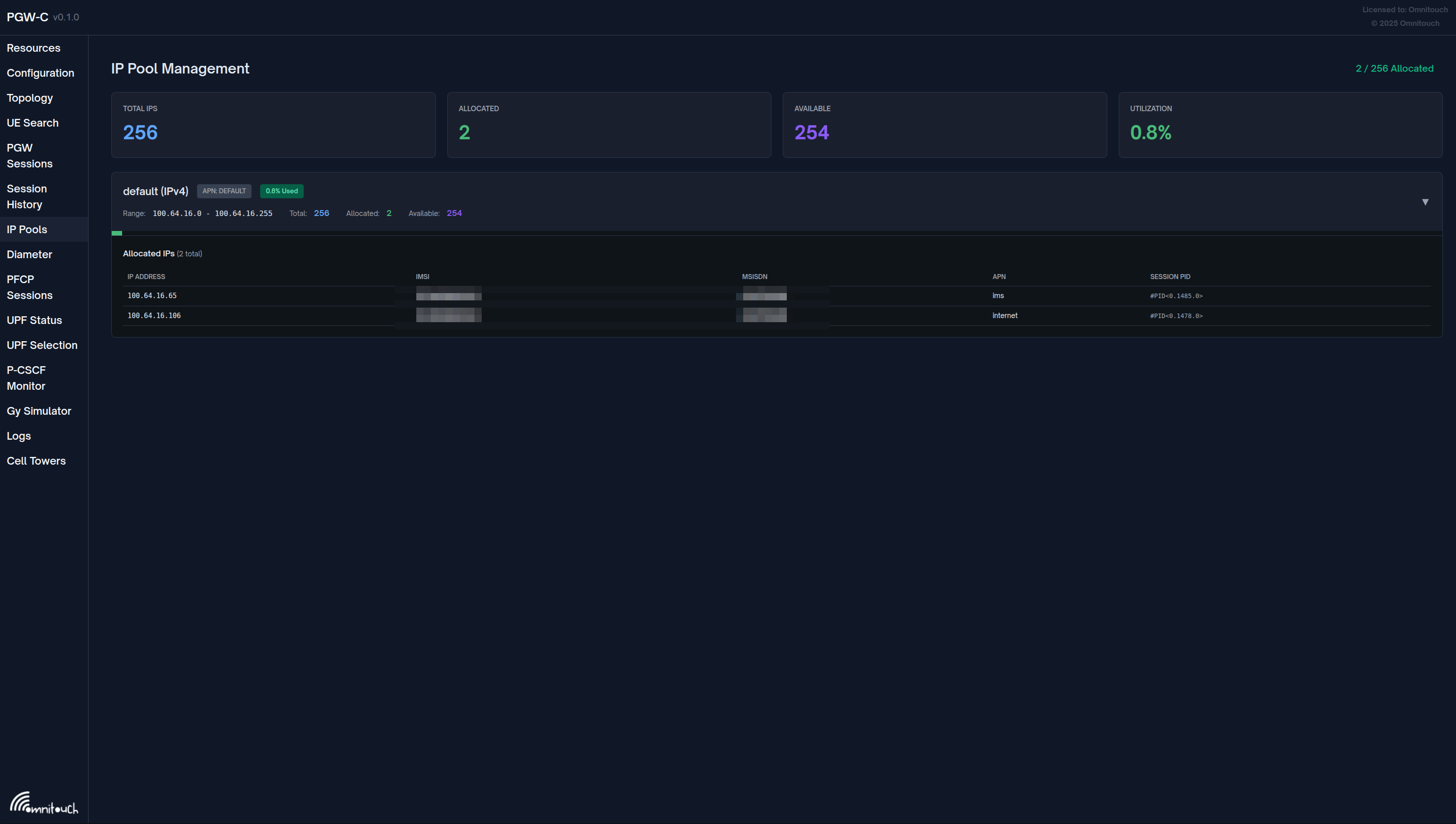
Features:
1. Pool Overview
- Total IPs across all pools
- Currently allocated addresses
- Available IPs remaining
- Real-time utilization percentage
2. Per-APN Pool Status Each configured pool displays:
- Pool Name - APN identifier (e.g., "default", "ims.something.else", "Internet")
- APN Label - Configured APN name badge
- IP Range - CIDR notation showing subnet range
- Utilization - Visual indicator showing percentage used
- Allocation Stats:
- Total: Number of IPs in pool
- Allocated: Currently assigned IPs
- Available: Remaining IPs for allocation
3. Real-time Updates
- Auto-refresh every 2 seconds
- No page reload required
- Live utilization tracking
Use Cases:
- Quick capacity check before maintenance
- Identify pools approaching exhaustion
- Verify pool configuration
- Monitor allocation patterns by APN
Key Metrics
Address Registry Count:
# Current allocated IPs
address_registry_count

# Pool utilization (requires calculation)
address_registry_count / <total_pool_size> * 100
Example:
Pool: 100.64.1.0/24 (254 IPs)
Allocated: 150 IPs
Utilization: 150 / 254 = 59%
Alerts
# Alert on high pool utilization
- alert: UEIPPoolUtilizationHigh
  expr: address_registry_count > 200  # For /24 pool
  for: 10m
  annotations:
    summary: "UE IP pool utilization above 80%"
    description: "Current: {{ $value }} / 254 IPs allocated"

# Alert on pool exhaustion
- alert: UEIPPoolExhausted
  expr: address_registry_count >= 254  # For /24 pool
  for: 1m
  annotations:
    summary: "UE IP pool exhausted - no IPs available"

# Alert on allocation failures
- alert: UEIPAllocationFailures
  expr: rate(ue_ip_allocation_failures_total[5m]) > 0
  for: 5m
  annotations:
    summary: "UE IP allocation failures occurring"
Grafana Dashboard
Panel 1: IP Pool Utilization
# Gauge showing percentage
(address_registry_count / 254) * 100
Panel 2: Allocated IPs Over Time
# Time series
address_registry_count
Panel 3: Allocation Rate
# Rate of new allocations
rate(address_registry_count[5m])
Panel 4: Pool Exhaustion Risk
# Days until exhaustion (based on current rate)
(254 - address_registry_count) / rate(address_registry_count[1h])
Troubleshooting
Issue 1: Session Establishment Fails (No IP Available)
Symptoms:
- Create Session Response: Cause "Request rejected"
- Log: "UE IP address allocation failed"
Possible Causes:
-
Pool Exhausted
# Check current allocation
curl http://<pgw_c_ip>:42069/metrics | grep address_registry_count -
Configuration Error
# Verify subnet configuration
config :pgw_c,
  ue: %{
    subnet_map: %{
      "internet" => [
        "100.64.1.0/24"  # Ensure valid CIDR
      ]
    }
} -
APN Misconfiguration
# If APN not found, falls back to default
# Ensure default pool exists
subnet_map: %{
  default: ["42.42.42.0/24"]
}
Resolution:
- Expand pool: Add more subnets
- Cleanup stale sessions: Restart PGW-C to release leaked IPs
- Verify config: Check
runtime.exsfor typos
Issue 2: IP Address Collision
Symptoms:
- Two UEs receive same IP (very rare)
- Routing issues
Cause:
- Bug in Address Registry (should not happen)
Debug:
# Check for duplicate IPs in logs
grep "already_registered" /var/log/pgw_c.log
Resolution:
- Should self-correct (second session retries)
- If persistent, report bug
Issue 3: Wrong IP Pool Used
Symptoms:
- UE receives IP from unexpected subnet
- APN "internet" gets IP from "ims" pool
Cause:
- Incorrect subnet_map configuration
Verify:
# Check exact APN string matching
subnet_map: %{
  "internet" => [...],    # Case-sensitive
  "Internet" => [...]     # Different APN!
}
Resolution:
- Ensure APN names match exactly (case-sensitive)
- Use default pool for catch-all
Issue 4: IPv6 Allocation Fails
Symptoms:
- UE requests IPv6, receives error
Possible Causes:
-
No IPv6 pool configured
# Missing IPv6 subnets
subnet_map: %{
  "internet" => [
    "100.64.1.0/24"  # Only IPv4
  ]
} -
Invalid IPv6 prefix
# Too small prefix (should be /48 or larger)
"internet" => [
  "2001:db8::/128"  # Wrong - no room for allocation
]
Resolution:
# Add IPv6 pool
subnet_map: %{
  "internet" => [
    "100.64.1.0/24",
    "2001:db8:1::/48"  # IPv6 pool
  ]
}
Issue 5: High Pool Utilization
Symptoms:
- Nearing pool exhaustion
address_registry_countapproaching max
Proactive Measures:
-
Add Subnets:
"internet" => [
  "100.64.1.0/24",   # Existing
  "100.64.2.0/24",   # New subnet (adds 254 IPs)
  "100.64.3.0/24"    # New subnet (adds 254 IPs)
] -
Use Larger Subnets:
# Replace /24 with /22
"internet" => [
  "100.64.0.0/22"  # 1022 usable IPs
] -
Session Cleanup:
- Monitor stale sessions
- Ensure proper Delete Session Request handling
Best Practices
Capacity Planning
Calculate required pool size:
Expected concurrent users: 10,000
Peak concurrency: 30% (3,000 simultaneous sessions)
Growth buffer: 50%
Required IPs: 3,000 * 1.5 = 4,500 IPs

Subnet: /20 (4,094 usable IPs) - Too small
Subnet: /19 (8,190 usable IPs) - Sufficient
Subnet Selection
Recommended:
- Use
100.64.0.0/10(RFC 6598 - Carrier-Grade NAT) - Provides 4 million IPs
- Reserved for service provider NAT
Avoid:
- Public IPs (expensive, limited)
- Common private ranges that conflict with enterprise VPNs
Configuration Layout
config :pgw_c,
  ue: %{
    subnet_map: %{
      # Primary internet APN - large pool
      "internet" => [
        "100.64.0.0/18"  # 16,382 IPs
      ],

      # IMS - smaller dedicated pool
      "ims" => [
        "100.64.64.0/22"  # 1,022 IPs
      ],

      # Enterprise - medium pool
      "enterprise.corp" => [
        "100.64.68.0/22"  # 1,022 IPs
      ],

      # IoT - large pool for many devices
      "iot.m2m" => [
        "100.64.72.0/20"  # 4,094 IPs
      ],

      # Default - small fallback
      default: [
        "100.64.127.0/24"  # 254 IPs
      ]
    }
  }
Related Documentation
Configuration
- Configuration Guide - UE IP pool configuration, APN subnet mapping
- PCO Configuration - DNS, P-CSCF, MTU delivered with IP address
- Session Management - Session lifecycle, IP allocation during PDN setup
- PFCP Interface - UE address assignment via PFCP to UPF
Network Planning
- S5/S8 Interface - IP address delivery via GTP-C
- Diameter Gx Interface - Policy control for IP allocation
Operations
- Monitoring Guide - IP pool utilization metrics, allocation tracking
- Data CDR Format - UE IP addresses in CDRs for billing correlation