Diameter Operations Guide
Table of Contents
- Overview
- Diameter in IMS Architecture
- Diameter Interfaces
- Peer Management via Web UI
- Diameter Result Codes
- Common Issues
Overview
Diameter is the authentication, authorization, and accounting (AAA) protocol used throughout the IMS architecture. OmniCall CSCF uses Diameter to communicate with critical network elements including HSS, PCRF, and OCS.
What is Diameter?
Diameter (RFC 6733) is the successor to RADIUS, designed for modern AAA scenarios:
- Reliable transport via TCP/SCTP (vs. UDP in RADIUS)
- Extensible via Application-Specific modules
- Peer-to-peer architecture (not just client-server)
- Stateful connections with watchdog monitoring
- Standardized error handling and result codes
Diameter in CSCF
Each CSCF component uses specific Diameter application interfaces:
| CSCF | Interface | Application ID | Connected To | Purpose |
|---|---|---|---|---|
| I-CSCF | Cx | 16777216 | HSS | S-CSCF selection, user location |
| S-CSCF | Cx | 16777216 | HSS | User authentication, profile download |
| S-CSCF | Sh | 16777217 | HSS | User data access (optional) |
| P-CSCF | Rx | 16777236 | PCRF | QoS policy and bearer control |
| S-CSCF | Ro | 4 | OCS | Online charging (credit control) |
| S-CSCF | Rf | 3 | CDF | Offline charging (accounting) |
Diameter in IMS Architecture
Network Overview
Diameter Interfaces
Cx Interface (CSCF ↔ HSS)
The Cx interface is used by I-CSCF and S-CSCF for user authentication and profile management.
3GPP Specification: TS 29.228
I-CSCF Operations
User-Authorization-Request (UAR) / User-Authorization-Answer (UAA):
- Purpose: Query HSS for S-CSCF assignment or capabilities
- Trigger: REGISTER received from user
- Use Case: I-CSCF needs to route registration to appropriate S-CSCF
Location-Info-Request (LIR) / Location-Info-Answer (LIA):
- Purpose: Query HSS for user's current S-CSCF
- Trigger: INVITE or MESSAGE received for terminating user
- Use Case: I-CSCF needs to route session to user's S-CSCF
S-CSCF Operations
Multimedia-Auth-Request (MAR) / Multimedia-Auth-Answer (MAA):
- Purpose: Retrieve authentication vectors from HSS
- Trigger: Initial REGISTER (before challenge)
- Use Case: S-CSCF needs to challenge user for IMS AKA authentication
Server-Assignment-Request (SAR) / Server-Assignment-Answer (SAA):
- Purpose: Inform HSS of registration state, download user profile
- Trigger: Successful authentication (after MAR/MAA)
- Use Case: S-CSCF downloads IFC and service profile for user
The User-Data AVP in SAA contains the complete user profile including:
- Public identities
- Initial Filter Criteria (IFC) for service triggering
- Subscribed media profile identifiers
- Charging information
Registration-Termination-Request (RTR) / Registration-Termination-Answer (RTA):
- Purpose: HSS-initiated deregistration (push from HSS)
- Trigger: Administrative deregistration, subscription change
- Use Case: HSS instructs S-CSCF to deregister a user
Rx Interface (P-CSCF ↔ PCRF)
The Rx interface provides policy and QoS control for IMS sessions.
3GPP Specification: TS 29.214
AA-Request (AAR) / AA-Answer (AAA):
- Purpose: Request QoS authorization for media session
- Trigger: SDP offer/answer exchange in SIP INVITE
- Use Case: P-CSCF requests PCRF to authorize bearer resources
Re-Auth-Request (RAR) / Re-Auth-Answer (RAA):
- Purpose: PCRF-initiated policy update (push from PCRF)
- Trigger: Policy change, bearer modification
- Use Case: PCRF instructs P-CSCF to update QoS policy
Session-Termination-Request (STR) / Session-Termination-Answer (STA):
- Purpose: Release Rx session and bearer resources
- Trigger: Call termination (BYE received)
- Use Case: P-CSCF informs PCRF to release QoS resources
Ro Interface (S-CSCF ↔ OCS)
The Ro interface provides online charging (credit control).
3GPP Specification: TS 32.299
Credit-Control-Request (CCR) / Credit-Control-Answer (CCA):
- Purpose: Real-time credit authorization and debit
- Trigger: Call setup, mid-call, call termination
- Use Case: Prepaid charging, real-time credit checks
Types:
- CCR-Initial: Request credit at call start
- CCR-Update: Refresh quota during call
- CCR-Terminate: Report final usage at call end
Peer Management via Web UI
OmniCall CSCF provides a web-based control panel for Diameter peer management.
Access: Navigate to Diameter tab in control panel (http://<cscf-server>:4000/diameter)
Viewing Peer Status
The Diameter management page displays:
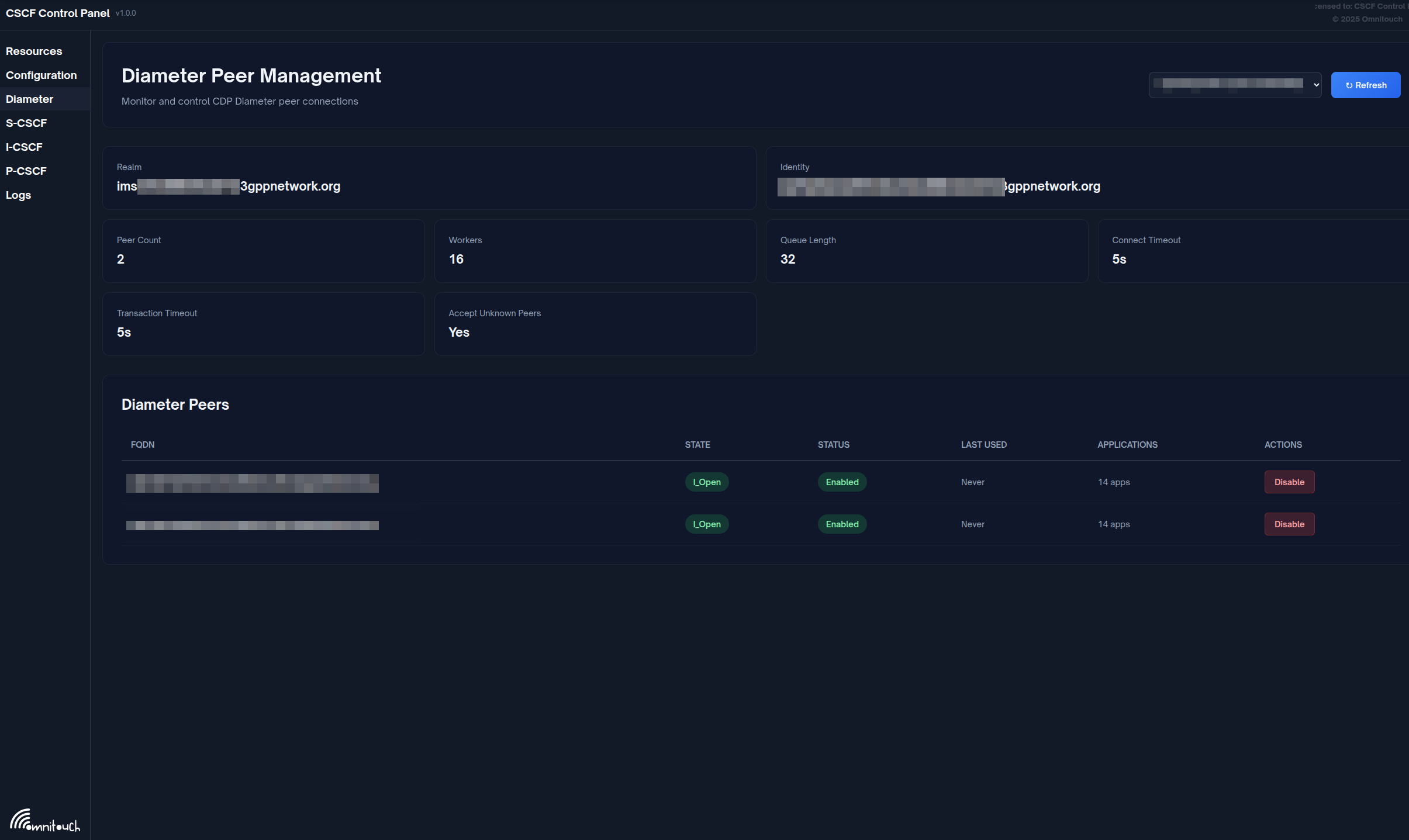
Summary Information
- Realm: Diameter realm
- Identity: Diameter Origin-Host
- Peer Count: Number of configured peers
- Workers: CDP worker count
- Queue Length: Pending transactions
- Connect Timeout: Connection timeout (seconds)
- Transaction Timeout: Transaction timeout (seconds)
- Accept Unknown Peers: Policy flag
Peer List
Table of all Diameter peers with the following columns:
| Column | Description |
|---|---|
| FQDN | Peer fully-qualified domain name |
| State | Connection state (I_Open, Closed, etc.) |
| Status | Enabled or Disabled |
| Last Used | Time since last transaction |
| Applications | Number of supported Diameter applications |
Peer Operations
Enable Peer:
- Locate disabled peer in table
- Click Enable button
- Peer will attempt to establish connection
Disable Peer:
- Locate enabled peer in table
- Click Disable button
- Confirm action
- Peer connection will be gracefully terminated
View Applications:
- Click on peer row to expand
- View list of supported Diameter applications with interface names
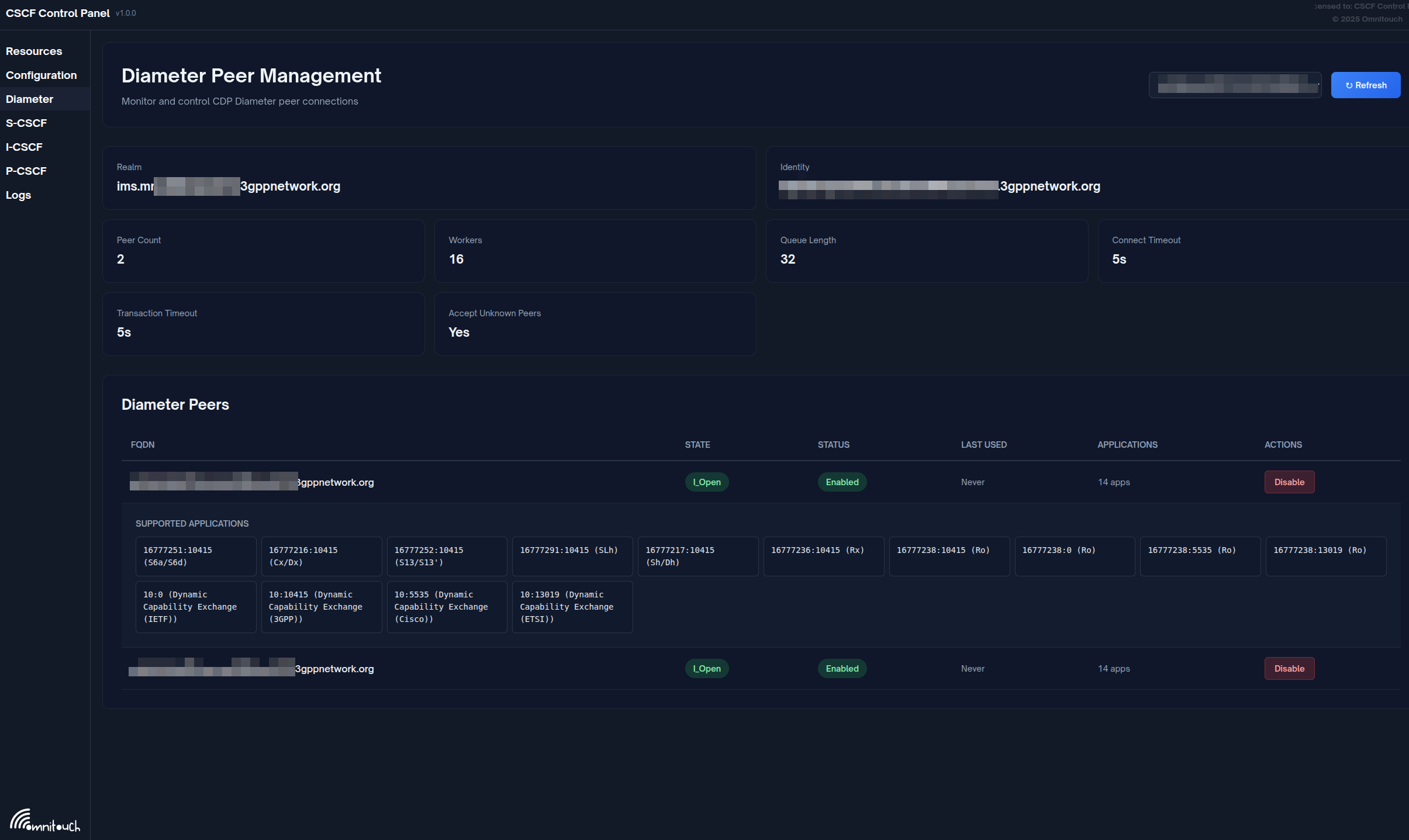
The expanded peer view shows all supported Diameter applications:
- 16777216:10415 - 3GPP Cx/Dx (HSS communication for I-CSCF/S-CSCF)
- 16777236:10415 - 3GPP Rx (PCRF QoS policy for P-CSCF)
- 16777238:0 - 3GPP Ro (Online charging)
- Other supported application IDs and vendor IDs
The control panel automatically maps Diameter Application IDs to 3GPP interface names:
- Cx/Dx (16777216:10415)
- Sh/Dh (16777217:10415)
- Rx (16777236:10415)
- Ro (16777238:10415/0/5535/13019)
- Gx (16777224:10415)
- S6a/S6d (16777251:10415)
- And many more (see
diameter_live.exfor complete list)
Peer States
| State | Description |
|---|---|
| I_Open | Connection open and operational |
| Closed | No connection established |
| Wait-Conn-Ack | Connection initiated, awaiting response |
| Wait-I-CEA | CER sent, awaiting CEA |
For detailed peer management: See Web UI Operations Guide
Diameter Result Codes
Common result codes and their meanings:
| Code | Name | Meaning | Action |
|---|---|---|---|
| 2xxx | Success | ||
| 2001 | DIAMETER_SUCCESS | Operation successful | None |
| 3xxx | Protocol Errors | ||
| 3002 | DIAMETER_UNABLE_TO_DELIVER | Cannot route to destination | Check peer connectivity |
| 3003 | DIAMETER_REALM_NOT_SERVED | Realm not recognized | Verify realm configuration |
| 3007 | DIAMETER_APPLICATION_UNSUPPORTED | Application not supported | Check Application-Id |
| 4xxx | Transient Failures | ||
| 4001 | DIAMETER_AUTHENTICATION_REJECTED | Auth failed | Check credentials |
| 4010 | DIAMETER_USER_UNKNOWN | User not provisioned | Verify HSS provisioning |
| 5xxx | Permanent Failures | ||
| 5001 | DIAMETER_AVP_UNSUPPORTED | AVP not recognized | Check protocol version |
| 5002 | DIAMETER_UNKNOWN_SESSION_ID | Session not found | Session expired or invalid |
| 5003 | DIAMETER_AUTHORIZATION_REJECTED | Not authorized | Check user permissions |
| 5012 | DIAMETER_UNABLE_TO_COMPLY | Cannot process request | Check HSS/PCRF/OCS logs |
Common Issues
Peer Connection Failures
Symptom: Peer stuck in "Closed" or "Wait-Conn-Ack" state
Diagnosis:
- Verify network connectivity:
ping <peer-fqdn>
telnet <peer-fqdn> 3868 - Check firewall rules (port 3868 TCP must be open)
- Verify peer configuration (IP address, port)
- Check peer logs for connection attempts
Resolution:
- Fix network/firewall issues
- Verify peer is running and listening on port 3868
- Check if peer has correct configuration for CSCF
- Use Enable Peer in web UI to retry connection
CER/CEA Exchange Failures
Symptom: Peer stuck in "Wait-I-CEA" state, or CEA with error code
Common Errors:
- 5010 (NO_COMMON_APPLICATION): Verify both peers support the same application (e.g., Cx = 16777216)
- 3003 (REALM_NOT_SERVED): Verify Origin-Realm matches peer's expected realm
Resolution:
- Check Diameter configuration for Application-Id and realm
- Ensure peer configuration matches CSCF expectations
- Review CSCF backend logs for detailed error messages
HSS Cx Interface Issues
Symptom: Registration failures, MAR/MAA timeouts
Common Errors:
| Result-Code | Meaning | Resolution |
|---|---|---|
| 4010 | USER_UNKNOWN | User not provisioned in HSS |
| 4001 | AUTHENTICATION_REJECTED | Incorrect IMPI/credentials |
| 5012 | UNABLE_TO_COMPLY | HSS internal error, check HSS logs |
Resolution:
- USER_UNKNOWN: Provision user in HSS
- AUTHENTICATION_REJECTED: Verify IMPI and shared secret in HSS
- UNABLE_TO_COMPLY: Check HSS logs and database connectivity
PCRF Rx Interface Issues
Symptom: Calls succeed but no QoS applied, AAR/AAA timeouts
Common Issues:
- PCRF down: Check peer status in web UI
- Framed-IP-Address not recognized: PCRF cannot map UE IP to subscriber
- Policy not applied: Check PCRF policy rules, verify PCEF integration
Resolution:
- Verify PCRF peer is in "I_Open" state
- Check UE IP address provisioning in PCRF
- Verify Gx interface (PCRF to PCEF) is functional
OCS Ro Interface Issues
Symptom: Prepaid calls fail, CCR/CCA timeouts, calls blocked
Common Errors:
| Result-Code | Meaning | Resolution |
|---|---|---|
| 4012 | CREDIT_LIMIT_REACHED | Insufficient credit |
| 5003 | AUTHORIZATION_REJECTED | User not authorized for prepaid |
Resolution:
- CREDIT_LIMIT_REACHED: Normal for prepaid users without credit
- OCS timeout: Check OCS availability and peer status
- AUTHORIZATION_REJECTED: Verify user is provisioned for prepaid in OCS
Performance Degradation
Symptom: Slow Diameter response times, high latency
Diagnosis:
- Check "Last Used" timestamp in peer list (should be recent)
- Monitor "Queue Length" (high values indicate backlog)
- Review CSCF backend logs for timeout warnings
Resolution:
- High latency: Investigate network between CSCF and peer
- High queue length: Check peer system load (HSS/PCRF/OCS)
- Timeouts: Increase transaction timeout if network has high latency
Best Practices
Operational Guidelines
Peer Management:
- Monitor peer status via web UI dashboard
- Set up external monitoring for peer down events
- Test peer connectivity during maintenance windows
Capacity Planning:
- Estimate Diameter transaction rate based on registrations and call volume
- Ensure HSS/PCRF/OCS can handle peak transaction rates
- Consider Diameter routing agents (DRA) for large deployments
Troubleshooting:
- Check peer status first when investigating registration or call failures
- Correlate Diameter failures with SIP failures (same Call-ID or user)
- Review CSCF backend logs for detailed Diameter transaction traces
Security:
- Use TLS for Diameter connections in production (if supported)
- Restrict Diameter peer access via firewall (only known peers)
- Regularly review peer enable/disable audit logs
Limitations and Future Enhancements
Current Implementation
The control panel provides:
- ✅ Real-time peer status viewing
- ✅ Enable/disable peer operations
- ✅ Application ID to interface name mapping
- ✅ Automatic refresh every 5 seconds
Not Yet Implemented
The following features are not currently available but may be added in future versions:
- Diameter Message Inspector: View recent Diameter transactions and AVP details
- Diameter Metrics Dashboard: Grafana integration for latency, error rates, etc.
- Peer Statistics: Message counts, success rates, average latency per peer
- Watchdog Monitoring: Real-time DWR/DWA status
- Manual Reconnect: Force peer reconnection via web UI
Workarounds
For Message Inspection: Check CSCF backend logs or enable Diameter debug logging
For Detailed Statistics: Query metrics from Prometheus endpoint (see Metrics Reference for complete CDP/Diameter metric definitions and Web UI Operations Guide for monitoring setup)
For Manual Reconnect: Use the web UI to disable and then re-enable the peer
Related Documentation
- P-CSCF Operations Guide - P-CSCF Rx interface operations
- I-CSCF Operations Guide - I-CSCF Cx interface operations
- S-CSCF Operations Guide - S-CSCF Cx, Ro interfaces
- Web UI Operations Guide - Diameter peer management via control panel
- CSCF Operations Guide - General CSCF operations
3GPP Specifications
- TS 29.228: Cx and Dx interfaces (CSCF-HSS)
- TS 29.214: Rx interface (P-CSCF-PCRF)
- TS 32.299: Diameter charging applications (Ro, Rf)
- RFC 6733: Diameter Base Protocol
Technical Details
Implementation
- Diameter Stack: Integrated Diameter protocol stack
- Management Interface: RPC protocol to CSCF backend
- Web UI: Phoenix LiveView (
lib/cscf_web/web/diameter_live.ex)
Configuration
Diameter peers are configured in CSCF backend configuration files, not via the control panel. The control panel provides monitoring and operational control (enable/disable) only.