S-CSCF Operations Guide
Table of Contents
Overview
The S-CSCF (Serving Call Session Control Function) is the central session control server in the IMS core. It performs registration, authentication, session routing, and service triggering. The S-CSCF is the authoritative registrar for users in its home network and maintains complete session state for all calls.
3GPP Specifications
- 3GPP TS 23.228: IP Multimedia Subsystem (IMS) Stage 2
- 3GPP TS 24.229: IMS Call Control Protocol
- 3GPP TS 29.228: Cx Interface (S-CSCF to HSS)
- 3GPP TS 29.229: Cx and Dx Protocols
- 3GPP TS 23.218: ISC Interface (S-CSCF to AS)
- 3GPP TS 32.260: IMS Charging
Key Responsibilities
- Registration Authority: Authoritative SIP registrar for home network users
- Authentication: Validates user credentials via HSS
- Session Routing: Routes originating and terminating calls
- Service Triggering: Invokes Application Servers based on iFC (initial Filter Criteria)
- User Profile Management: Stores and applies service profiles from HSS
- Presence: Handles SUBSCRIBE/PUBLISH/NOTIFY for presence services
- PSTN Interconnection: Routes to/from legacy PSTN networks
Note on Charging: While the S-CSCF has the capability to perform online charging via the Ro interface to an OCS (Online Charging System), in our deployments this functionality is typically disabled. Charging is instead handled by the TAS (Telephony Application Server) where it can properly account for complex scenarios such as call forwarding, call transfer, roaming on 2G/3G networks, and other supplementary services that the S-CSCF alone cannot accurately track.
Key Characteristics
- Stateful: Maintains full dialog state
- Service Logic: Executes complex routing rules and service triggers
- HSS Integration: Continuous sync with user database
- Application Server Interface: ISC (IMS Service Control)
- Most Complex CSCF: Largest configuration and most features
Role in IMS Architecture
Network Position
3GPP Reference Points
| Interface | Protocol | Purpose | Connected To |
|---|---|---|---|
| Mw | SIP | I-CSCF/P-CSCF to S-CSCF | I-CSCF, P-CSCF |
| ISC | SIP | S-CSCF to Application Server | AS, TAS |
| Cx | Diameter | User data, authentication, registration | HSS |
| Ro | Diameter | Online charging (real-time) | OCS |
| Rf | Diameter | Offline charging (CDR) | CDF/CGF |
| Mi | SIP | S-CSCF to BGCF | BGCF (PSTN routing) |
S-CSCF Functions
1. Registration and Authentication
The S-CSCF is the authoritative registrar that validates user credentials and stores registration bindings.
Registration Flow with Authentication
Authentication Algorithms Supported
Configuration: The S-CSCF is configured with the following authentication parameters:
- Authentication vector timeout: 599 seconds
- Authentication data hash size: 1024 buckets
- Checks only IMPU for authentication (not IMPI)
Supported Algorithms:
- AKAv1-MD5: 3GPP AKA with MD5 (most common for LTE/5G)
- AKAv2-MD5: Enhanced AKA
- MD5: HTTP Digest
- CableLabs-Digest: PacketCable/IMS for cable networks
- 3GPP-Digest: Digest-MD5 variant
- TISPAN-HTTP_DIGEST_MD5: ETSI TISPAN
- HSS-Selected: Let HSS choose the algorithm
AKA Flow:
- RAND: Random challenge (128 bits)
- AUTN: Authentication token to prove HSS identity
- XRES: Expected response from UE
- CK/IK: Cipher Key / Integrity Key for IPsec
Nonce Generation:
nonce = base64(RAND) + ":" + algorithm_indicator
Response Validation:
UE_response = base64(RES)
Expected = base64(XRES)

if (UE_response == Expected) {
    # Authentication success
} else {
    # Authentication failure
}
AKA Re-Synchronization
If the UE's sequence number (SQN) is out of sync with the HSS:
Process:
- UE sends AUTS (authentication sync token) in the Authorization header
- S-CSCF extracts AUTS from the header
- S-CSCF sends MAR (Multimedia-Auth-Request) with AUTS to HSS
- HSS re-synchronizes its sequence number and sends new authentication vectors
- S-CSCF receives new vectors and continues authentication flow
Registration Parameters
The S-CSCF is configured with the following registration parameters:
Registration Expiry Times:
- Default/Min/Max expires: 599 seconds (approximately 10 minutes)
- Subscription default/min/max expires: 599 seconds
Contact Management:
- Maximum contacts per IMPU: 1 (single device registration)
- Maximum contact behavior: Overwrite oldest (when limit exceeded, remove oldest contact)
2. User Location Database (USRLOC)
The S-CSCF maintains a database of registered users and their contact bindings.
Database Structure
The S-CSCF maintains several database tables to store registration and user information:
IMPU Table: Stores IP Multimedia Public Identities (the SIP URIs users register with). Each IMPU has attributes like:
- Public identity (sip:user@domain.com)
- Type (public user identity vs. public service identity)
- Barring status
- Registration state (registered/not registered)
- Charging function addresses (CCF1, CCF2, ECF1, ECF2)
IMPU Contact Table: Stores the actual contact bindings for each IMPU, including:
- Contact URI (where to reach the device)
- Expiration time
- Path header (route back through P-CSCF)
- User-Agent string
- Received address (actual IP where REGISTER came from)
Subscriber Table: Maps IMPIs (Private Identities) to their associated IMPUs. One private identity can have multiple public identities.
Service Profile Table: Stores the XML user profile received from the HSS during registration, including Initial Filter Criteria (iFC) for service triggering.
Hash Table Configuration
The S-CSCF uses an in-memory hash table for fast registration lookups. For deployments with 20,000+ users, the hash size should be tuned appropriately (e.g., 8,192 buckets for ~50,000 users) to maintain lookup performance.
Managing Registrations via Web UI
All user location operations can be performed through the control panel web interface at /scscf:
- Registration List Tab: View all registered users with pagination and search
- User Location Tab: Query specific IMPU details including all contact bindings
- Quick Actions: Lookup, deregister, dump IFC, and test IFC operations
The web interface provides a real-time view of registration status, contact bindings, and allows administrative actions like forced de-registration when needed for troubleshooting.
3. Initial Filter Criteria (iFC) and Service Triggering
The S-CSCF evaluates iFC (initial Filter Criteria) from the user's service profile to determine when to invoke Application Servers.
iFC Structure (XML)
Example from HSS User Profile:
<IMSSubscription>
  <PrivateID>user@ims.mnc001.mcc001.3gppnetwork.org</PrivateID>
  <ServiceProfile>
    <PublicIdentity>
      <Identity>sip:user@ims.mnc001.mcc001.3gppnetwork.org</Identity>
      <IdentityType>0</IdentityType>  <!-- 0=public user identity -->
    </PublicIdentity>

    <InitialFilterCriteria>
      <Priority>0</Priority>  <!-- Lower = higher priority -->
      <TriggerPoint>
        <ConditionTypeCNF>1</ConditionTypeCNF>  <!-- 0=DNF, 1=CNF -->
        <SPT>
          <ConditionNegated>0</ConditionNegated>
          <Group>0</Group>
          <Method>INVITE</Method>
        </SPT>
        <SPT>
          <ConditionNegated>0</ConditionNegated>
          <Group>0</Group>
          <SessionCase>0</SessionCase>  <!-- 0=originating -->
        </SPT>
      </TriggerPoint>
      <ApplicationServer>
        <ServerName>sip:tas.ims.mnc001.mcc001.3gppnetwork.org</ServerName>
        <DefaultHandling>0</DefaultHandling>  <!-- 0=SESSION_CONTINUED, 1=SESSION_TERMINATED -->
      </ApplicationServer>
    </InitialFilterCriteria>

    <InitialFilterCriteria>
      <Priority>1</Priority>
      <TriggerPoint>
        <ConditionTypeCNF>0</ConditionTypeCNF>  <!-- DNF -->
        <SPT>
          <ConditionNegated>0</ConditionNegated>
          <Group>0</Group>
          <RequestURI>^sip:\+1800.*</RequestURI>  <!-- Toll-free -->
        </SPT>
      </TriggerPoint>
      <ApplicationServer>
        <ServerName>sip:tollfree-as.example.com</ServerName>
        <DefaultHandling>0</DefaultHandling>
      </ApplicationServer>
    </InitialFilterCriteria>
  </ServiceProfile>
</IMSSubscription>
Service Point Triggers (SPT)
SPT Types:
- Method: SIP method (INVITE, MESSAGE, SUBSCRIBE, etc.)
- RequestURI: Regex on Request-URI
- SIPHeader: Check for presence/value of SIP header
- SessionCase: Originating (0), Terminating (1), Terminating Unregistered (2)
- SessionDescription: SDP content (media type, codec, etc.)
Logic:
- CNF (Conjunctive Normal Form): AND of ORs -
(A OR B) AND (C OR D) - DNF (Disjunctive Normal Form): OR of ANDs -
(A AND B) OR (C AND D)
Group: SPTs with same group number are OR'd together, then groups are AND'd (for CNF).
iFC Matching Flow
iFC Testing via Web UI
The control panel provides two operations through the web interface:
-
Dump iFC: Show all iFC for a user - displays the complete XML structure of trigger points and Application Server routing
-
Test iFC: Simulate a call to see which AS would be triggered - tests a hypothetical call scenario with specified IMPU, originating URI, and destination URI to determine which iFC would match
Web UI Workflow:
- Navigate to S-CSCF page
- Click "IFC" tab
- Enter IMPU
- Choose "Dump IFC" or "Test IFC"
- View detailed iFC structure with trigger points and AS routing
4. Dialog Management
The S-CSCF maintains full SIP dialog state for all active calls.
Dialog Database
The S-CSCF maintains a dialog table that tracks active calls with the following information:
- Call-ID (unique identifier for the SIP dialog)
- From/To URIs and tags
- Caller and callee sequence numbers (CSeq)
- Route sets for both parties
- Contact addresses
- Socket information
- Dialog state and timestamps
- Timeout values
Dialog States
Dialogs transition through three states:
- Early: Provisional response received (e.g., 180 Ringing)
- Confirmed: 200 OK received and ACK sent/received (call active)
- Deleted: BYE sent/received (call ended)
Dialog Configuration
The dialog module is configured to:
- Detect spiral routing (same request passing through multiple times)
- Maintain separate profiles for originating and terminating sides
- Persist dialogs to database (write-through mode with periodic updates)
- Set dialog-specific timeouts
- Track route sets for proper in-dialog routing
Web UI Operations:
- Navigate to S-CSCF → Dialogs tab
- View active calls with:
- Call-ID
- From/To URIs
- State (Early/Confirmed)
- Start time
- Timeout
- Click "End Dialog" to terminate specific call
- Click "End All Active Dialogs" for emergency mass termination
5. Originating Call Handling
When a registered user initiates a call, the S-CSCF processes it as an originating session.
Originating Call Flow
Originating Route Configuration
Originating Call Processing: The S-CSCF performs several validation and routing steps when processing originating calls:
-
Registration Check: Verifies that the calling user is currently registered. If not, the call is rejected with a 403 Forbidden response.
-
Identity Header Management:
- Removes any existing P-Asserted-Identity headers from the request
- Adds a new P-Asserted-Identity header containing the authenticated caller's identity
-
Charging Correlation: Creates and adds a P-Charging-Vector header containing:
- IMS Charging Identifier (icid) generated from the Call-ID and timestamp
- Originating Inter-Operator Identifier (orig-ioi) for multi-operator charging
-
Service Triggering: Evaluates Initial Filter Criteria (iFC) for originating session triggers to determine if any Application Servers should be invoked
-
Online Charging (if enabled): Initiates a Diameter Ro Credit Control Request (CCR) with event type "0" (initial request) for originating calls
-
Dialog Tracking: Assigns the call to the "orig" (originating) dialog profile for tracking purposes
-
Routing Decision: Routes the call either to PSTN handling (if destination is a phone number) or to the terminating I-CSCF for IMS routing
6. Terminating Call Handling
When a call is destined for a registered user, the S-CSCF processes it as terminating.
Terminating Call Flow
Terminating Route Configuration
Terminating Call Processing: The S-CSCF handles terminating calls by first attempting to locate the called user and then applying appropriate service logic:
-
User Location Lookup: Queries the registration database to determine if the called user is currently registered
- Uses the Request-URI username and domain to construct the IMPU
- Retrieves contact bindings and routing information if registered
-
If User is NOT Registered:
- Attempts to retrieve unregistered service profile from HSS via Server Assignment Request (SAR)
- If successful, evaluates iFC for "unregistered terminating" session triggers (e.g., voicemail, offline services)
- If no unregistered services are available, responds with 480 Temporarily Unavailable
-
If User IS Registered:
- Evaluates iFC for "terminating" session triggers to determine Application Server invocation
- Initiates online charging (if enabled) by sending Diameter Ro CCR with event type "0" for terminating calls
- Assigns call to "term" (terminating) dialog profile for tracking
- Forwards the INVITE to the registered P-CSCF using the Path header stored during registration
7. PSTN Interconnection via OmniTAS
The S-CSCF routes calls to/from PSTN via the Mi interface to the BGCF (Breakout Gateway Control Function), which is integrated within OmniTAS in our deployment.
Mi Interface - S-CSCF to BGCF
3GPP Reference Point: Mi (SIP interface between S-CSCF and BGCF)
The Mi interface is used when the S-CSCF determines that a call needs to break out to the PSTN. In our architecture, the BGCF functionality is built directly into OmniTAS, so all mobile-originated (MO) calls destined for PSTN numbers are routed to OmniTAS.
PSTN Routing Flow
How PSTN Routing Works:
-
Destination Number Detection: The S-CSCF examines the Request-URI to determine if the destination is a phone number (E.164 format like +12015551234)
-
Route to OmniTAS: For PSTN destinations, the S-CSCF routes the call via the Mi interface to OmniTAS, which includes integrated BGCF functionality
-
BGCF Processing at OmniTAS: OmniTAS determines the appropriate PSTN breakout point based on:
- Destination number analysis (country code, area code)
- Least-cost routing rules
- Available trunk groups
- Carrier selection
-
PSTN Breakout: OmniTAS handles the actual media gateway interaction to complete the call to the PSTN network
Mi Interface Details:
- Protocol: SIP
- Purpose: Route PSTN-destined calls from S-CSCF to BGCF
- Direction: S-CSCF → OmniTAS (with BGCF)
- Call Types: Mobile originated (MO) calls to PSTN numbers
Configuration: The S-CSCF is configured to recognize PSTN destinations (phone numbers) and route them to OmniTAS. When OmniTAS is used as the TAS (Telephony Application Server), it inherently includes BGCF capabilities, eliminating the need for a separate BGCF component.
8. Charging Architecture
The S-CSCF has built-in capability to interface with an OCS (Online Charging System) via the Diameter Ro interface for real-time credit control. However, in our deployments, S-CSCF charging is typically disabled in favor of performing charging at the TAS (Telephony Application Server) level.
Why Charging is Done at the TAS Instead of S-CSCF
TAS-Based Charging Advantages:
-
Call Forwarding Scenarios: When a call is forwarded, the S-CSCF only sees the initial INVITE to the original destination. It doesn't have visibility into the forwarding logic or final destination. The TAS, however, handles the forwarding service and knows:
- Who initiated the call
- Who the call was originally for
- Where the call was forwarded to
- Duration of the forwarded call
- Proper party to charge (caller, forwardee, or both)
-
2G/3G Roaming: When subscribers roam on legacy 2G/3G networks, calls may bypass the IMS core entirely and route through circuit-switched infrastructure. The TAS integrates with both IMS and CS (Circuit Switched) domains and can:
- Detect when a subscriber is roaming on 2G/3G
- Apply appropriate roaming charges
- Track call duration across network types
- Handle handoffs between IMS and CS domains
-
Call Transfer: Similar to call forwarding, call transfers involve mid-call changes that the S-CSCF doesn't track:
- Blind transfers (immediate handoff)
- Attended transfers (consultation then handoff)
- Transfer to voicemail
- Multi-party transfers
-
Conference Calls: Multi-party conferences require special charging logic:
- Who initiated the conference
- How many participants
- Duration each participant was on the call
- Different rates for conference initiator vs. participants
-
Supplementary Services: Services like call waiting, call hold, and three-way calling require the TAS to understand service state:
- Multiple simultaneous calls per user
- Hold/resume events
- Merged calls
-
Prepaid vs. Postpaid Logic: The TAS can apply different charging strategies:
- Prepaid: Real-time credit checks and call cutoff
- Postpaid: CDR generation for monthly billing
- Hybrid: Different rates for different service features
-
Rating Flexibility: The TAS has full context to apply complex rating rules:
- Time-of-day pricing
- Destination-based pricing (local, long distance, international)
- Volume discounts
- Promotional rates
- Bundle minutes vs. overage charges
S-CSCF Charging Limitations:
- Only sees basic SIP dialog (INVITE → 200 OK → BYE)
- No knowledge of supplementary services
- Cannot track call state changes mid-call
- Limited context for rating decisions
- Doesn't understand CS domain activity
S-CSCF Ro Interface (Available but Disabled by Default)
While not used in production, the S-CSCF does support online charging via Diameter Ro. This capability remains in the configuration but is deactivated.
How S-CSCF Charging Would Work (If Enabled)
If S-CSCF charging were enabled, the system would use the Diameter Ro interface (Application ID 4) to communicate with an OCS. The S-CSCF would be configured with the OCS peer information (FQDN, realm, port 3868) and would send Credit Control Requests (CCR) at three key points in the call lifecycle:
CCR Flow (If Enabled):
When Charging Would Trigger:
-
CCR-Initial: Sent when the INVITE is received, before allowing the call to proceed. The OCS checks the account balance and either grants credit (allowing the call) or denies it (call rejected with 402 Payment Required).
-
CCR-Update: Sent periodically during the call based on the Granted-Service-Unit time from the OCS (e.g., every 300 seconds). This ensures long calls don't exceed available credit.
-
CCR-Terminate: Sent when the call ends (BYE received or dialog timeout), reporting final usage to the OCS for account deduction.
Actual Deployment: Since this charging functionality is disabled in our deployments, the S-CSCF simply routes calls without any credit control checks. All charging logic is handled downstream by the TAS, which has full visibility into the complete call flow and service context.
9. Presence and SUBSCRIBE/PUBLISH
The S-CSCF handles SIP presence for user availability status.
Presence Architecture
Presence Configuration
The S-CSCF presence functionality is configured with:
- Maximum expires: 3600 seconds (1 hour) - maximum subscription duration
- Default state: "active" - presence state defaults to active
- PIDF support: Enabled - allows modification of PIDF (Presence Information Data Format) documents
PUBLISH Handling
Presence Publication Processing: When the S-CSCF receives a PUBLISH request (used to update presence status):
- Method Detection: Checks if the incoming request is a PUBLISH method
- Authorization Check: Verifies the user is currently registered in the location database. If not registered, responds with 403 Forbidden
- Presence Update: Processes the PUBLISH request to update the user's presence information in the presence database
- Error Handling: If presence handling fails (e.g., database error, malformed presence document), responds with 500 Server Error
SUBSCRIBE Handling
Presence Subscription Processing: When the S-CSCF receives a SUBSCRIBE request (used to watch another user's presence):
- Method Detection: Checks if the incoming request is a SUBSCRIBE method
- Event Type Check: Examines the Event header to determine subscription type
- If Event is "reg" (registration event package), this is a subscription to registration state changes
- For reg event subscriptions, performs Server Assignment Request (SAR) to HSS if user is not registered, to get service profile
- Evaluates iFC for "subscribe" triggers to determine if any Application Servers should handle the subscription
- Presence Subscription Processing: Handles the SUBSCRIBE request to create or refresh a presence watcher subscription
- Error Handling: If subscription processing fails, responds with 500 Server Error
Web UI Operations
Accessing S-CSCF Page
Navigate to: https://<control-panel>/scscf
Page Layout
The S-CSCF page has five main tabs:
- Registration List - Paginated list of registered users
- User Location - Query specific IMPU details
- Dialogs - Active call sessions
- IFC - Initial Filter Criteria management and testing
- Hash Tables - Shared memory tables
Registration List Tab
Purpose: View all registered users with pagination
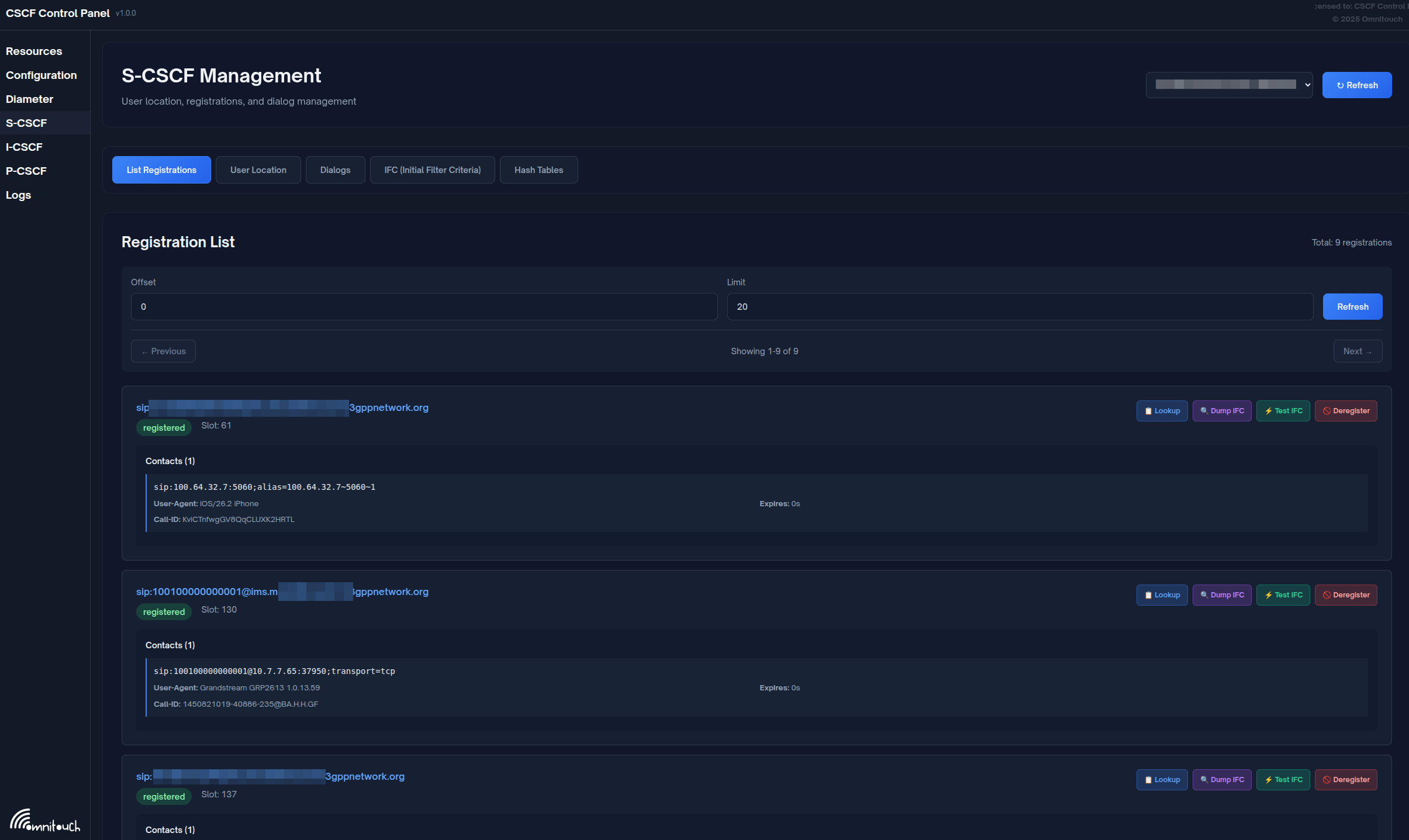
Display Columns:
- IMPU: IP Multimedia Public Identity (SIP URI)
- Contacts: Number of registered contact bindings
- State: Registration state (Registered/Not Registered)
- Expires: Registration expiry timestamp
Features:
- Pagination (50 users per page)
- Search by IMPU or contact
- Sort by column
- Click row to expand and see contact details
Example:
IMPU: sip:12015551234@ims.mnc001.mcc001.3gppnetwork.org
Contacts: 1
State: Registered
Expires: 2025-11-29 15:45:30

[Expand to see:]
  Contact: sip:12015551234@10.4.12.100:5060;transport=tcp
  Path: <sip:term@pcscf.ims.mnc001.mcc001.3gppnetwork.org:5060;lr>
  User-Agent: Android IMS Client v1.0
  Received: 10.4.12.100:52341
Quick Actions:
- Lookup: Quick search for specific IMPU
- Dump IFC: View Initial Filter Criteria for user
- Test IFC: Simulate call to test AS triggering
- Deregister: Force de-registration (use with caution!)
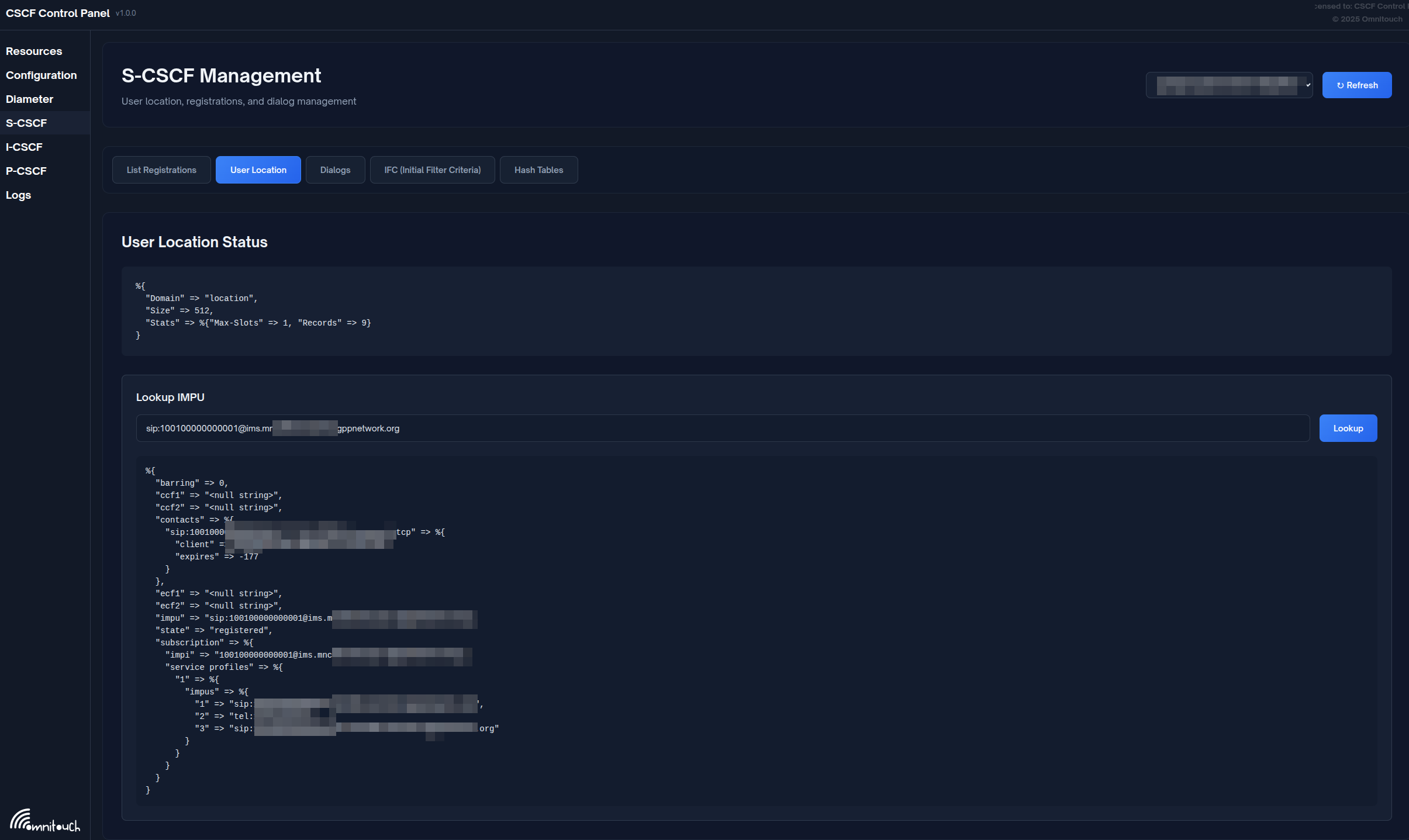
User Location Tab
Purpose: Detailed query of specific IMPU
Operations:
- Enter IMPU (e.g.,
sip:user@domain.com) - Click "Lookup"
- View detailed information:
- All registered contacts
- Service-Route header
- Registration timestamps
- Path headers
- Associated IMPIs (Private Identities)
Use Cases:
- Troubleshoot why user can't receive calls
- Verify registration details
- Check contact bindings
- Verify service routes
Dialogs Tab
Purpose: Monitor and manage active call sessions
Display Columns:
- Call-ID: SIP Call-ID
- From URI: Caller identity
- To URI: Called identity
- State: Early (ringing) or Confirmed (answered)
- Start Time: When dialog was created
- Timeout: Dialog timeout value
Operations:
- Refresh: Manual refresh (auto-refresh every 5s)
- End Dialog: Terminate specific call (sends BYE)
- End All Active Dialogs: Emergency mass termination
Example:
Call-ID: 3c26700857a87f84@10.4.12.165
From: sip:12015551234@ims.mnc001.mcc001.3gppnetwork.org
To: sip:+12015555678@ims.mnc001.mcc001.3gppnetwork.org
State: Confirmed
Start Time: 2025-11-29 15:30:15
Timeout: 360000 seconds

[End Dialog] button
Warning: Ending dialogs will immediately terminate active calls. Use for troubleshooting or emergency situations only.
IFC Tab
Purpose: View and test Initial Filter Criteria for service triggering
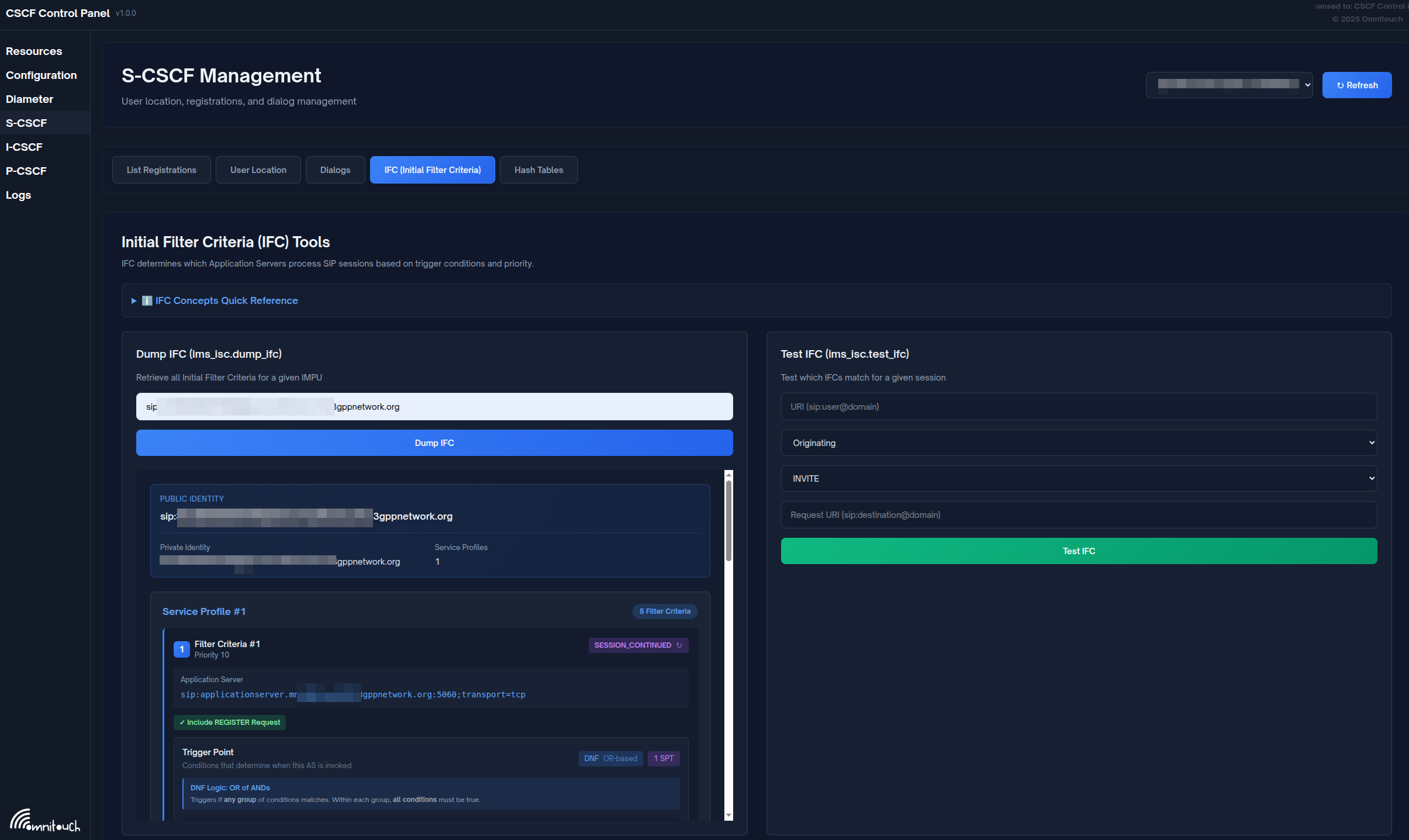
The IFC tab provides two main operations: Dump IFC (retrieve and display a user's IFC from HSS) and Test IFC (simulate a call scenario to see which Application Servers would be triggered).
Dump IFC Operation
- Enter IMPU:
sip:user@domain.com - Click "Dump IFC"
- View detailed iFC structure:
- Priority order
- Trigger points (SPT conditions)
- Application Server URIs
- Default handling
Example Output:
<InitialFilterCriteria>
  <Priority>0</Priority>
  <TriggerPoint>
    <ConditionTypeCNF>1</ConditionTypeCNF>
    <SPT>
      <Group>0</Group>
      <Method>INVITE</Method>
    </SPT>
    <SPT>
      <Group>0</Group>
      <SessionCase>0</SessionCase>  <!-- Originating -->
    </SPT>
  </TriggerPoint>
  <ApplicationServer>
    <ServerName>sip:tas.ims.mnc001.mcc001.3gppnetwork.org</ServerName>
    <DefaultHandling>0</DefaultHandling>
  </ApplicationServer>
</InitialFilterCriteria>
Test IFC Operation
- Enter IMPU:
sip:user@domain.com - Enter Originating URI:
sip:user@domain.com(calling party) - Enter Destination URI:
sip:+12015555678@domain.com(called party) - Click "Test IFC"
- View results:
- Which iFC matched
- Which Application Servers would be invoked
- In what order (priority)
Use Cases:
- Verify service triggering configuration
- Troubleshoot why AS is not being invoked
- Test new iFC before deploying to production
- Understand call flow for specific scenarios
Hash Tables Tab
Similar to P-CSCF and I-CSCF, manage shared memory hash tables.
Common S-CSCF Hash Tables:
auth: Authentication vectors cacheprofile: Cached user profiles (if using)- Custom tables for service logic
Call Flows
Complete Registration Flow
See "1. Registration and Authentication" section above for detailed sequence diagram.
Complete Originating Call Flow
See "5. Originating Call Handling" section above for detailed sequence diagram.
Complete Terminating Call Flow
See "6. Terminating Call Handling" section above for detailed sequence diagram.
Troubleshooting
Registration Issues
User Cannot Register - 403 Forbidden
Possible Causes:
- User not provisioned in HSS
- HSS unreachable
- Authentication failure
- Barring applied
Diagnostic Steps:
-
Check HSS connectivity via the control panel:
- Navigate to Diameter page
- Select S-CSCF node
- Verify HSS peer shows as "I_Open" (connected)
-
Review S-CSCF logs for MAR/MAA (Multimedia Auth Request/Answer) message flow
-
Verify user exists in HSS (if accessible)
-
Check S-CSCF logs for authentication vectors received from HSS
-
Test with different authentication algorithm if supported
User Cannot Register - 500 Server Error
Possible Causes:
- Database connection lost
- SAR/SAA failure
- Module error
Solutions:
-
Check database connectivity from the S-CSCF server (verify database is reachable and credentials are correct)
-
Review S-CSCF logs for SAR/SAA (Server Assignment Request/Answer) Diameter message flow
-
Restart S-CSCF service if needed to recover from module errors
Call Routing Issues
Calls Not Routing to User
Symptoms: INVITE reaches S-CSCF but doesn't forward to P-CSCF
Diagnostic Steps:
-
Check user is registered via the control panel web interface:
- Navigate to S-CSCF → User Location tab
- Enter the IMPU and click "Lookup"
- Verify user shows as registered with contact bindings
-
Verify contact bindings exist and Path header is present
-
Review S-CSCF logs for terminating route processing
-
Test with different destination to isolate issue
Application Server Not Triggered
Symptoms: iFC should match but AS not invoked
Diagnostic Steps:
-
Dump iFC via the control panel web interface:
- Navigate to S-CSCF → IFC tab
- Enter the IMPU
- Click "Dump IFC"
- Review the trigger points and Application Server URIs
-
Test iFC matching via the web interface:
- Navigate to S-CSCF → IFC tab
- Enter IMPU, originating URI, and destination URI
- Click "Test IFC"
- Verify which iFC should have matched
-
Check if user profile was loaded from HSS by reviewing logs
-
Verify SAA (Server Assignment Answer) from HSS contained user profile XML
-
Review S-CSCF logs for iFC parsing errors
Dialog Issues
Dialogs Not Terminating After BYE
Symptoms: Dialog remains in database after call ends
Solutions:
-
Check active dialogs via the control panel:
- Navigate to S-CSCF → Dialogs tab
- Review dialog count and states
-
Verify BYE detection in dialog module logs
-
Check dialog timeout settings in configuration
-
Manually end dialog via the control panel:
- Navigate to S-CSCF → Dialogs tab
- Find the stuck dialog
- Click "End Dialog"
-
Review database for orphaned dialog entries and clean up if needed
Charging Issues
CCR Timeout
Note: In our deployments, S-CSCF charging is typically disabled. Charging is handled by the TAS. If you're seeing charging-related errors, verify that S-CSCF Ro charging wasn't accidentally enabled.
Symptoms: Calls fail with charging errors (if charging is enabled)
Possible Causes:
- OCS unreachable
- Diameter Ro peer down
- Transaction timeout too short
Solutions:
-
Check OCS peer status via the control panel:
- Navigate to Diameter page
- Select S-CSCF node
- Check if OCS peer shows as "I_Open" (connected)
-
Test OCS network connectivity from the S-CSCF server
-
Review Diameter transaction timeout configuration
-
Check S-CSCF logs for CCR/CCA message flow and errors
Insufficient Credit - All Calls Fail
Note: This issue only applies if S-CSCF charging is enabled (which it typically isn't in our deployments).
Symptoms: Users get 402 Payment Required for all calls
Solutions:
-
Verify S-CSCF charging should actually be enabled (usually it should be disabled)
-
Check OCS balance for test accounts if charging is intentionally enabled
-
Review CCA (Credit Control Answer) result codes in S-CSCF logs
-
Consider disabling S-CSCF charging and using TAS-based charging instead
PSTN Issues
Calls to PSTN Fail - 503 No Gateway Available
Possible Causes:
- No MGCF/gateway configured
- All gateways down
- Dispatcher not loaded
Solutions:
-
Coordinate with system administrators to verify PSTN gateways are configured
-
Test gateway connectivity from the S-CSCF server (network reachability, SIP response)
-
Review gateway configuration with system administrators
-
Add missing gateways if needed via system administrators
Performance Issues
High CPU Usage
Possible Causes:
- Too many dialogs
- Database slow queries
- iFC evaluation overhead
Solutions:
-
Check dialog count via the control panel:
- Navigate to S-CSCF → Dialogs tab
- Review number of active dialogs
-
Optimize database tables (dialog, impu, impu_contact) if database queries are slow
-
Add database indexes if needed (on impu.impu, dialog.callid, etc.)
-
Tune worker process count in configuration if needed (increase from default 4 to 8 for high load)
Best Practices
High Availability
- Deploy multiple S-CSCFs with shared database
- Use capabilities for S-CSCF selection at I-CSCF
- Database replication: Master-master or master-slave
- Session persistence: Write-through dialog mode
- Health checks: Monitor registration and dialog counts
Security
- Always authenticate users via HSS
- Validate P-Asserted-Identity from trusted sources only
- Rate limit registrations and calls per user
- Sanitize headers from untrusted networks
- Use TLS for Diameter (Cx, Ro)
Performance
-
Tune hash_size for user location: The hash size should be set based on expected user count. For example, hash_size=13 (which equals 2^13 = 8192 buckets) is appropriate for approximately 50,000 users
-
Cache user profiles: If the HSS supports it, enable profile caching to reduce Diameter SAR requests
-
Optimize iFC: Keep Service Point Trigger (SPT) conditions simple and minimize the number of iFC rules per user to reduce evaluation overhead
-
Use async operations for Diameter: Configure asynchronous processing for MAR (authentication), SAR (registration), and CCR (charging) to prevent blocking worker processes
-
Monitor database performance regularly: Track query execution times, optimize indexes, and ensure connection pooling is working efficiently
Monitoring
For a complete list of all S-CSCF metrics, see the Metrics Reference.
Key metrics to track:
- Registration success rate
- MAR/SAR/LIR success rate
- Dialog count (active calls)
- iFC evaluation time
- Database query latency
- Diameter peer uptime
- Call setup time
Reference
3GPP Specifications
- TS 23.228: IMS Architecture
- TS 24.229: IMS SIP Protocol
- TS 29.228: Cx Interface
- TS 23.218: ISC Interface
- TS 32.260: IMS Charging