I-CSCF Operations Guide
Table of Contents
Overview
The I-CSCF (Interrogating Call Session Control Function) serves as the entry point to an IMS operator's network from external networks and from the P-CSCF. Its primary responsibility is to query the HSS (Home Subscriber Server) to discover the appropriate S-CSCF for a user and to hide the internal network topology from external entities.
3GPP Specifications
- 3GPP TS 23.228: IP Multimedia Subsystem (IMS) Stage 2
- 3GPP TS 24.229: IMS Call Control Protocol
- 3GPP TS 29.228: Cx Interface (I-CSCF to HSS)
- 3GPP TS 29.229: Cx Protocol
Key Responsibilities
- HSS Interrogation: Queries HSS for user location and S-CSCF assignment
- S-CSCF Selection: Chooses appropriate S-CSCF based on capabilities
- Topology Hiding: Shields internal S-CSCF addresses from external view
- Load Balancing: Distributes load across multiple S-CSCF instances
- Routing Proxy: Routes requests to the selected S-CSCF
- Network Entry Point: First hop for external SIP messages
Key Characteristics
- Stateless Operation: Minimal state retention
- Diameter Client: Cx interface to HSS
- No Media Handling: Pure signaling proxy
- No Authentication: Delegates to S-CSCF
- High Throughput: Optimized for query-and-forward
Role in IMS Architecture
Network Position
3GPP Reference Points
| Interface | Protocol | Purpose | Connected To |
|---|---|---|---|
| Mw | SIP | P-CSCF/External to I-CSCF | P-CSCF, External IMS |
| Mw | SIP | I-CSCF to S-CSCF | S-CSCF |
| Cx | Diameter | User data queries | HSS |
I-CSCF Functions
1. HSS Interrogation (Cx Interface)
The I-CSCF uses the Diameter Cx interface to query the HSS for two primary operations:
User Authorization Request (UAR)
Used during REGISTER to determine which S-CSCF should serve the user.
Purpose:
- Check if user is allowed to register
- Get S-CSCF name if already assigned
- Get S-CSCF capabilities if not assigned
Diameter Command:
UAR (User-Authorization-Request)
  Session-Id
  Vendor-Specific-Application-Id
    Vendor-Id: 10415 (3GPP)
    Auth-Application-Id: 16777216 (Cx)
  Auth-Session-State: NO_STATE_MAINTAINED
  Origin-Host: icscf.ims.mnc001.mcc001.3gppnetwork.org
  Origin-Realm: ims.mnc001.mcc001.3gppnetwork.org
  Destination-Realm: ims.mnc001.mcc001.3gppnetwork.org
  User-Name: sip:user@ims.mnc001.mcc001.3gppnetwork.org
  Public-Identity: sip:user@ims.mnc001.mcc001.3gppnetwork.org
  Visited-Network-Identifier: ims.mnc001.mcc001.3gppnetwork.org
  UAR-Flags: 0
HSS Response (UAA):
UAA (User-Authorization-Answer)
  Result-Code: 2001 (DIAMETER_SUCCESS)
  Experimental-Result-Code: 2001 (FIRST_REGISTRATION)
  Server-Name: sip:scscf.ims.mnc001.mcc001.3gppnetwork.org
  Server-Capabilities:
    Mandatory-Capability: 1
    Optional-Capability: 2
    Server-Name: sip:scscf-backup.ims.mnc001.mcc001.3gppnetwork.org
Result Codes:
2001: Success (user authorized)5003: User Unknown5004: Identities Don't Match5042: No S-CSCF Available
Location Information Request (LIR)
Used for INVITE and other requests to find which S-CSCF is currently serving the user.
Purpose:
- Find the S-CSCF serving a registered user
- Route terminating calls correctly
Diameter Command:
LIR (Location-Info-Request)
  Session-Id
  Vendor-Specific-Application-Id
    Vendor-Id: 10415 (3GPP)
    Auth-Application-Id: 16777216 (Cx)
  Auth-Session-State: NO_STATE_MAINTAINED
  Origin-Host: icscf.ims.mnc001.mcc001.3gppnetwork.org
  Origin-Realm: ims.mnc001.mcc001.3gppnetwork.org
  Destination-Realm: ims.mnc001.mcc001.3gppnetwork.org
  Public-Identity: sip:user@ims.mnc001.mcc001.3gppnetwork.org
  Originating-Request: 0  # 0=terminating, 1=originating
HSS Response (LIA):
LIA (Location-Info-Answer)
  Result-Code: 2001 (DIAMETER_SUCCESS)
  Server-Name: sip:scscf.ims.mnc001.mcc001.3gppnetwork.org
Result Codes:
2001: Success (user registered, S-CSCF returned)5401: User Not Registered5003: User Unknown
2. S-CSCF Selection
When the HSS doesn't return a specific S-CSCF (e.g., first registration), the I-CSCF must select one based on capabilities matching.
Capability Matching Algorithm
- Retrieve capabilities from HSS UAA
- Query local database for available S-CSCFs
- Match mandatory capabilities (all must match)
- Match optional capabilities (best effort)
- Apply load balancing if multiple matches
- Select S-CSCF with best fit
S-CSCF Database Structure
The I-CSCF maintains a database with two related tables:
S-CSCF Table: Stores information about available S-CSCF servers:
- ID: Unique identifier for each S-CSCF
- Name: Descriptive name (e.g., "Primary S-CSCF")
- S-CSCF URI: SIP URI of the S-CSCF (e.g., sip:scscf.ims.mnc001.mcc001.3gppnetwork.org:5060;transport=tcp)
S-CSCF Capabilities Table: Maps S-CSCFs to their supported capabilities:
- ID: Unique identifier for the capability mapping
- S-CSCF ID: References the S-CSCF in the first table
- Capability: Integer capability ID that this S-CSCF supports
Example Configuration: A typical deployment might have:
- S-CSCF #1: "Primary S-CSCF" with URI sip:scscf.ims.mnc001.mcc001.3gppnetwork.org:5060
- Supports capability 0 (mandatory capability)
- Supports capability 1 (optional capability)
You can view the current S-CSCF list via: Web UI → I-CSCF → S-CSCF List tab
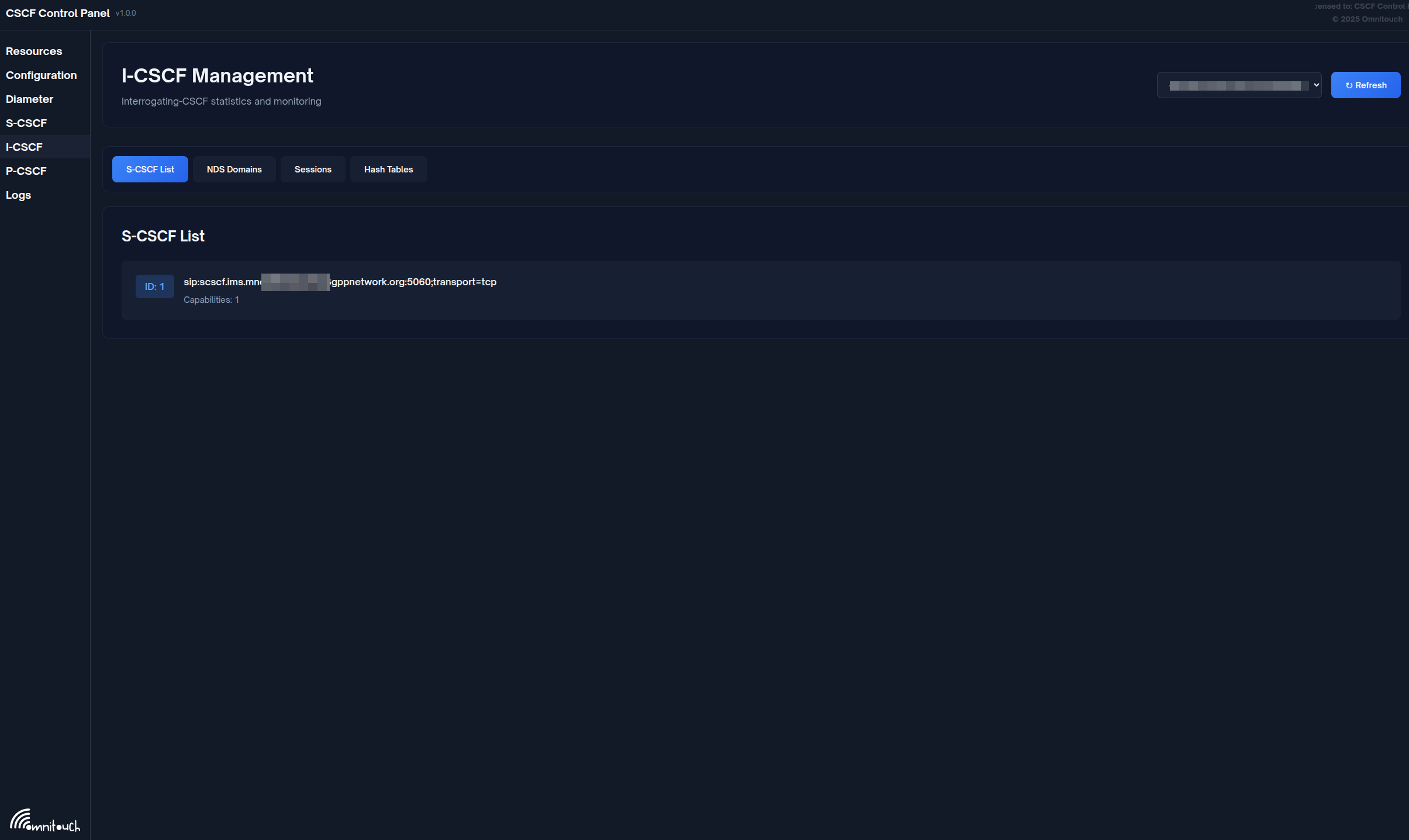
The S-CSCF list shows available S-CSCF servers and their capabilities for load balancing and assignment.
Selection Logic
S-CSCF Selection Process: The I-CSCF performs capability-based S-CSCF selection using the following logic:
-
Extract Capabilities: Retrieves mandatory and optional capability requirements from the HSS UAA (User Authorization Answer) response and stores them in AVP variables
-
Database Query: Queries the database with the capability requirements to find S-CSCF servers that match the required capabilities
-
Result Handling:
- If a matching S-CSCF is found, the URI is stored in $avp(scscf_uri) and set as the destination URI ($du) for request forwarding
- If no matching S-CSCF is available, responds to the original request with 503 Service Unavailable
3. Topology Hiding
The I-CSCF shields internal S-CSCF addresses from external networks by:
- Removing Record-Route: Doesn't add Record-Route header
- Proxying responses: Removes Via headers revealing S-CSCF
- Contact rewriting: (optional) Replaces S-CSCF contact with I-CSCF
- Path removal: Strips internal path information
Example:
External sees:
  Via: SIP/2.0/UDP icscf.example.com:5060

Internal reality:
  Via: SIP/2.0/UDP scscf.example.com:5060
  Via: SIP/2.0/UDP icscf.example.com:5060
4. Routing Logic
REGISTER Processing
INVITE Processing (Terminating)
5. NDS (Network Domain Security)
The I-CSCF maintains a list of trusted domains for inter-operator security.
Trusted Domains Database: Contains a list of domain names that are trusted for inter-operator communication:
- ID: Unique identifier for each trusted domain
- Trusted Domain: Domain name (e.g., "ims.mnc001.mcc001.3gppnetwork.org")
Example Configuration: A typical deployment includes the home IMS domain and any peering partner domains:
- ims.mnc001.mcc001.3gppnetwork.org (home network)
- ims.mnc002.mcc001.3gppnetwork.org (roaming partner)
Purpose:
- Validate incoming requests from peering networks
- Apply security policies based on trust relationships
- Implement rate limiting per domain
- Control which external networks can access the IMS core
You can view trusted domains via: Web UI → I-CSCF → Trusted Domains tab
6. Failover and Load Balancing
S-CSCF Failover
Trigger Conditions - Failover to the next S-CSCF is triggered by:
- 408 Request Timeout
- 5xx Server Error responses
- 6xx Global Failure responses (except 600 Busy Everywhere, which indicates user rejection rather than server failure)
Failover Logic: The I-CSCF implements automatic failover using a failure route:
-
Status Check: When a response is received, checks if the status code matches failover criteria (408, 5xx, or 6xx)
-
Next S-CSCF Selection: If failover is triggered, selects the next available S-CSCF from the list
-
Retry or Fail:
- If another S-CSCF is available, relays the request to it
- If all S-CSCFs have been tried and failed, responds with 503 Service Unavailable to the originator
Stateful S-CSCF List Management:
- The list of candidate S-CSCFs is kept in transaction memory
- Position in the list is maintained across multiple attempts
- The list is cleared when a final successful response is received (2xx success or 4xx client error)
- The list is preserved when receiving 401 Unauthorized (authentication challenge), as the same S-CSCF must handle the subsequent authenticated request
Load Balancing
Load Balancing Configuration:
When multiple S-CSCFs support the same capabilities:
- S-CSCF 1: sip:scscf1.example.com:5060 - capability 0
- S-CSCF 2: sip:scscf2.example.com:5060 - capability 0
- S-CSCF 3: sip:scscf3.example.com:5060 - capability 0
The I-CSCF uses round-robin or random selection to distribute load evenly across all matching S-CSCFs.
View load distribution via: Web UI → I-CSCF → S-CSCF List (shows all configured servers)
Web UI Operations
Accessing I-CSCF Page
Navigate to: https://<control-panel>/icscf
Page Layout
The I-CSCF page has four main tabs:
- S-CSCF Servers - Configured S-CSCFs and capabilities
- NDS Trusted Domains - Network domain security
- Sessions - Active I-CSCF sessions with S-CSCF selection
- Hash Tables - Shared memory tables
Viewing S-CSCF Servers
Purpose: See which S-CSCFs are available for user assignment
Display Columns:
- ID: Database ID
- Name: Descriptive name
- S-CSCF URI: SIP URI of the S-CSCF
- Capabilities: Comma-separated capability IDs
Example Output:
ID   Name                    S-CSCF URI                                          Capabilities
1    Primary S-CSCF          sip:scscf.ims.mnc001.mcc001.3gppnetwork.org:5060   0, 1
2    Secondary S-CSCF        sip:scscf2.ims.mnc001.mcc001.3gppnetwork.org:5060  0, 1
Operations:
- View list of S-CSCFs
- Check capabilities configured
- Verify S-CSCF URIs
Note: To add/modify S-CSCFs, coordinate with system administrators. New S-CSCF entries require:
- A name (descriptive label like "New S-CSCF")
- The S-CSCF URI (e.g., sip:scscf3.example.com:5060;transport=tcp)
- Associated capability IDs (e.g., capabilities 0 and 1)
Viewing NDS Trusted Domains
Purpose: Monitor which network domains are trusted for peering
Display Columns:
- ID: Database ID
- Trusted Domain: FQDN of trusted network
Example Output:
ID   Trusted Domain
1    ims.mnc001.mcc001.3gppnetwork.org
2    ims.mnc002.mcc001.3gppnetwork.org
3    carrier.example.com
Operations:
- View trusted domains
- Verify peering relationships
Adding Trusted Domains: Coordinate with system administrators to add new trusted domains. Each entry requires the fully qualified domain name (FQDN) of the trusted network (e.g., partner.example.com).
Monitoring Active Sessions
Purpose: See real-time I-CSCF decision-making and S-CSCF selection
Display Information:
- Call-ID: SIP Call-ID
- User Identity: Public identity being queried
- Selected S-CSCF: Which S-CSCF was chosen
- Capability Match: Capabilities that matched
- UAR/LIR Result: Diameter result code
- Timestamp: When session was created
Use Cases:
- Verify S-CSCF selection is working
- Troubleshoot routing issues
- Monitor load distribution across S-CSCFs
- Analyze capability matching
Example:
Call-ID: 3c26700857a87f84@10.4.12.165
User: sip:12015551234@ims.mnc001.mcc001.3gppnetwork.org
Selected S-CSCF: sip:scscf.ims.mnc001.mcc001.3gppnetwork.org:5060
Capabilities: mandatory=[0,1], optional=[]
Operation: UAR (Registration)
Result: 2001 (FIRST_REGISTRATION)
Timestamp: 2025-11-29 14:35:22
Hash Table Management
Similar to P-CSCF, the I-CSCF can use hash tables for caching or custom logic.
Common Use Cases:
- Cache UAR/LIR results (short TTL)
- Rate limiting per source IP
- Custom routing decisions
Operations: Same as P-CSCF (list, dump, delete, flush)
Call Flows
Registration Flow with I-CSCF
Terminating Call Flow via I-CSCF
S-CSCF Failover Flow
Troubleshooting
HSS Connectivity Issues
Diameter Peer Closed
Symptoms: Cannot query HSS, all registrations fail
Diagnostic Steps:
-
Check Diameter peer status in Web UI:
- Navigate to Diameter page
- Select I-CSCF node
- Check HSS peer state
-
Verify network connectivity to HSS (coordinate with network team if needed)
-
Try to enable peer via the control panel:
- Navigate to Diameter page
- Find HSS peer
- Click "Enable" button
-
Review system logs via the control panel Logs page for CER/CEA (Capabilities Exchange) messages and Diameter errors
-
Coordinate with system administrators to verify Diameter configuration if needed
UAR/LIR Timeout
Symptoms: Registrations/calls timeout, logs show Diameter timeout
Possible Causes:
- HSS overloaded
- Network latency
- Incorrect routing realm
- HSS not responding to this I-CSCF
Solutions:
-
Review system logs for Diameter timeout errors
-
Verify HSS peer is connected via the control panel (Diameter page)
-
Coordinate with system administrators to:
- Increase Diameter transaction timeout if needed
- Verify destination realm configuration
- Check HSS logs if accessible
-
Monitor Diameter message flow via the control panel Logs page
-
Coordinate with network team to verify no network latency or routing issues to HSS
S-CSCF Selection Issues
No S-CSCF Selected
Symptoms: 503 Service Unavailable, logs show "No S-CSCF available"
Diagnostic Steps:
-
Check S-CSCF list via the control panel:
- Navigate to I-CSCF → S-CSCF Servers tab
- Verify S-CSCFs are configured with appropriate capabilities
-
Review system logs for HSS UAA (User Authorization Answer) capabilities
-
Verify capabilities matching between what HSS returns and what's configured in the I-CSCF database
-
Coordinate with system administrators to:
- Verify database connectivity
- Add missing S-CSCF entries if needed
- Check capability configuration matches HSS expectations
Wrong S-CSCF Selected
Symptoms: Calls route to unexpected S-CSCF
Possible Causes:
- Capability mismatch
- Load balancing issue
- Database out of sync with HSS
Solutions:
-
Monitor session tracking via the control panel:
- Navigate to I-CSCF → Sessions tab
- Review S-CSCF selection decisions
-
Review system logs to check if HSS is assigning a specific S-CSCF name (which would override selection logic)
-
Verify I-CSCF database S-CSCF list and capabilities match HSS expectations
-
Coordinate with system administrators to review capability matching configuration
Routing Issues
Requests Not Forwarding to S-CSCF
Symptoms: I-CSCF receives request but doesn't forward
Diagnostic Steps:
-
Review system logs via the control panel Logs page for routing errors
-
Verify destination S-CSCF URI is being set correctly (check logs for routing decisions)
-
Verify network connectivity to S-CSCF (coordinate with network team)
-
Check that selected S-CSCF is actually reachable and responding
-
Coordinate with system administrators to enable debug logging if needed for deeper analysis
S-CSCF Responds But I-CSCF Doesn't Relay
Symptoms: Wireshark shows response to I-CSCF but not forwarded
Possible Causes:
- Transaction timeout
- Via header mismatch
- Record-Route loop
Solutions:
-
Review system logs for transaction matching errors or loop detection
-
Verify Via headers are being processed correctly (check logs)
-
Coordinate with system administrators to:
- Increase transaction timeout if needed
- Verify no SIP routing loops
Database Issues
Database Connection Lost
Symptoms: "Database connection error" in logs
Solutions:
- Coordinate with system administrators to:
- Verify database service is running
- Test database connectivity
- Enable auto-reconnect if not already configured
- Restart I-CSCF service if needed
Database Schema Mismatch
Symptoms: SQL errors in logs about missing columns/tables
Solutions:
- Coordinate with system administrators to:
- Verify database schema matches expected structure
- Check s_cscf, s_cscf_capabilities, and nds_trusted_domains tables exist and have correct columns
- Re-create database schema if needed
Best Practices
High Availability
-
Deploy multiple I-CSCF instances:
- Use DNS SRV for load balancing
- Each instance connects to same HSS
- Share database (read-only for S-CSCF list)
-
DNS SRV Configuration:
_sip._udp.ims.example.com. SRV 10 50 5060 icscf01.example.com.
_sip._udp.ims.example.com. SRV 10 50 5060 icscf02.example.com.
_sip._tcp.ims.example.com. SRV 10 50 5060 icscf01.example.com.
_sip._tcp.ims.example.com. SRV 10 50 5060 icscf02.example.com. -
Stateless operation: I-CSCF doesn't maintain dialog state, making failover seamless
Performance Tuning
-
Worker processes: Set high worker count for optimal query throughput
- children=64 (high value optimized for I-CSCF's query-heavy workload)
- tcp_children=8 for handling TCP connections
-
Database connection pooling: Use persistent connections to reduce connection overhead
-
Disable unnecessary features to reduce processing overhead:
- No RTP handling (I-CSCF is signaling-only)
- No presence services
- Minimal logging in production (set to info or warning level only)
-
Optimize Diameter for high-throughput Cx interface:
- sessions_hash_size=4096 (larger hash table for better session lookup performance)
- workers=4 (dedicated Diameter worker threads for concurrent Cx operations)
Security
-
Validate trusted domains: Check Via/P-Visited-Network-ID
-
Rate limiting: Prevent DoS attacks on HSS by limiting UAR/LIR queries per source IP
- Use pike module to check request rate
- If rate limit exceeded, respond with 503 Too Many Requests
- Protects HSS from being overwhelmed by malicious query floods
-
TLS to HSS: Use Diameter over TLS (DTLS)
-
Sanitize headers: Remove untrusted P-headers from external networks
Monitoring
-
Key Metrics:
- UAR success rate
- LIR success rate
- Average query latency
- S-CSCF distribution (load balance)
- Diameter peer uptime
-
Prometheus Queries:
# UAR success rate
rate(icscf_uar_success[5m]) / rate(icscf_uar_total[5m])

# Average Diameter latency
rate(diameter_request_duration_sum[5m]) / rate(diameter_request_duration_count[5m]) -
Alerting:
- HSS peer down
- All S-CSCFs unavailable
- High error rate (>5%)
Database Maintenance
Database maintenance is handled by system administrators. Key maintenance tasks include:
-
Keep S-CSCF list updated: Coordinate with administrators to ensure S-CSCF list in database matches actual deployments
- Verify via web UI: Navigate to I-CSCF → S-CSCF List tab
- Check that all active S-CSCF servers are listed with correct capabilities
-
Prune old sessions: If UAR/LIR results are cached, old entries should be cleaned periodically
Reference
3GPP Specifications
- TS 23.228: IMS Architecture
- TS 29.228: Cx Interface (I-CSCF to HSS)
- TS 29.229: Cx/Dx Protocol
Diameter RFCs
- RFC 6733: Diameter Base Protocol
- RFC 7155: Diameter NAT Traversal