OmniUPF API Documentation
Overview
The OmniUPF API provides a comprehensive RESTful interface for managing and monitoring the eBPF-based User Plane Function. The API enables real-time control and observability of all UPF components.
API Capabilities
Session Management:
- PFCP Sessions: Query active sessions, view session details, filter by UE IP or TEID
- PFCP Associations: Monitor control plane node associations and status
Traffic Rules:
- Packet Detection Rules (PDR): Inspect uplink and downlink traffic classifiers (IPv4/IPv6)
- Forwarding Action Rules (FAR): View forwarding, buffering, and drop policies
- QoS Enforcement Rules (QER): Monitor rate limiting and QoS policies
- Usage Reporting Rules (URR): Track data volume counters per session
Packet Buffering:
- Buffer Status: View buffered packets per FAR (
GET /buffer,GET /buffer/:far_id) - Buffer Operations: Flush or clear buffered packets (
POST /buffer/:far_id/flush,DELETE /buffer/:far_id,DELETE /buffer) - Buffering Control: Manual notification triggering (
POST /buffer/:far_id/notify) - Notification Status: View DLDR notification state (
GET /buffer/notifications)
Monitoring and Statistics:
- Packet Statistics: Real-time packet counters by protocol (GTP, IP, TCP, UDP, ICMP, ARP)
- XDP Statistics: Datapath performance metrics (pass, drop, redirect, abort)
- N3/N6 Interface Stats: RAN and Data Network traffic distribution
- Route Statistics: FIB lookup performance (cache hits, lookups, errors)
Route Management:
- UE Routes: Query UE IP to gNB routing table (
GET /routes) - FRR Integration: Synchronize routes with Free Range Routing daemon (
POST /routes/sync) - Routing Sessions: View routing protocol sessions (
GET /routing/sessions) - OSPF Database: Query OSPF external route database (
GET /ospf/database/external)
Configuration:
- UPF Config: Retrieve and edit configuration (
GET /config,POST /config) - Dataplane Config: Query dataplane-specific configuration (
GET /dataplane_config) - XDP Capabilities: Query XDP mode support and interface capabilities (
GET /xdp_capabilities) - eBPF Map Capacity: Monitor resource utilization and capacity (
GET /map_info)
Web UI Integration
The OmniUPF Web UI is built on this API and provides an interactive dashboard for all API functionality. See the Web UI Guide for screenshots and usage examples.
Swagger API Documentation
The API is fully documented using OpenAPI 3.0 (Swagger) specification. The interactive Swagger UI provides:
- Complete endpoint documentation with request/response schemas
- Try-it-out functionality for testing API calls directly from the browser
- Schema definitions for all data models
- HTTP status codes and error responses
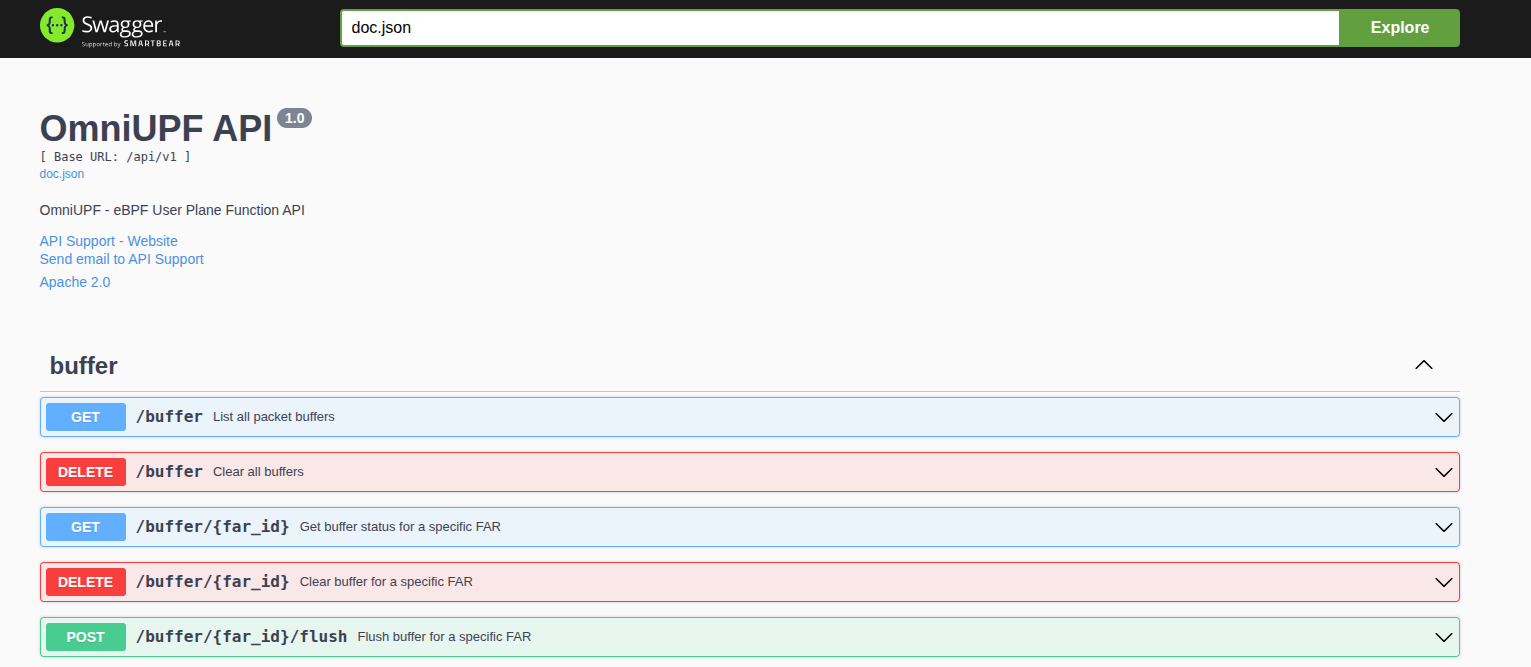
Interactive Swagger UI showing the OmniUPF API endpoints with detailed documentation.
Accessing Swagger UI
The Swagger documentation is available at:
http://<upf-host>:8080/swagger/index.html
For example: http://10.98.0.20:8080/swagger/index.html
API Base Path
All API endpoints are prefixed with:
/api/v1
API Features
Pagination
OmniUPF API supports pagination for endpoints that return large datasets. Pagination prevents timeouts and reduces memory usage when querying thousands of sessions, PDRs, or URRs.
Supported Pagination Styles:
-
Page-based pagination (recommended):
page: Page number (starting from 1)page_size: Items per page (default: 100, max: 1000)
-
Offset-based pagination:
offset: Number of items to skiplimit: Number of items to return (max: 1000)
Example Requests:
# Page-based: Get second page with 50 items per page
GET /api/v1/pfcp_sessions?page=2&page_size=50

# Offset-based: Skip first 100 items, return next 50
GET /api/v1/pfcp_sessions?offset=100&limit=50

# Default behavior (no pagination params): First 100 items
GET /api/v1/pfcp_sessions
Response Format:
{
  "data": [
    { /* session object */ },
    { /* session object */ },
    ...
  ],
  "pagination": {
    "total": 5432,
    "page": 2,
    "page_size": 50,
    "total_pages": 109
  }
}
Paginated Endpoints:
/api/v1/pfcp_sessions- PFCP sessions list/api/v1/pfcp_associations- PFCP associations list/api/v1/routes- UE IP routes/api/v1/uplink_pdr_map- Uplink PDRs (basic info)/api/v1/uplink_pdr_map/full- Uplink PDRs with full SDF filter details/api/v1/downlink_pdr_map- Downlink PDRs IPv4 (basic info)/api/v1/downlink_pdr_map/full- Downlink PDRs IPv4 with full SDF filter details/api/v1/downlink_pdr_map_ip6- Downlink PDRs IPv6 (basic info)/api/v1/downlink_pdr_map_ip6/full- Downlink PDRs IPv6 with full SDF filter details/api/v1/far_map- Forwarding Action Rules/api/v1/qer_map- QoS Enforcement Rules/api/v1/urr_map- Usage Reporting Rules
Buffer Management Endpoints:
GET /api/v1/buffer- List all FAR buffers with statisticsGET /api/v1/buffer/:far_id- Get buffer status for specific FARGET /api/v1/buffer/notifications- List DLDR notification statusDELETE /api/v1/buffer- Clear all buffered packetsDELETE /api/v1/buffer/:far_id- Clear buffer for specific FARPOST /api/v1/buffer/:far_id/flush- Flush (replay) buffered packetsPOST /api/v1/buffer/:far_id/notify- Manually send DLDR notification
Configuration Endpoints:
GET /api/v1/config- Get current UPF configurationPOST /api/v1/config- Update UPF configuration (runtime editable fields)GET /api/v1/dataplane_config- Get dataplane-specific configuration
Routing Integration Endpoints:
GET /api/v1/routes- List UE routesPOST /api/v1/routes/sync- Trigger route synchronization with FRRGET /api/v1/routing/sessions- Get routing protocol sessionsGET /api/v1/ospf/database/external- Get OSPF external LSA database
Best Practices:
- Use
page_size=100for Web UI display - Use
page_size=1000for bulk exports (max limit) - Query
pagination.total_pagesto determine iteration count - Increase
page_sizefor better API performance (fewer requests)
CORS Support
Cross-Origin Resource Sharing (CORS) is enabled by default for all API endpoints, allowing Web UI and third-party applications to consume the API from different origins.
Prometheus Metrics
In addition to the REST API, OmniUPF exposes Prometheus metrics on the /metrics endpoint (default port :9090).
Metrics provide:
- PFCP message counters and latency per peer
- Packet statistics by protocol type
- XDP action verdicts
- Buffer statistics
- eBPF map capacity utilization
- URR volume tracking
See the Metrics Reference for complete documentation.
Related Documentation
- Web UI Guide - Interactive dashboard built on this API
- Metrics Reference - Prometheus metrics documentation
- PFCP Cause Codes - PFCP error codes and troubleshooting
- Rules Management Guide - PDR, FAR, QER, URR configuration
- Route Management Guide - FRR integration and UE routing
- Monitoring Guide - Statistics monitoring and capacity planning
- Configuration Guide - UPF configuration options
- Swagger UI - Interactive API documentation (replace
localhostwith your UPF host)