Diameter Gx Interface Documentation
Policy and Charging Rules Function (PCRF) Interface
Table of Contents
- Overview
- Gx Interface Basics
- Diameter Protocol
- Credit Control Messages
- Policy and Charging Rules
- Configuration
- Message Flows
- Error Handling
- Troubleshooting
Overview
The Gx interface connects PGW-C to the PCRF (Policy and Charging Rules Function) or PCF (Policy Control Function) in 5G networks. This interface enables:
- Dynamic Policy Control - Real-time QoS and policy enforcement
- Charging Control - Credit authorization and usage tracking
- Service Awareness - Application-level traffic differentiation
- Subscriber Profile Management - Per-user policy application
Gx in the Network Architecture
Key Functions
| Function | Description |
|---|---|
| Policy Provisioning | PCRF provides PCC rules defining how to handle traffic |
| QoS Control | Dynamic adjustment of bitrates and QoS parameters |
| Charging Control | Credit authorization for prepaid/postpaid scenarios |
| Gating Control | Enable/disable traffic flows based on policy |
| Usage Monitoring | Track data consumption per service |
Gx Interface Basics
3GPP Reference
- Specification: 3GPP TS 29.212
- Diameter Application ID: 16777238 (Gx)
- Protocol: Diameter Base Protocol (RFC 6733)
Session Concept
Each UE PDN connection has a corresponding Gx session identified by a Session-ID. This session:
- Created when UE attaches (CCR-Initial)
- Updated during the connection lifetime (CCR-Update) - optional
- Terminated when UE detaches (CCR-Termination)
Session ID Format
Session-ID: <Origin-Host>;<high32>;<low32>[;<optional>]
Example: omni-pgw_c.epc.mnc999.mcc999.3gppnetwork.org;1234567890;98765
Components:
- Origin-Host: PGW-C's Diameter identity
- high32: High 32 bits of unique identifier
- low32: Low 32 bits of unique identifier
Diameter Protocol
Message Structure
Diameter messages are binary-encoded with the following structure:
Diameter Header (20 bytes)
├── Version (1 byte) = 1
├── Message Length (3 bytes)
├── Flags (1 byte)
│   ├── R: Request (1) / Answer (0)
│   ├── P: Proxiable
│   ├── E: Error
│   └── T: Potentially retransmitted
├── Command Code (3 bytes)
├── Application ID (4 bytes) = 16777238 (Gx)
├── Hop-by-Hop ID (4 bytes)
└── End-to-End ID (4 bytes)

AVPs (Attribute-Value Pairs)
├── AVP Header
│   ├── AVP Code
│   ├── Flags (V, M, P)
│   ├── AVP Length
│   └── Vendor ID (optional)
└── AVP Data
Key Diameter Concepts
AVP (Attribute-Value Pair):
- Basic data unit in Diameter
- Contains a code, flags, and value
- Can be nested (Grouped AVP)
Command:
- Request/Answer pair
- CCR (Credit-Control-Request) / CCA (Credit-Control-Answer)
Result Codes:
2001- DIAMETER_SUCCESS3xxx- Protocol errors4xxx- Transient failures5xxx- Permanent failures
Credit Control Messages
PGW-C uses the Diameter Credit Control Application (RFC 4006) for Gx.
Message Types
CCR-Initial (Credit Control Request - Initial)
When: UE creates a new PDN connection
Purpose:
- Request initial policy and charging rules
- Provide UE and network context to PCRF
- Obtain QoS parameters and charging authorization
Key AVPs Sent by PGW-C:
| AVP Name | AVP Code | Type | Description |
|---|---|---|---|
| Session-Id | 263 | UTF8String | Unique Gx session identifier |
| Auth-Application-Id | 258 | Unsigned32 | 16777238 (Gx) |
| Origin-Host | 264 | DiamIdent | PGW-C's Diameter identity |
| Origin-Realm | 296 | DiamIdent | PGW-C's Diameter realm |
| Destination-Realm | 283 | DiamIdent | PCRF's realm |
| CC-Request-Type | 416 | Enumerated | 1 = INITIAL_REQUEST |
| CC-Request-Number | 415 | Unsigned32 | Sequence number (starts at 0) |
| Subscription-Id | 443 | Grouped | UE identifier (IMSI/MSISDN) |
| Called-Station-Id | 30 | UTF8String | APN name |
| Framed-IP-Address | 8 | OctetString | Allocated UE IPv4 address |
| IP-CAN-Type | 1027 | Enumerated | 5 = 3GPP-EPS |
| RAT-Type | 1032 | Enumerated | 1004 = EUTRAN |
| QoS-Information | 1016 | Grouped | Current QoS (AMBR) |
| Network-Request-Support | 1024 | Enumerated | Network-initiated procedures |
| Supported-Features | 628 | Grouped | Gx feature list |
Example CCR-I Structure:
CCR (Command Code: 272, Request)
├── Session-Id: "pgw_c.example.com;123;456"
├── Auth-Application-Id: 16777238
├── Origin-Host: "omni-pgw_c.epc.mnc999.mcc999.3gppnetwork.org"
├── Origin-Realm: "epc.mnc999.mcc999.3gppnetwork.org"
├── Destination-Realm: "epc.mnc999.mcc999.3gppnetwork.org"
├── CC-Request-Type: INITIAL_REQUEST (1)
├── CC-Request-Number: 0
├── Subscription-Id (Grouped)
│   ├── Subscription-Id-Type: END_USER_IMSI (1)
│   └── Subscription-Id-Data: "310260123456789"
├── Called-Station-Id: "internet"
├── Framed-IP-Address: 100.64.1.42
├── IP-CAN-Type: 3GPP-EPS (5)
├── RAT-Type: EUTRAN (1004)
├── QoS-Information (Grouped)
│   ├── APN-Aggregate-Max-Bitrate-UL: 100000000 (100 Mbps)
│   └── APN-Aggregate-Max-Bitrate-DL: 50000000 (50 Mbps)
├── Network-Request-Support: 1
└── Supported-Features: [...]
CCA-Initial (Credit Control Answer - Initial)
Sent by: PCRF in response to CCR-I
Purpose:
- Authorize or reject the session
- Provide PCC rules for traffic handling
- Specify QoS parameters
Key AVPs Received by PGW-C:
| AVP Name | AVP Code | Description |
|---|---|---|
| Result-Code | 268 | Success (2001) or error code |
| Experimental-Result | 297 | Vendor-specific result codes |
| QoS-Information | 1016 | Authorized QoS (may differ from request) |
| Charging-Rule-Install | 1001 | PCC rules to activate |
| Charging-Rule-Definition | 1003 | Inline rule definitions |
| Default-EPS-Bearer-QoS | 1049 | QoS for default bearer |
Success Response Example:
CCA (Command Code: 272, Answer)
├── Session-Id: "pgw_c.example.com;123;456"
├── Result-Code: DIAMETER_SUCCESS (2001)
├── Origin-Host: "pcrf.example.com"
├── Origin-Realm: "example.com"
├── Auth-Application-Id: 16777238
├── CC-Request-Type: INITIAL_REQUEST (1)
├── CC-Request-Number: 0
├── QoS-Information (Grouped)
│   ├── APN-Aggregate-Max-Bitrate-UL: 50000000 (50 Mbps - reduced)
│   └── APN-Aggregate-Max-Bitrate-DL: 100000000 (100 Mbps - increased)
├── Charging-Rule-Install (Grouped)
│   ├── Charging-Rule-Name: "default_internet_rule"
│   └── Charging-Rule-Name: "video_streaming_rule"
└── Charging-Rule-Definition (Grouped)
    ├── Charging-Rule-Name: "default_internet_rule"
    ├── QoS-Information: {...}
    └── Precedence: 1000
CCR-Termination (Credit Control Request - Termination)
When: UE detaches or PDN connection is deleted
Purpose:
- Notify PCRF of session termination
- Final accounting/charging record
Key Differences from CCR-I:
CC-Request-Type: TERMINATION_REQUEST (3)- May include usage statistics
- Simplified AVP set
Example CCR-T:
CCR (Command Code: 272, Request)
├── Session-Id: "pgw_c.example.com;123;456"
├── Auth-Application-Id: 16777238
├── Origin-Host: "omni-pgw_c.epc.mnc999.mcc999.3gppnetwork.org"
├── Origin-Realm: "epc.mnc999.mcc999.3gppnetwork.org"
├── Destination-Realm: "epc.mnc999.mcc999.3gppnetwork.org"
├── CC-Request-Type: TERMINATION_REQUEST (3)
├── CC-Request-Number: 1
└── Termination-Cause: DIAMETER_LOGOUT (1)
CCA-Termination
Sent by: PCRF in response to CCR-T
Purpose:
- Acknowledge session termination
- No policy rules returned
Example CCA-T:
CCA (Command Code: 272, Answer)
├── Session-Id: "pgw_c.example.com;123;456"
├── Result-Code: DIAMETER_SUCCESS (2001)
├── Origin-Host: "pcrf.example.com"
├── Origin-Realm: "example.com"
├── Auth-Application-Id: 16777238
├── CC-Request-Type: TERMINATION_REQUEST (3)
└── CC-Request-Number: 1
Policy and Charging Rules
PCC Rule Structure
A PCC (Policy and Charging Control) Rule defines how to handle specific traffic flows:
Rule Components
1. Rule Name:
- Unique identifier for the rule
- Example:
"video_streaming_rule"
2. Precedence:
- Lower number = higher priority
- Range: 0-65535
- Used when multiple rules match
3. Flow Filters (TFT - Traffic Flow Template):
- Defines which packets match this rule
- Examples:
- IP 5-tuple: Protocol, Src/Dst IP, Src/Dst Port
"permit out ip from any to 8.8.8.8 80"
4. QoS Information:
- QCI (QoS Class Identifier): 1-9 (standardized), 128-254 (operator-specific)
- QCI 1: Conversational Voice
- QCI 5: IMS Signaling
- QCI 9: Default Internet
- ARP (Allocation and Retention Priority): Pre-emption capability
- MBR/GBR: Maximum/Guaranteed Bit Rates
5. Charging Information:
- Rating Group: Identifies charging category (used by OCS - see Diameter Gy Interface)
- Metering Method: Volume, time, or event-based
- Online/Offline Charging: OCS (prepaid via Diameter Gy) vs. offline CDRs (postpaid - see Data CDR Format)
6. Gating Status:
- OPEN: Allow traffic
- CLOSED: Block traffic
Dynamic Rule Provisioning
PCRF can provide rules in two ways:
1. Predefined Rules (by name):
Charging-Rule-Install (Grouped)
├── Charging-Rule-Name: "gold_subscriber_internet"
└── Charging-Rule-Name: "video_qos_boost"
2. Dynamic Rules (inline definition):
Charging-Rule-Definition (Grouped)
├── Charging-Rule-Name: "dynamic_rule_123"
├── Precedence: 100
├── Flow-Information (Grouped)
│   ├── Flow-Description: "permit out ip from any to 192.0.2.0/24"
│   └── Flow-Direction: DOWNLINK
├── QoS-Information (Grouped)
│   ├── QoS-Class-Identifier: 5
│   ├── Max-Requested-Bandwidth-UL: 10000000
│   └── Max-Requested-Bandwidth-DL: 50000000
└── Rating-Group: 1000
QoS Information AVP
APN-AMBR (Aggregate Maximum Bit Rate):
Applies to all non-GBR bearers for this APN:
QoS-Information (Grouped)
├── APN-Aggregate-Max-Bitrate-UL: 100000000  # 100 Mbps
└── APN-Aggregate-Max-Bitrate-DL: 200000000  # 200 Mbps
PGW-C Response:
- Updates internal AMBR state
- Sends Session Modification Request to PGW-U with updated QER
Configuration
Basic Gx Configuration
Edit config/runtime.exs:
config :pgw_c,
  diameter: %{
    # IP address to listen for Diameter connections
    listen_ip: "0.0.0.0",

    # PGW-C's Diameter identity (Origin-Host)
    host: "omni-pgw_c.epc.mnc999.mcc999.3gppnetwork.org",

    # PGW-C's Diameter realm (Origin-Realm)
    realm: "epc.mnc999.mcc999.3gppnetwork.org",

    # List of PCRF peers
    peer_list: [
      %{
        # PCRF Diameter identity
        host: "pcrf.epc.mnc999.mcc999.3gppnetwork.org",

        # PCRF realm (usually same as PGW-C realm)
        realm: "epc.mnc999.mcc999.3gppnetwork.org",

        # PCRF IP address
        ip: "10.0.0.30",

        # Whether PGW-C initiates connection to PCRF
        # true = PGW-C connects to PCRF
        # false = Wait for PCRF to connect
        initiate_connection: true
      }
    ]
  }
Multiple PCRF Peers
For redundancy or geographic distribution:
config :pgw_c,
  diameter: %{
    listen_ip: "0.0.0.0",
    host: "omni-pgw_c.epc.mnc999.mcc999.3gppnetwork.org",
    realm: "epc.mnc999.mcc999.3gppnetwork.org",
    peer_list: [
      %{
        host: "pcrf-primary.example.com",
        realm: "epc.mnc999.mcc999.3gppnetwork.org",
        ip: "10.0.1.30",
        initiate_connection: true
      },
      %{
        host: "pcrf-backup.example.com",
        realm: "epc.mnc999.mcc999.3gppnetwork.org",
        ip: "10.0.2.30",
        initiate_connection: true
      }
    ]
  }
Load Balancing:
- Diameter protocol handles peer selection
- Requests distributed based on availability
- Automatic failover on peer failure
Hostname Resolution
Diameter Identities must be FQDNs (Fully Qualified Domain Names):
# CORRECT - FQDN format
host: "pgw_c.epc.mnc999.mcc999.3gppnetwork.org"

# INCORRECT - Not a valid Diameter Identity
host: "pgw_c"
host: "10.0.0.20"  # IP addresses not allowed
Realm Format:
- Must be valid domain name
- Typically matches 3GPP PLMN format:
epc.mncXXX.mccYYY.3gppnetwork.org
Message Flows
Successful Session Establishment
Note: QoS parameters from PCRF are translated into QERs (QoS Enforcement Rules) and programmed into PGW-U via PFCP. See PFCP Interface for QER details.
Policy Update (Network-Initiated)
Session Termination
Error Handling
Result Codes
PGW-C handles various Diameter result codes in CCA messages:
Success Codes:
| Code | Name | Action |
|---|---|---|
| 2001 | DIAMETER_SUCCESS | Continue session establishment |
Permanent Failures (5xxx):
| Code | Name | PGW-C Action |
|---|---|---|
| 5002 | DIAMETER_UNKNOWN_SESSION_ID | Log error, fail session |
| 5030 | DIAMETER_USER_UNKNOWN | Reject session (User Unknown) |
| 5140 | DIAMETER_ERROR_INITIAL_PARAMETERS | Log error, retry or fail |
| 5003 | DIAMETER_AUTHORIZATION_REJECTED | Reject session (Not Authorized) |
Transient Failures (4xxx):
| Code | Name | PGW-C Action |
|---|---|---|
| 4001 | DIAMETER_AUTHENTICATION_REJECTED | Retry or fail session |
| 4010 | DIAMETER_TOO_BUSY | Retry with backoff |
| 4012 | DIAMETER_UNABLE_TO_COMPLY | Log error, may retry |
Experimental Result Codes
Vendor-specific error codes:
Experimental-Result (Grouped)
├── Vendor-Id: 10415 (3GPP)
└── Experimental-Result-Code: <vendor-specific code>
Common 3GPP Experimental Codes:
| Code | Name | Meaning |
|---|---|---|
| 5065 | IP_CAN_SESSION_NOT_AVAILABLE | PCRF cannot establish session |
| 5143 | INVALID_SERVICE_INFORMATION | Service data invalid |
Timeout Handling
CCR-I Timeout:
If PCRF doesn't respond to CCR-Initial within timeout:
1. PGW-C waits for configured timeout (e.g., 5 seconds)
2. If no CCA received:
   - Log: "CCR-Initial timeout for Session-ID: ..."
   - Respond to SGW-C with error cause
   - Clean up allocated resources
3. SGW-C receives: Create Session Response (Cause: Remote Peer Not Responding)
Error Response to SGW-C:
When CCR-Initial times out, the PGW-C sends a Create Session Response with cause code :remote_peer_not_responding to the SGW-C.
Failure Scenarios
Scenario 1: PCRF Rejects Session (User Unknown)
Scenario 2: PCRF Temporarily Unavailable
Troubleshooting
Common Issues
1. Diameter Peer Connection Fails
Symptoms:
- Log: "Diameter peer not connected"
- No CCR-Initial sent
Possible Causes:
- PCRF not reachable
- Incorrect PCRF IP in configuration
- Firewall blocking Diameter port (3868)
- Incorrect Diameter identities (host/realm)
Resolution:
# Test network connectivity
ping <pcrf_ip>

# Test Diameter port (TCP 3868)
telnet <pcrf_ip> 3868

# Check Diameter identity configuration
# Ensure host and realm are FQDNs, not IPs
Verify Configuration:
config :pgw_c,
  diameter: %{
    # Must be FQDN, not IP
    host: "pgw_c.epc.mnc999.mcc999.3gppnetwork.org",
    realm: "epc.mnc999.mcc999.3gppnetwork.org",
    peer_list: [
      %{
        host: "pcrf.epc.mnc999.mcc999.3gppnetwork.org",
        ip: "10.0.0.30"
      }
    ]
  }
2. CCR-Initial Timeouts
Symptoms:
- Create Session Request fails
- Log: "CCR-Initial timeout"
Possible Causes:
- PCRF overloaded
- Network latency
- PCRF not responding to this Session-ID
Resolution:
- Check PCRF logs for errors
- Verify PCRF is processing requests
- Check network latency:
ping <pcrf_ip> - Increase timeout if network latency is high
3. Sessions Rejected by PCRF
Symptoms:
- CCA-Initial with Result-Code != 2001
- Create Session Response fails
Common Result Codes:
| Result Code | Likely Cause | Resolution |
|---|---|---|
| 5030 | IMSI not in subscriber database | Provision subscriber in HSS/SPR |
| 5003 | Authorization rejected | Check subscriber permissions |
| 4010 | PCRF too busy | Retry or add PCRF capacity |
Check Logs:
# PGW-C logs show:
[error] Diameter Gx error: Result-Code 5030 (DIAMETER_USER_UNKNOWN)
[error] IMSI 310260999999999 rejected by PCRF
4. QoS Not Applied
Symptoms:
- Session established but wrong QoS
- Bitrates don't match expected values
Debugging Steps:
-
Check CCA-Initial:
- Verify
QoS-InformationAVP present - Check
APN-Aggregate-Max-Bitrate-UL/DLvalues
- Verify
-
Check PFCP Session Establishment:
- Verify QER created with correct MBR values
- Check PGW-U logs for QER installation
-
Verify PCRF Policy:
- Check PCRF configuration
- Verify subscriber profile includes correct QoS
5. Diameter Routing Issues
Symptoms:
- Diameter messages not reaching PCRF
- Log: "No route to Destination-Realm"
Cause:
- Realm mismatch between configuration and messages
Resolution:
Ensure consistency:
# All must match
config :pgw_c,
  diameter: %{
    realm: "epc.mnc999.mcc999.3gppnetwork.org",  # PGW-C's realm
    peer_list: [
      %{
        realm: "epc.mnc999.mcc999.3gppnetwork.org"  # PCRF's realm (usually same)
      }
    ]
  }
In CCR-Initial:
Origin-Realm: "epc.mnc999.mcc999.3gppnetwork.org"
Destination-Realm: "epc.mnc999.mcc999.3gppnetwork.org"
Monitoring Gx Health
Key Metrics:
# Gx message rates
rate(gx_inbound_messages_total{message_type="gx_CCA"}[5m])
rate(gx_outbound_messages_total{message_type="gx_CCR"}[5m])

# Gx error rates
rate(gx_inbound_errors_total[5m])

# Gx response success rate (new metric)
sum(rate(gx_outbound_responses_total{result_code_class="2xxx"}[5m])) /
sum(rate(gx_outbound_responses_total[5m])) * 100

# Gx response failures by PCRF host
rate(gx_outbound_responses_total{result_code_class!="2xxx"}[5m]) by (diameter_host)

# Gx session count
session_id_registry_count

# Gx message handling duration
histogram_quantile(0.95, rate(gx_inbound_handling_duration_bucket[5m]))
Response Metrics by Result Code Class:
The gx_outbound_responses_total metric provides detailed visibility into Diameter responses sent to PCRF peers, categorized by:
message_type: Response message type (gx_RAA,gx_CCA)result_code_class: Result code category (2xxx,3xxx,4xxx,5xxx)diameter_host: PCRF peer receiving the response
Common Result Codes:
- 2001 (DIAMETER_SUCCESS) - Successful response
- 3001 (DIAMETER_COMMAND_UNSUPPORTED) - Protocol error
- 5012 (DIAMETER_UNABLE_TO_COMPLY) - Cannot execute request
- 5030 (DIAMETER_USER_UNKNOWN) - Subscriber not found
Alert Examples:
# Alert on high Gx error rate
- alert: GxErrorRateHigh
  expr: rate(gx_inbound_errors_total[5m]) > 0.1
  for: 5m
  annotations:
    summary: "High Gx error rate detected"

# Alert on high Gx response failure rate
- alert: GxResponseFailureRate
  expr: |
    sum(rate(gx_outbound_responses_total{result_code_class!="2xxx"}[5m])) /
    sum(rate(gx_outbound_responses_total[5m])) > 0.1
  for: 5m
  annotations:
    summary: "High Gx response failure rate"
    description: "More than 10% of Gx responses are failures"

# Alert on PCRF-specific failures
- alert: GxPCRFFailures
  expr: rate(gx_outbound_responses_total{result_code_class=~"4xxx|5xxx"}[5m]) by (diameter_host) > 0.05
  for: 3m
  annotations:
    summary: "PCRF {{ $labels.diameter_host }} receiving failure responses"
    description: "High failure rate for PCRF host"

# Alert on session rejection
- alert: GxSessionRejection
  expr: rate(gx_inbound_errors_total{result_code="5030"}[5m]) > 0.01
  for: 5m
  annotations:
    summary: "PCRF rejecting sessions (USER_UNKNOWN)"
Debug Logging
Enable verbose Diameter logging:
# config/runtime.exs
config :logger, level: :debug

# Or at runtime
iex> Logger.configure(level: :debug)
Look for:
[debug] Sending CCR-Initial for Session-ID: ...[debug] Received CCA-Initial: Result-Code 2001[error] Diameter error: ...
Web UI - Diameter Peer Monitoring
OmniPGW includes a real-time Web UI for monitoring Diameter peer connections and status.
Diameter Peers Page
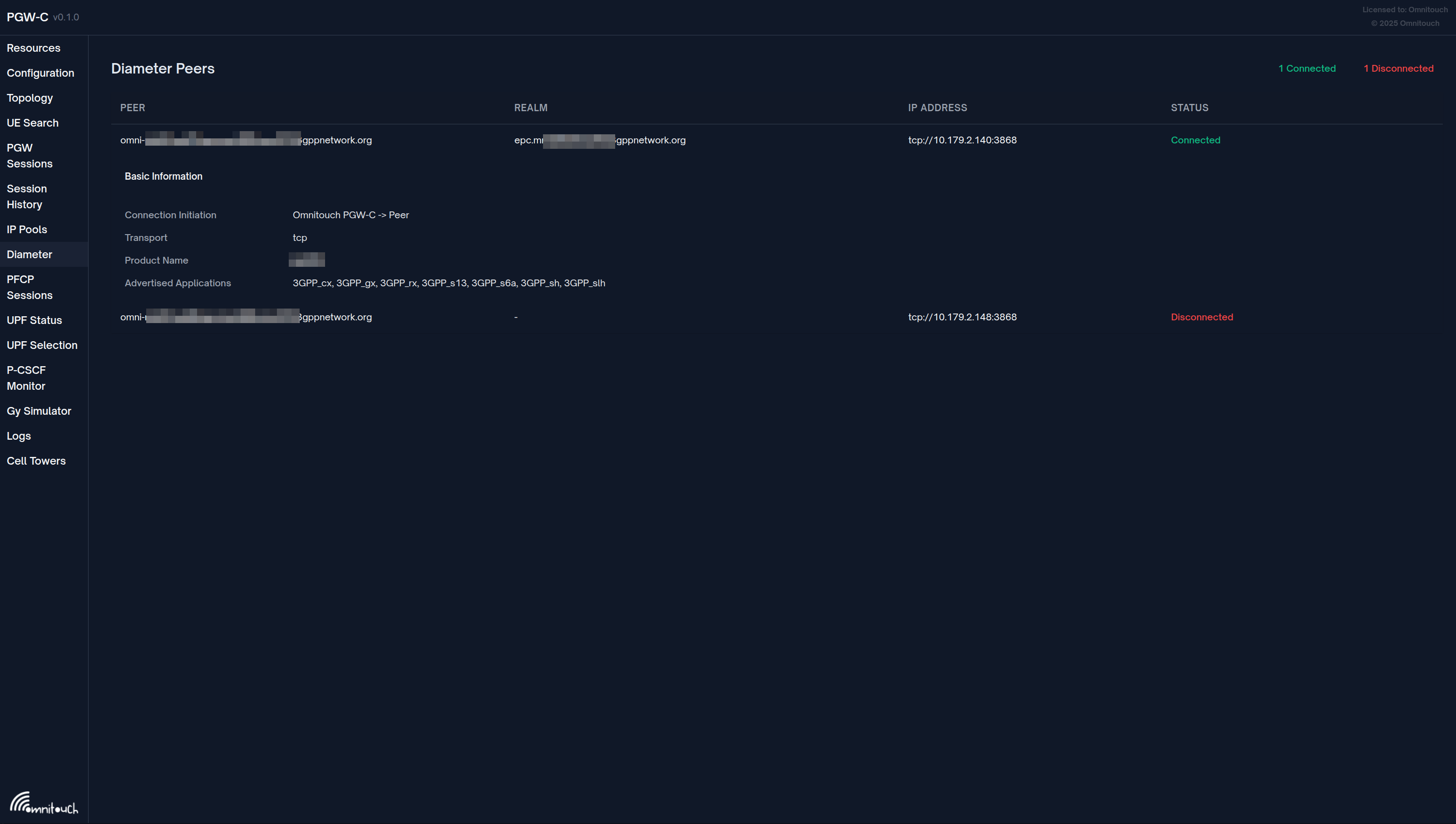
Access: http://<omnipgw-ip>:<web-port>/diameter
Purpose: Monitor Diameter Gx peer connectivity to PCRF in real-time
Features:
1. Peer Connection Overview
- Connected Count - Number of PCRF peers with active connection
- Disconnected Count - Number of configured but not connected peers
- Auto-refreshes every 1 second (fastest refresh of all pages)
2. Per-Peer Status Information For each configured PCRF peer:
- Host - Diameter identity (Origin-Host)
- IP Address - PCRF IP
- Port - Diameter port (default 3868)
- Status - Connected (green) / Disconnected (red)
- Transport - TCP or SCTP
- Connection Initiation - Who initiates (PGW or PCRF)
- Realm - Diameter realm
- Product Name - PCRF product identifier (if advertised)
- Application IDs - Supported Diameter applications (e.g., Gx = 16777238)
3. Expandable Details Click any peer row to see:
- Complete peer configuration
- Capabilities Exchange (CER/CEA) details
- Supported features
- Full connection state
Operational Use Cases
Monitor PCRF Connectivity:
1. Open Diameter page in browser
2. Verify all PCRF peers show "Connected"
3. Check Connection Initiation matches configuration
4. Verify Application IDs include Gx (16777238)
Troubleshoot Session Creation Failures (Gx Issues):
1. User sessions failing with "PCRF timeout" errors
2. Open Diameter page
3. Check peer status:
   - Disconnected?
     → Check network connectivity
     → Verify PCRF is running
     → Check firewall rules for TCP 3868
   - Connected but sessions failing?
     → Issue is at application level (check logs)
     → PCRF may be rejecting subscribers
Verify Diameter Configuration:
1. After configuring new PCRF peer
2. Open Diameter page
3. Verify peer appears in list
4. Check status changes to "Connected"
5. Expand peer to verify:
   - Realm matches configuration
   - Application IDs include Gx
   - Product Name shows PCRF identifier
Monitor Failover:
Scenario: Primary PCRF fails
1. Diameter page shows primary "Disconnected"
2. Verify backup PCRF still "Connected"
3. New sessions automatically use backup
4. When primary recovers, status returns to "Connected"
Detect Diameter Routing Issues:
- Peer shows "Connected" but wrong realm
- Application IDs don't include Gx (16777238)
- Product Name doesn't match expected PCRF
Identify Configuration Mismatches:
Web UI shows:
  Connection Initiation: "Peer initiates"
But configuration says:
  initiate_connection: true

This indicates:
  - OmniPGW attempts to connect
  - But PCRF also initiating
  - May cause connection race conditions
Advantages:
- Fastest refresh rate - 1 second updates
- Visual connection status - Immediate red/green indication
- No Diameter tools needed - No need for diameter CLI tools
- Peer configuration visible - Verify settings without checking config files
- Application-level details - See supported Diameter applications
- Realm verification - Confirm Diameter routing configuration
Integration with Metrics
While the Web UI provides real-time status, combine with Prometheus for:
- Historical Gx error rates
- CCR/CCA message counts
- Latency trends
Web UI = "Is it working right now?" Metrics = "How has it been working over time?"
Related Documentation
Configuration and Policy
- Configuration Guide - Diameter configuration, PCRF peer setup
- PFCP Interface - QoS enforcement via QERs from PCC rules
- Session Management - Session lifecycle with policy integration
- QoS & Bearer Management - Detailed QoS configuration and bearer setup
Charging Integration
- Diameter Gy Interface - Online charging triggered by PCC rules
- Data CDR Format - Offline charging records with policy info
- PCO Configuration - P-CSCF delivery for IMS policy control
Operations
- Monitoring Guide - Gx metrics, policy tracking, PCRF connectivity alerts
- S5/S8 Interface - Bearer management integration with policy