OmniWeb Operations Guide
OmniWeb is Omnitouch's unified, web-based management portal for an entire mobile core network. It is a single pane of glass that brings real-time monitoring, configuration, protocol tracing, log analysis, dashboards, and software lifecycle management for every network function (NF) into one interface - EPC, IMS, CS Core, 5G Core, SS7, messaging, charging, and the supporting infrastructure that runs them.
Instead of logging into a dozen element CLIs, Grafana, Loki, and Homer separately, an operator opens OmniWeb and can:
- See the whole network at a glance through interactive topology maps and per-element health.
- View, edit, and change NF setups - add a route in the SMSC, provision a subscriber in the HSS, clear a session on the UPF - through one consistent UI.
- Watch real-time, structured logs for any element and trace a single subscriber across the entire network (Diameter, GTP-C, PFCP, SIP, MAP).
- Open Grafana dashboards and statistics embedded inline, without leaving the portal.
- Manage software versions and lifecycle across the fleet.
- Run a SIM estate end to end: define a profile, issue the cards against it, print the carriers, and keep every card in step over the air.
Every network function is operated through the same set of patterns. This guide documents those generic patterns once - they apply to every NF.
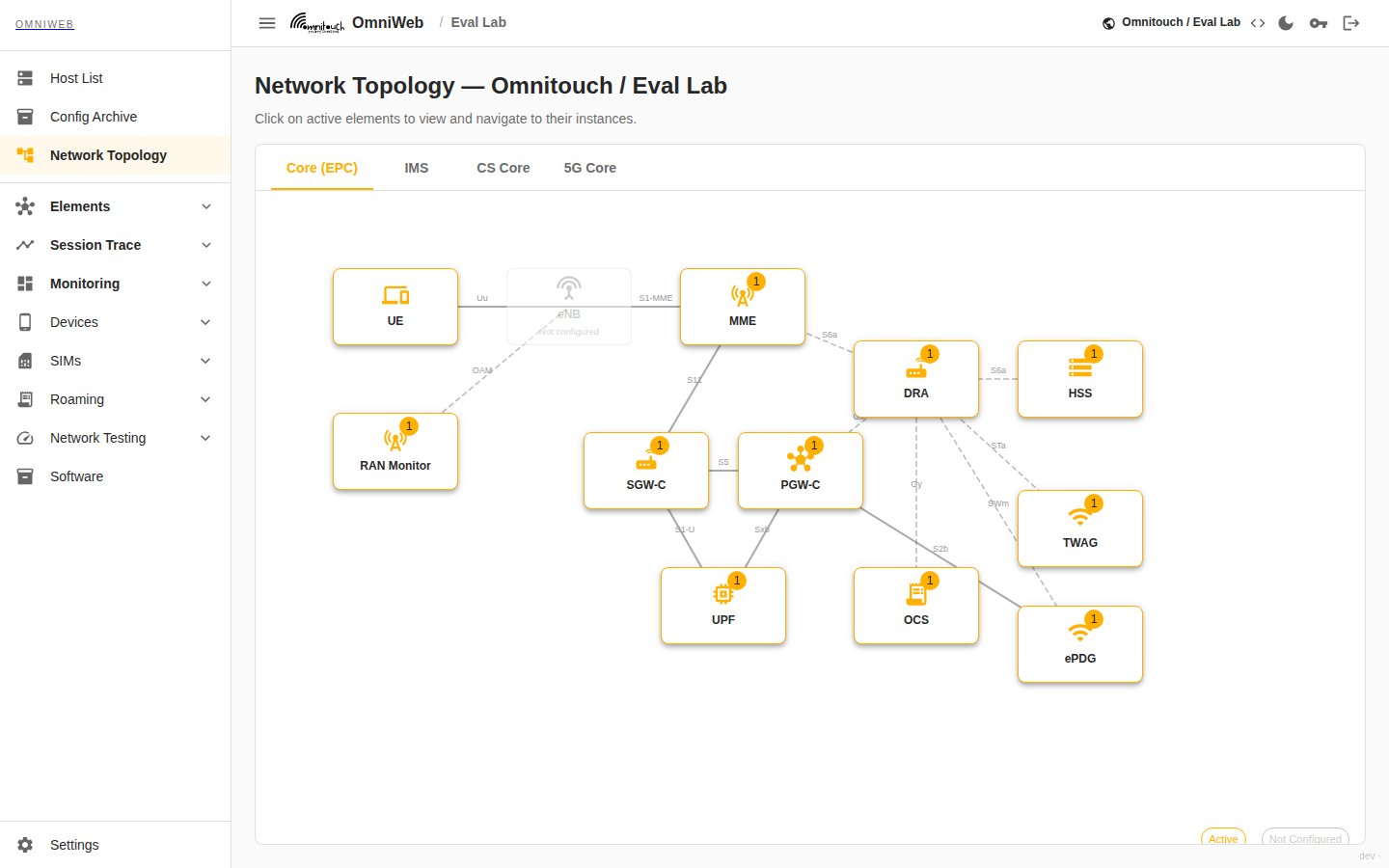
OmniWeb's topology view - the single pane of glass across EPC, IMS, CS Core, and 5G Core. Active elements are clickable and lead straight into their management pages.
Because OmniWeb consumes the network's own signalling telemetry, it can reconstruct a single subscriber's call flow live - no packet capture to upload - and draw it as a time-ordered ladder across every element that touched it:
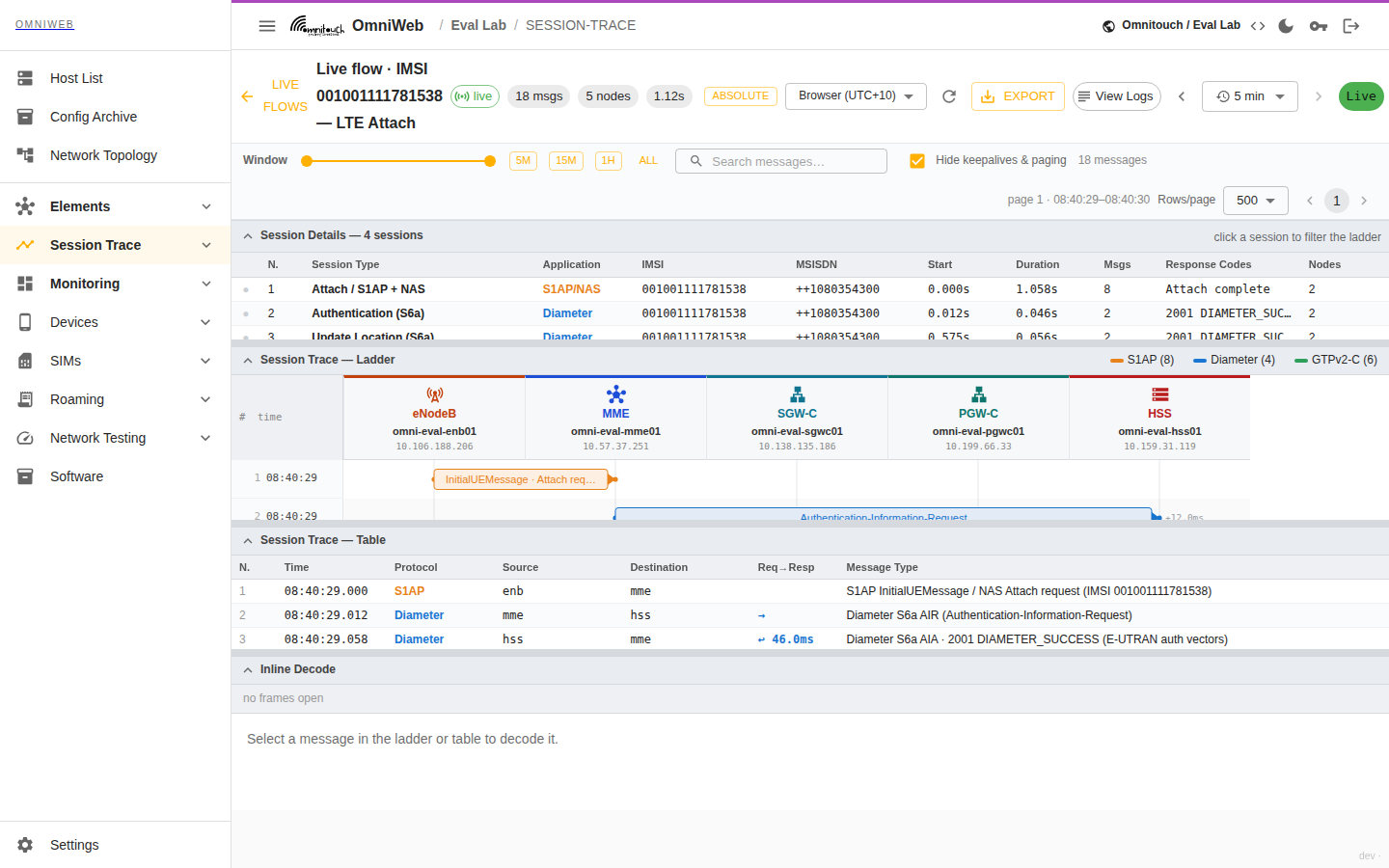
Session Trace Live Flows - one subscriber's LTE attach reconstructed straight from the network's signalling telemetry, correlating S1AP, Diameter S6a and GTP-C across the eNodeB, MME, HSS, SGW-C and PGW-C on one ladder. Click any message for its decode and hex. See Logs & Subscriber Tracing.
Documentation Map
Start Here
- Architecture - How OmniWeb works: the SPA, the backend proxy, the configuration model, and how it talks to every NF, Loki, and Grafana.
- Common Operations - The patterns shared by every element: how to view, edit, and change NF setups; how to read logs; how polling, configuration viewing, and RBAC behave. Read this once and it applies everywhere.
Observability & Troubleshooting
- Grafana Dashboards & Statistics - Embedded dashboards, element statistics, alerting, and login-protected access to the Prometheus UI and Loki API.
- Logs & Subscriber Tracing - Real-time Loki structured logs, cross-network Session Trace (follow one subscriber end to end), and Homer SIP capture.
- Homer - SIP Capture - The embedded, auto-authenticated Homer SIP capture UI: search captured SIP and reconstruct a call's signalling ladder; how it differs from Session Trace.
- Call Trace (SIP Trace) - Search recorded calls, open a full call detail with per-leg voice-quality (MOS) and jitter, follow the multi-hop SIP ladder across the IMS, view the QoS graph, listen to the recorded audio, download the PCAP, and watch live calls and capture-agent health. Powered by bundled packet-capture agents on the IMS elements.
- Network Topology - The single-pane-of-glass topology views and the infrastructure Host List.
- Config Archive - Device configuration backups: routers push their own export to OmniWeb over FTP, and the archive keeps every version searchable, sortable and diffable.
Platform
- API Reference (OpenAPI / Swagger) - Browse and try the controller REST API at
/api/docs; the OpenAPI spec lives at/api/openapi.json. - Software Management - Versioning, APT repository, and software lifecycle.
- Test Devices - Remotely control ADB-connected phones at remote sites; place calls, send texts, and run scheduled VoLTE / signal / connectivity tests exported to Prometheus.
- RAN Simulator - Stand up virtual eNodeBs and UEs to exercise a live core without hardware: attaches, data sessions, IMS registration with cell location, SMS/calls, outage scenarios, and load testing - drivable from Test Devices.
- Network Testing (Load Test) - Drive synthetic signalling load at a live core with the RAN Simulator: attaches, data sessions, and IMS registrations, run on demand or on a schedule with results exported to Prometheus.
- 5G Core - Per-NF dashboards for the 5GC control plane (NRF, AMF, SMF, UDM/UDR, AUSF, PCF, CHF, NSSF, BSF, SCP): health, registrations, UE contexts, PDU sessions, SMF IP pools, and state-clearing actions.
- Site Editor - Read the raw per-site configuration file (elements, hosts,
fivegc, monitoring) in a syntax-highlighted viewer; the source of truth OmniWeb derives every site from. - OmniRoam - Roaming Test Automation - Run the GSMA roaming test books (IR.38, IR.48, VoLTE) automatically against a live network, capture pass/fail with evidence, schedule routine runs, and export the completed GSMA workbook. Links to Test Books, Running Tests, the Test Book Explorer, and Completed Documents.
- OmniRoam - Roaming Agreements & Email Automation - The commercial/provisioning side of OmniRoam: forward a partner email and OmniRoam extracts the facts, creates or updates the agreement, generates and e-signs the AA.12/AA.13/CLL/TCC/TNS paperwork, files it, and raises work orders with webhook + email notifications to the assignee.
- SIM Bank - Distributed inventory of every SIM in every reader across all agents - reader-centric, with card presence, identity, and per-slot filesystem/APDU tools.
- SIM Card Tools - Low-level per-card tools that reach through any reader on any agent: the SIM Filesystem Explorer (browse/edit/decode EFs), the APDU Terminal (send raw APDUs, single-shot or stateful session), the APDU Log (live modem↔SIM trace), and eSIM (eUICC) profile management.
- SIM Toolkit (STK) - Interactive STK applet client. Navigate operator menus, trigger SIM-resident services, and drive proactive commands on any card in a connected reader.
- Remote SIM & Virtual SIM - Present any SIM to any modem over the network via card emulators, and emulate a virtual SIM (saved image + HSS keys) so a modem attaches as a subscriber you have no physical card for.
- SIM Lifecycle - Profiles, Issuance & Convergence - The SIM estate end to end: versioned SIM profiles that define what a card must contain, issuance batches with per-card secrets and vendor/print exports, artwork approval, the estate with drift per card, and convergence campaigns that bring every card back in step with its profile version.
- eSIM (SGP.22) - Order eSIM profiles from a vendor SM-DP+, allocate matching IDs, activation codes and QR payloads, track download and install state, and manage the installed profile over the air like any other card.
- OTA SIM Management - Read and edit a remote SIM's files over the air: secured (03.48 / SCP80) RFM/RAM packets through a reader on the host, a remote agent or SMPP to a field SIM, and HTTP (SCP81) administration sessions the card dials out for. Includes reusable security profiles, fan-out campaigns, and the cards proven end to end on hardware.
- Trasna SIMs Over The Air - How Trasna UICCs behave over the air: what the card will and will not tell you, the four message properties SMS OTA needs, the administration session the card dials out for, and how to redirect that session to your own server.
- Authentication & Access Control - Overview of the access-control model, linking to:
- Login & JWT Sessions - login flow, token lifetime, one-login-spans-stack.
- Role-Based Access Control - per-element, per-method permissions and enforcement.
- SSH Key Login - central host SSH access, keys served live from OmniWeb.
- Audit Logging - portal, SSH-login, and command audit.
Architecture at a Glance
Every request from the browser carries a JWT. The backend verifies it, checks role-based permissions for the target element and HTTP method, then forwards (proxies) the call to the element's own management API. Grafana, Loki, and Homer are reached through the same authenticated gateway, so a single OmniWeb login governs the entire stack. See Architecture for the full breakdown.
Supported Network Functions
OmniWeb administers every function in the Omnitouch core. They are all managed through the same generic patterns described in Common Operations - this is the inventory of what can be administered, not a per-element manual.
| Domain | Network functions |
|---|---|
| EPC | HSS, MME, SGW-C, PGW-C / SMF, UPF |
| 5G Core | AMF, SMF, UDM, UDR, AUSF, PCF, NSSF, BSF, SCP, CHF, NRF |
| IMS | P-CSCF, I-CSCF, S-CSCF, TAS, ePDG, Entitlement (OmniSEP) |
| CS Core & SS7 | MSC, STP, HLR, CAMEL Gateway |
| Messaging | SMSC, SMPP Gateway, IP-SM-GW, DRA |
| Location | LCS (OmniLCS) |
| Charging & Access | OCS, TWAG, RAN Monitor, License Server |
| Exposure & IoT | SCEF (OmniSCEF) |
Adding another instance of any of these is a configuration change only - see the configuration model. OmniWeb deployment and configuration is managed via Ansible; do not edit configuration files directly on hosts. When multiple instances of the same type are present, OmniWeb provides a per-instance dropdown and a fleet view for aggregate status - see Multi-Instance & Fleet Views.
What You Can Do With OmniWeb
Every task below uses the same generic mechanics, documented in Common Operations.
| Goal | Where in OmniWeb | How it works |
|---|---|---|
| Get a network-wide overview | Topology views (EPC / IMS / CS Core / 5GC) | Topology |
| Provision or edit a subscriber | Element → data tab → add/edit form | Editing & Changing NF Setups |
| Add or change a route | Element → Routing → add/edit form | Editing & Changing NF Setups |
| Clear / release a session or call | Element → Sessions / Calls → action | Running Actions |
| Read configuration (secrets masked) | Element → Configuration | Viewing Configuration |
| Watch live logs for an element | Element → Logs | Logs & Tracing |
| Follow one subscriber across the network | Session Trace → search IMSI/MSISDN | Logs & Tracing |
| Analyse a SIP/VoIP call flow in detail | Homer / SIP Capture (sidebar, auto-detected) | Homer |
| Check a call's voice quality (MOS) or listen to it | Session Trace → Call Trace → open a call | Call Trace |
| Inspect a 5GC network function | 5G Core → NF dashboard | 5G Core |
| Load-test the core (Diameter / SIP) | Network Testing | Network Testing |
| Browse or edit a card's file system / send raw APDUs | SIMs → SIM Filesystem / APDU Terminal | SIM Card Tools |
| Navigate STK menus on a SIM applet | SIMs → SIM Toolkit | SIM Toolkit |
| Manage eSIM profiles on an eUICC | SIMs → eSIM (LPA) | SIM Card Tools |
| Read a site's raw configuration | Site Editor | Site Editor |
| View dashboards & statistics | Element → Dashboards, or Grafana sidebar | Grafana |
| Manage software versions | Software | Software Management |
| Test a real phone at a remote site | Test Devices → fleet / console | Test Devices |
| Run a GSMA roaming test book | Roaming Tests → Test Books | OmniRoam |
| Read or edit a SIM's files over the air | SIMs → OTA | OTA SIM Management |
| Define what a SIM must contain, and version it | SIMs → SIM Profiles | SIM Lifecycle |
| Record how to reach a new card type over the air | SIMs → Card Products | Card Products |
| Order a batch of SIMs and export the vendor and print files | SIMs → Batches | Issuance |
| See which cards are behind their profile version | SIMs → Estate | The estate |
| Roll a profile change across every card you issued | SIMs → Convergence | Convergence campaigns |
| Prove what is actually on a card, and correct the record | Audit (/api/ota/sync/audit) | Audit |
| Issue an eSIM and deliver its activation code | SIMs → Batches | eSIM (SGP.22) |
| Manage users & permissions | Settings → Permissions | Authentication |
Real-Time Polling (applies everywhere)
All operational pages auto-refresh on a configurable interval. A Polling Indicator in each page header shows:
- Whether polling is active (green dot) or paused.
- The polling interval (typically 5 seconds; configurable per element via
pollIntervalMs). - Whether a fetch is currently in progress (spinner).
- The timestamp of the last successful update.
Polling can be toggled on or off per page. Some pages - interactive consoles and diagnostics tools - do not poll automatically and require a manual refresh. Polling behaviour is documented once in Common Operations.