Service Usage and Balance Tracking
The Service Usage system provides real-time monitoring of customer consumption for data, voice, SMS, and monetary balances. This feature integrates with the OCS (Online Charging System) to display current usage, remaining allowances, and balance expiry information to both customers (via Self-Care Portal ) and staff.
Overview
Usage tracking enables:
- Real-time Balance Display - View current usage and remaining allowances
- Multiple Balance Types - Track data, voice, SMS, and monetary balances simultaneously
- Expiry Monitoring - See when balances expire
- Balance Breakdown - Detailed view of individual balance buckets
- Auto-Refresh - Usage updates every 3 seconds automatically
Accessing Service Usage
From Service List:
- Navigate to Services → Service List
- Click the actions menu (⋮) next to a service
- Select "Usage"
From Service Details:
- Open a service's detail page
- Click the "Usage" tab
From Customer Page:
- Open customer overview
- Navigate to Services tab
- Click "View Usage" next to any service
The usage modal or page opens showing real-time consumption data.
Usage Display
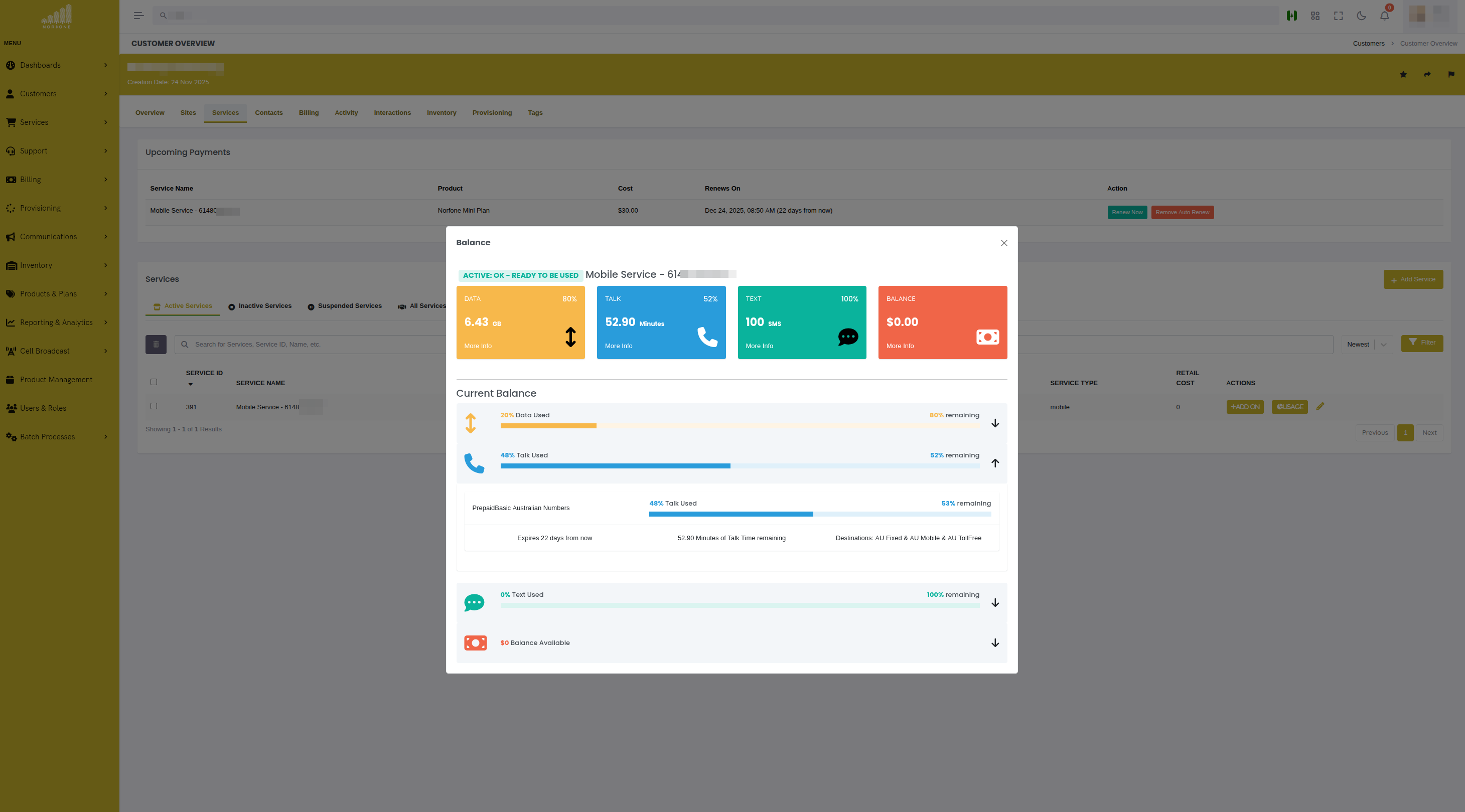
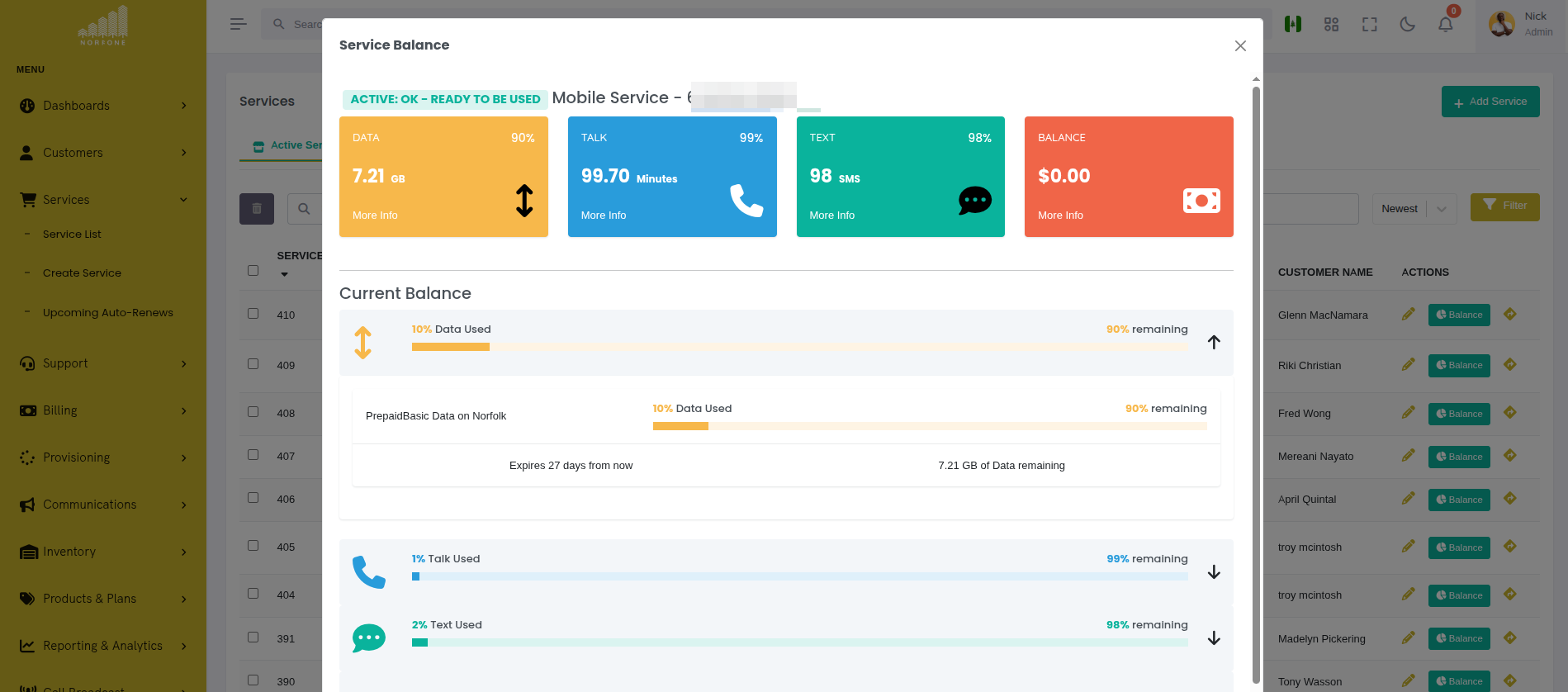
The usage interface shows summary cards and detailed progress bars for each balance type.
 {.align-center
width="800px"}
{.align-center
width="800px"}
Summary Cards
Top row displays quick-view cards for each balance type:
Card Information:
- Balance Type - Icon and label (Data, Voice, SMS, Monetary)
- Remaining Amount - Current balance in appropriate units
- Expiry Time - Days/hours until balance expires
- More Info Button - Click to expand detailed breakdown
Progress Bars
Below the cards, progress bars show consumption visually with filled portions indicating remaining balance.
Progress Bar Features:
- Visual Indicator - Filled portion shows remaining balance
- Percentage - Numeric percentage of balance remaining
- Absolute Values - Shows used vs. total (e.g., "12.5GB / 20GB")
- Color Coding:
- Green: >50% remaining
- Yellow: 20-50% remaining
- Red: <20% remaining
- Clickable - Click to expand detailed breakdown
Balance Types
Data Balance
Tracks internet data consumption.
Units: Gigabytes (GB) or Megabytes (MB)
Display Format:
Progress: 12.5GB / 20GB (62%)
Common Scenarios:
- Mobile data plans - 5GB, 10GB, 20GB monthly allowances
- Fixed wireless - Unlimited or capped at high amounts (500GB, 1TB)
- Top-ups - Additional data purchased mid-cycle
- Dongle services - Prepaid data for hotspot devices
Multiple Buckets:
Services often have multiple data balances:
- Monthly allowance (expires monthly)
- Bonus data (expires after campaign period)
- Top-up data (shorter expiry, consumed first)
Voice Balance
Tracks phone call minutes.
Units: Minutes (min)
Display Format:
Progress: 125 min / 500 min (25%)
Call Duration Tracking:
- Incoming calls (if charged)
- Outgoing calls
- International calls (separate bucket if applicable)
- Premium numbers
Calculation:
Voice usage is calculated by call duration in nanoseconds internally, converted to minutes for display.
SMS Balance
Tracks text message usage.
Units: Messages (msgs)
Display Format:
Progress: 45 / 250 (18%)
Message Types:
- Standard SMS (160 characters)
- Long SMS (multiple segments)
- MMS (if separately tracked)
Monetary Balance
Tracks prepaid credit or account balance.
Units: Currency (£, $, €, etc.)
Display Format:
Progress: £15.50 / £20.00 (77%)
Usage:
- Prepaid accounts use monetary balance to pay for usage
- Credit decrements as customer uses services
- Can be topped up via payment or voucher
- May expire if not used within validity period
Detailed Balance Breakdown
Click "More Info" on any card or click a progress bar to expand the detailed breakdown.
Expanded View:
📦 Monthly Allowance 20GB
: Remaining: 12.5 GB Used: 7.5 GB Expires: 25 Jan 2025 (15 days) Weight: 10
📦 Bonus Data 5GB
: Remaining: 5.0 GB Used: 0 GB Expires: 31 Jan 2025 (21 days) Weight: 20
📦 Top-Up Data 3GB
: Remaining: 0 GB Used: 3.0 GB Expires: 18 Jan 2025 (EXPIRED) Weight: 30
Total Remaining: 17.5 GB
Balance Bucket Fields:
- ID/Name - Identifier for the balance bucket
- Remaining - Amount left in this specific bucket
- Used - Amount consumed from this bucket
- Expiry Date - When this balance expires
- Weight - Priority order (higher weight consumed first)
Weight System
Balances have a weight value that determines consumption order:
- Higher weight = consumed first
- Lower weight = consumed last
Example Weights:
- Top-up data: Weight 30 (consumed first, shorter expiry)
- Bonus data: Weight 20 (consumed second)
- Monthly allowance: Weight 10 (consumed last, longest expiry)
This ensures that expiring balances are used before longer-lasting ones.
Real-Time Updates
Usage data refreshes automatically every 3 seconds via polling.
What Updates:
- Current balance amounts
- Usage progress bars
- Expiry timers
- Individual bucket details
User Experience:
- No page reload required
- Smooth updates without flicker
- Loading overlay during refresh
- Status badge shows current service state
Use Cases:
- Monitor customer usage during call
- Watch balance decrement in real-time as customer uses service
- Verify top-up immediately after purchase
Usage in Different Service Types
Mobile Services
Display all four balance types:
- Data (GB)
- Voice (minutes)
- SMS (messages)
- Monetary (currency)
Example:
DATA: 12.5GB remaining VOICE: 125 min remaining SMS: 45 msgs remaining MONETARY: £15.50 remaining
Fixed Wireless / Internet
Typically shows only:
- Data (GB or TB)
- Monetary (if prepaid)
Example:
DATA: 450GB / 500GB remaining MONETARY: £45.00 (prepaid credit)
Hotspot / Dongle Services
Shows dongle-specific data tracking:
- Data (consumed vs. prepaid)
- Monetary (prepaid balance)
Display Mode:
When dongle=true, the component hides voice and SMS, showing only
relevant data and monetary balances.
Troubleshooting
Usage showing as 0 / 0
- Cause: Service not integrated with OCS or CGRateS
- Fix:
- Verify service is provisioned in OCS
- Check OCS API connectivity
- Review service UUID mapping
Usage not updating
- Cause: Polling stopped or OCS unreachable
- Fix:
- Refresh the page
- Check browser console for errors
- Verify OCS API is online
Balances show incorrect amounts
- Cause: OCS data mismatch or caching issue
- Fix:
- Force OCS balance refresh
- Check for pending transactions
- Verify OCS configuration
Expiry dates missing
- Cause: Balance has no expiry set
- Fix:
- Some balances are set to never expire (unlimited validity)
- Check balance configuration in OCS
Multiple balances confusing
- Cause: Multiple top-ups or bonus data added
- Fix:
- Use detailed breakdown view to see all buckets
- Sort by weight to see consumption order
- Review individual expiry dates
Integration with OCS/CGRateS
Usage data comes from the OCS (Online Charging System), typically CGRateS.
Data Flow:
- User opens usage view
- OmniCRM calls
GET /crm/service/{service_id} - API queries OCS via service UUID
- OCS returns balance map:
{
  "BalanceMap": {
    "*data": [
      {
        "ID": "monthly_data_20GB",
        "Value": 13421772800,
        "ExpiryTime": "2025-01-25T23:59:59Z",
        "Weight": 10
      }
    ],
    "*voice": [
      {
        "ID": "monthly_voice_500min",
        "Value": 7500000000000,
        "ExpiryTime": "2025-01-25T23:59:59Z",
        "Weight": 10
      }
    ],
    "*sms": [
      {
        "ID": "monthly_sms_250",
        "Value": 250,
        "ExpiryTime": "2025-01-25T23:59:59Z",
        "Weight": 10
      }
    ],
    "*monetary": [
      {
        "ID": "prepaid_credit",
        "Value": 1550,
        "ExpiryTime": "2025-02-25T23:59:59Z",
        "Weight": 10
      }
    ]
  }
}
- UI converts values to display units (bytes → GB, nanoseconds → minutes)
- Progress bars and cards rendered
- Polling continues every 3 seconds
OCS Balance Types Mapping:
The OCS returns balance data with type prefixes that map to UI display:
*data→ DATA card (internet usage)*voice→ VOICE card (call minutes)*sms→ SMS card (text messages)*monetary→ MONETARY card (prepaid credit)
Each balance type can have multiple buckets (e.g., monthly allowance + bonus data + top-up data), all displayed in the detailed breakdown view.
Balance Value Conversions:
- Data: Bytes → GB (divide by 1024³)
- Voice: Nanoseconds → Minutes (divide by 60×10⁹)
- SMS: Count (no conversion)
- Monetary: Cents → Currency (divide by 100)
Auto-Renew and ActionPlans
Services with auto-renew enabled have ActionPlans scheduled in the OCS.
What are ActionPlans?
ActionPlans are scheduled tasks in CGRateS that automatically execute at specific times to:
- Add balance to an account (auto top-up)
- Renew monthly allowances
- Apply recurring charges
- Expire old balances
How Auto-Renew Works:
-
Service Provisioning:
- When service created with
auto_renew = true - Provisioning playbook creates ActionPlan in OCS
- ActionPlan configured to run monthly (or per billing cycle)
- When service created with
-
ActionPlan Configuration:
ActionPlan contains:
- Account ID - Service UUID
- Actions - What to do (add data, voice, SMS, monetary balance)
- Schedule - When to execute (e.g., monthly on 1st at 00:00 UTC)
- Amount - How much balance to add
-
Automatic Execution:
- OCS executes ActionPlan at scheduled time
- Adds balance to account (e.g., 20GB data, 500 minutes voice)
- Sets expiry date for new balance (e.g., 30 days)
- Customer charged via payment method on file
-
Viewing ActionPlans:
- Navigate to service details in OCS view
- ActionPlans listed with next execution time
- Shows: Plan name, next run date, action details
Example ActionPlan:
{
  "ActionPlanId": "ProductID_MonthlyPlan__ProductName_20GB_Mobile__ActionPlan_Monthly_Renew",
  "NextExecTime": "2025-02-01T00:00:00+00:00",
  "ActionName_hr": "Monthly Renew",
  "PlanName": "20GB Mobile",
  "ActionFrequency_hr": "Every MonthlyPlan",
  "custom_NextExecTime_hr": "in 22 days"
}
Managing Auto-Renew:
- Enable - Set during service creation or modification
- Disable - Remove ActionPlan from OCS (service keeps existing balance but won't auto-renew)
- Modify - Change renewal amount or frequency via service modification
Manual Renewal:
If auto-renew disabled, customer must manually:
- Top-up before balance expires
- Or service suspends when balance depletes
Viewing in UI:
Services tab shows auto-renew status:
Next Renewal: 1 Feb 2025 (in 22 days) Renewal Amount: £15.00
Best Practices
For Support Staff:
- Check usage before answering "Why is my service slow?" calls
- Verify balance after top-ups to confirm success
- Use detailed breakdown to identify expired buckets
- Monitor high-usage customers to prevent overages
For Customers (Self-Care):
- Check usage regularly to avoid running out
- Top up before balance expires
- Understand weight system to know which balance is consumed first
- Contact support if usage seems incorrect
For Administrators:
- Configure appropriate balance expiries
- Set weight values to prioritize expiring balances
- Monitor OCS connectivity for accurate reporting
- Review balance configurations match product offerings
Related Documentation
features_topup_recharge- Top-up system for adding balancecsa_service_management- Managing servicescsa_modify- Adding add-ons to increase allowancesconcepts_products_and_services- Product configuration