Global Search
The Global Search feature provides a unified search interface to quickly find customers, contacts, services, inventory, and sites across the entire OmniCRM database.
See also: Customers , Inventory , Service Management .
Access Global Search
From anywhere in the CRM:
Click the search icon in the top navigation bar or navigate to:
The global search page appears with a large search box and filter options.
How It Works
Global search performs a cross-entity search across five data types:
What Gets Searched:
- Customers - Customer name
- Contacts - First name, last name, email address, phone number
- Sites - Site name
- Inventory - Serial numbers, ICCIDs, identifiers (itemtext1, itemtext2)
- Services - Service name, service UUID
Search Behavior:
- Partial matching - Searches for terms containing your query (e.g., "Smith" matches "John Smith" and "Smithson")
- Case-insensitive - "john" matches "John", "JOHN", and "john"
- Multiple entities - Single search returns results from all entity types
- Paginated results - Shows 10 results per page by default
Performing a Search
Basic Search
- Enter your search term in the search box
- Click "Search" or press Enter
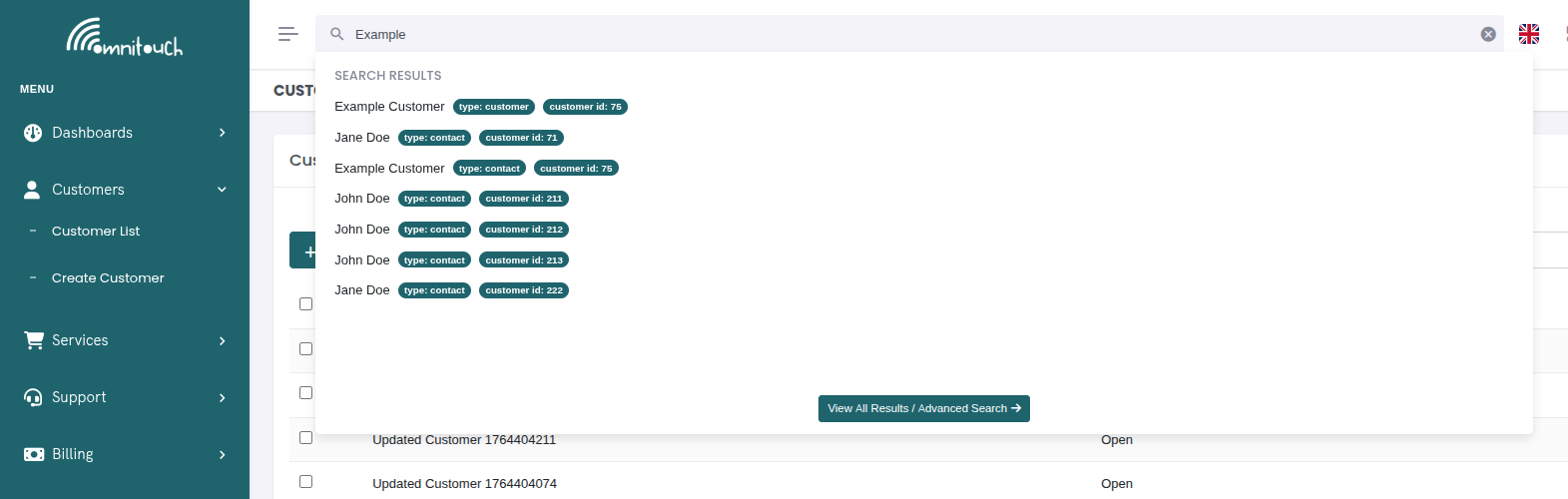 {.align-center
width="800px"}
{.align-center
width="800px"}
Example search terms:
- Customer name:
"Acme Corp" - Phone number:
"+1234567890"or"1234567890" - Email:
"john@example.com"or"john" - Serial number:
"ICCID8944"or just"8944" - Service UUID:
"123e4567-e89b"
Include Closed Accounts
By default, search only returns results from Open customer accounts.
To search across all accounts including closed ones:
- Check the "Include Closed Accounts" checkbox
- Click "Search" again
This will search:
- Customers with
customer_status = "Closed" - Contacts, services, sites, and inventory linked to closed customers
Use cases for closed account search:
- Finding historical customer records
- Locating equipment from deprovisioned services
- Looking up old phone numbers or services
- Recovering customer data for re-activation
Understanding Search Results
Result Display Format
Results are displayed in a scrollable list showing:
John Smith Customer ID: 123 Type: customer
John Smith (Contact) Customer ID: 123 Type: contact
Mobile - +44 7700 900123 Customer ID: 123 Type: service
Each result shows:
- Name/Title - The primary identifier (clickable link)
- Customer ID - The parent customer this belongs to
- Type - The entity type (customer, contact, site, inventory, service)
Result Types Explained
Customer Results:
Clicking opens the customer overview page showing all details, services, contacts, etc.
Contact Results:
Clicking opens the customer page with the Contacts tab active, scrolling to the specific contact.
Site Results:
Clicking opens the customer page with the Sites tab active.
Inventory Results:
Clicking opens the customer page with the Inventory tab active. If inventory is unassigned (no customer_id), it links to the main inventory list instead.
Service Results:
Clicking opens the customer page with the Services tab active, highlighting the specific service.
Navigation from Results
All search results are clickable links that navigate directly to the relevant page:
Link Pattern:
/customers/{customer_id}- Customer records/customers/{customer_id}#4- Contacts (tab 4)/customers/{customer_id}#2- Sites (tab 2)/customers/{customer_id}#8- Inventory (tab 8)/customers/{customer_id}#3- Services (tab 3)/inventory-items-list- Unassigned inventory
The hash (#) fragment automatically selects the correct tab when the
customer page loads.
Pagination
Results are paginated with 10 items per page:
Showing results 11-20 of 47
Navigate through pages using:
- Previous/Next buttons
- Page numbers - Click specific page
- Keyboard - Left/right arrows (if implemented)
Common Search Scenarios
Scenario 1: Find Customer by Phone
User calls in, provides phone number.
Results: • John Smith (Contact) - Customer ID: 123 • Mobile - 555-0123 (Service) - Customer ID: 123
Click either result to access customer account.
Scenario 2: Locate SIM Card
Technician needs to find which customer has a specific SIM.
Results: • 8944538000000001234 (Inventory) - Customer ID: 456
Click result to see SIM assignment, customer details.
Scenario 3: Find Inactive Customer
Need to locate a customer who closed their account 6 months ago.
☑ Include Closed Accounts
Results: • Acme Corporation (customer) - Customer ID: 789
Scenario 4: Search by Email
Customer emails support, staff needs to find their account.
Results: • John Smith (Contact) - Customer ID: 123
Scenario 5: Find Service by UUID
Provisioning log shows service UUID, need to find which customer.
Results: • Mobile - +44 7700 900123 (Service) - Customer ID: 456
Search Tips
For Best Results:
- Use partial terms - "Smith" is better than "John Smith" for broader results
- Try variations - If "John" doesn't work, try phone or email
- Include closed accounts - When searching historical data
- Be specific for equipment - Use full serial numbers for inventory
- Search service UUID - When other identifiers aren't known
What Gets Searched (by Entity):
Customers:
- Customer name only (not address, notes, or other fields)
Contacts:
- First name
- Last name
- Email address
- Phone number
Sites:
- Site name only
Inventory:
- itemtext1 (typically ICCID, serial number, MAC address)
- itemtext2 (typically IMSI, secondary identifier)
- Note: Does not search itemtext3-20 or inventory notes
Services:
- Service name
- Service UUID
What Doesn't Get Searched:
- Customer addresses
- Customer notes
- Transaction descriptions
- Invoice details
- Provisioning logs
- Activity log entries
- Inventory notes (beyond itemtext1/2)
API Reference
Global Search Endpoint
GET /utilities/search_everything?search=Smith&page=1&per_page=10&search_closed_records=false
Authorization: Bearer <token>
Query Parameters:
search(required) - The search termpage(optional) - Page number (default: 1)per_page(optional) - Results per page (default: 10)search_closed_records(optional) - Include closed accounts (default: false)
Response:
{
  "data": [
    {
      "id": 123,
      "name": "John Smith",
      "customer_id": 123,
      "type": "customer"
    },
    {
      "id": 456,
      "name": "John Smith",
      "customer_id": 123,
      "type": "contact"
    },
    {
      "id": 789,
      "name": "Mobile - +44 7700 900123",
      "customer_id": 123,
      "type": "service"
    }
  ],
  "pagination": {
    "current_page": 1,
    "per_page": 10,
    "total_pages": 5,
    "total_items": 47
  }
}
Search Logic (Backend):
The backend performs a SQL UNION across all entity tables:
-- Customers
SELECT customer_id AS id,
       customer_name AS name,
       customer_id,
       'customer' AS type
FROM customer
WHERE customer_name LIKE '%Smith%'
  AND customer_status = 'Open'

UNION ALL

-- Contacts
SELECT contact_id AS id,
       CONCAT(contact_firstname, ' ', contact_lastname) AS name,
       customer_id,
       'contact' AS type
FROM customer_contact
WHERE (contact_firstname LIKE '%Smith%' OR
       contact_lastname LIKE '%Smith%' OR
       contact_email LIKE '%Smith%' OR
       contact_phone LIKE '%Smith%')

UNION ALL

-- Sites
SELECT site_id AS id,
       site_name AS name,
       customer_id,
       'site' AS type
FROM customer_site
WHERE site_name LIKE '%Smith%'

UNION ALL

-- Inventory
SELECT inventory_id AS id,
       itemtext1 AS name,
       customer_id,
       'inventory' AS type
FROM inventory
WHERE itemtext1 LIKE '%Smith%' OR
      itemtext2 LIKE '%Smith%'

UNION ALL

-- Services
SELECT service_id AS id,
       service_name AS name,
       customer_id,
       'service' AS type
FROM customer_service
WHERE service_name LIKE '%Smith%' OR
      service_uuid LIKE '%Smith%'
Results are then paginated and returned.
Performance Considerations
Search Performance:
- Searches use LIKE queries with wildcards (
%term%) - No full-text indexing currently implemented
- Large databases (>100k customers) may experience slower searches
- Results limited to 10 per page for performance
Optimization Tips:
- Be specific with search terms to reduce result set
- Use closed account filter to reduce search scope
- Consider adding database indexes on frequently searched fields
Troubleshooting
No results found (but record exists)
- Cause: Search term doesn't match stored data format
- Examples:
- Phone stored as "+44 7700 900123", searching "07700900123" won't match
- Email stored as "<john.smith@example.com>", searching "john" won't match
- Fix: Try variations, use partial matches that definitely exist
Search too slow
- Cause: Large database, complex query across multiple tables
- Fix:
- Use more specific search terms
- Limit to open accounts only (uncheck closed accounts)
- Contact administrator about database indexing
Results link to wrong customer
- Cause: Multiple customers/contacts with same name
- Fix: Use Customer ID to differentiate, or search by unique identifier (email, phone)
Closed accounts not appearing
- Cause: "Include Closed Accounts" checkbox not checked
- Fix: Check the box and search again
Related Documentation
basics_customers- Customer managementbasics_navigation- General navigationadministration_inventory- Inventory searches